
Kubernetes has become so familiar that many teams don’t choose to adopt it anymore; they just start using it. When a new internal API appears, someone sets up an AKS cluster, and within weeks, the team manages node pools, upgrade channels, ingress, identity, policies, observability, and a backlog of Helm charts. None of these decisions are incorrect, but the issue is that the workload might never have required a Kubernetes platform in the first place.
Azure Container Apps (ACA) has closed enough of the gap that “AKS by default” is no longer the safe choice for smaller workloads. ACA will not replace Kubernetes, but it removes substantial platform work when an application only needs containers, autoscaling, secure connectivity, revisions, and a deployment path.
By “smaller,” I refer to a workload managed by a single team, consisting of around three to ten services, with moderate or sporadic traffic and no strict reliance on Kubernetes-specific extensions. If your upcoming service environment matches this description, then AKS needs to demonstrate its value.
What counts as a smaller workload?
This comparison targets applications with:
- a single team responsible for both delivery and operations;
- a small number of APIs, workers, and scheduled jobs;
- no custom resource definitions, operators, or controllers;
- no need for sophisticated multi-tenant scheduling; and
- traffic that is modest, bursty, or concentrated during business hours.
This is not a judgment on a large internal developer platform, a regulated multi-cluster system, or a shared cluster supporting multiple teams. Similarly, ACA isn’t “Kubernetes without Kubernetes.” It provides an application platform rather than the Kubernetes API itself. This abstraction is both the product and its limitation.
Where Azure Container Apps genuinely wins
The first advantage is elasticity. ACA Consumption can scale an app to zero when no replicas are needed, incurring no resource charges at zero. It employs KEDA-based declarative scaling for HTTP, TCP, and event sources like queues. Since CPU and memory rules cannot start a workload from zero, choose a trigger that is active even when no replica runs. Microsoft’s scaling documentation clearly explains both the capabilities and limitations.
That makes ACA particularly attractive for queue workers, internal tools, development environments, and APIs that can tolerate a cold start. I covered the billing mechanics and optimization controls in Optimizing Azure Container Apps Costs, so I will not repeat the full FinOps model here.
The second advantage is the operational surface area outside your direct control, including customer-managed node pools, Kubernetes upgrades, node-image patch cycles, CNI selection, and ingress-controller lifecycle. You remain responsible for application security, images, sizing, scaling, identity, observability, and network design. Managed services reduce exposed layers but do not lessen your responsibilities.
ACA also provides capabilities that would otherwise require platform assembly. Dapr integration is available per app. KEDA-based scaling is part of the service. Revisions provide immutable deployment snapshots, and multiple active revisions can receive weighted traffic for blue-green or A/B releases. These are platform features, not add-ons you must install and reconcile.
The route to production highlights key differences. ACA requires an environment, registry access, app definitions, ingress, identity, scaling, and observability. AKS additionally demands a cluster operating model, node pools, networking, ingress, namespaces, RBAC, policies, upgrades, and autoscaling. While AKS Automatic simplifies this list with managed defaults, it still leaves Kubernetes platform choices intact..
Where AKS still wins
AKS performs strongly when the Kubernetes API is integrated into the product. However, if your requirements include operators, CRDs, admission controllers, specialized scheduling, or infrastructure-reconciling controllers, ACA’s abstraction can become a barrier instead of an advantage.
The same applies to deep service networking. ACA supports virtual-network integration, internal environments, user-defined routes in supported configurations, network security groups, and environment-level ingress controls. However, it does not provide the same pod-level canvas as AKS. AKS gives teams Kubernetes NetworkPolicy, Cilium capabilities, custom gateways, and deeper service-mesh control. That distinction matters for the patterns explored in my Azure Kubernetes Application Network series.
AKS is more appropriate for large-scale multi-tenant setups. Features such as namespaces, quotas, admission policies, RBAC, network policies, and placement controls establish clear tenant boundaries. However, a Container Apps environment does not serve as a direct substitute for a managed shared Kubernetes platform.
For AI and GPU tasks, ACA now provides both serverless and dedicated GPU options, so the idea that “GPU means AKS” is no longer always accurate. AKS remains the preferred choice when requiring a wider selection of GPU node sizes, node labels and taints, topology-aware placement, device plugins, custom schedulers, or precise control over model-serving infrastructure. Refer to Running AI Workloads on AKS for insights into the control plane.
Existing investment changes the answer. Trusted Helm charts, Flux reconciliation, policy libraries, golden clusters, and an experienced on-call team can make AKS the lower-risk path. Leaving a mature platform has a cost.
Head-to-head
| Dimension | Azure Container Apps | AKS |
|---|---|---|
| Scale to zero | Native for suitable HTTP, TCP, and event-driven rules; zero replicas incur no resource-usage charge | Pods can reach zero with KEDA, but worker-node cost remains unless node capacity also scales down; system capacity remains |
| Pricing model | Consumption is billed per replica resource allocation and external requests; Dedicated is instance-based | Primarily node/VM-based, plus selected cluster tier and supporting services; control-plane terms depend on tier |
| Operational overhead | Microsoft operates the underlying orchestration, nodes, and platform upgrades | AKS Automatic manages more lifecycle work; AKS Standard exposes more choices and shared responsibility |
| Networking control | VNet integration, internal environments, NSGs, private endpoints, and supported UDR patterns; less app-level programmability | More CNI, ingress, egress, NetworkPolicy, Cilium, and service-mesh choice |
| Extensibility | No direct Kubernetes API, CRDs, or arbitrary operators; managed Dapr integration | Full Kubernetes API and ecosystem, including operators, CRDs, admission, and mesh tooling |
| Multi-region / DR | Deploy separate environments per region and place Front Door or Traffic Manager above them; application and data failover remain yours | Deploy separate clusters per region; Fleet can coordinate parts of fleet operations, but application and data failover remain yours |
| Learning curve | Smaller for teams that understand containers and Azure application primitives | Higher because teams must understand Kubernetes and the selected AKS operating model |
| CI/CD and GitOps | Strong CI/CD and revision-based releases; GitOps is possible through IaC workflows but is not the native Kubernetes reconciliation model | Mature Helm, Flux, Argo CD, policy-as-code, and Kubernetes-native promotion patterns |
The important row is not “features.” It is required control. Paying extra for unused control is wasteful. Losing control that you truly need creates architectural debt.
Cost reality check
Consider three services, each allocated 0.25 vCPU and 0.5 GiB. They are active for ten hours on each of 22 business days and scale to zero outside that window. Assume three million external requests per month. Using illustrative public ACA Consumption rates of $0.000024 per active vCPU-second, $0.000003 per GiB-second, and $0.40 per million requests after the monthly free grants, the compute-and-request estimate is about $13 per month.
If all three replicas stay active throughout the month, the simplified ACA estimate increases to approximately $54. For AKS, two worker nodes costing about $0.10 per node-hour result in a $146 monthly node baseline, excluding disks, load balancers, logging, egress, support, or a paid control-plane tier. Using one node would be cheaper, but it would not be a realistic comparison for production availability.
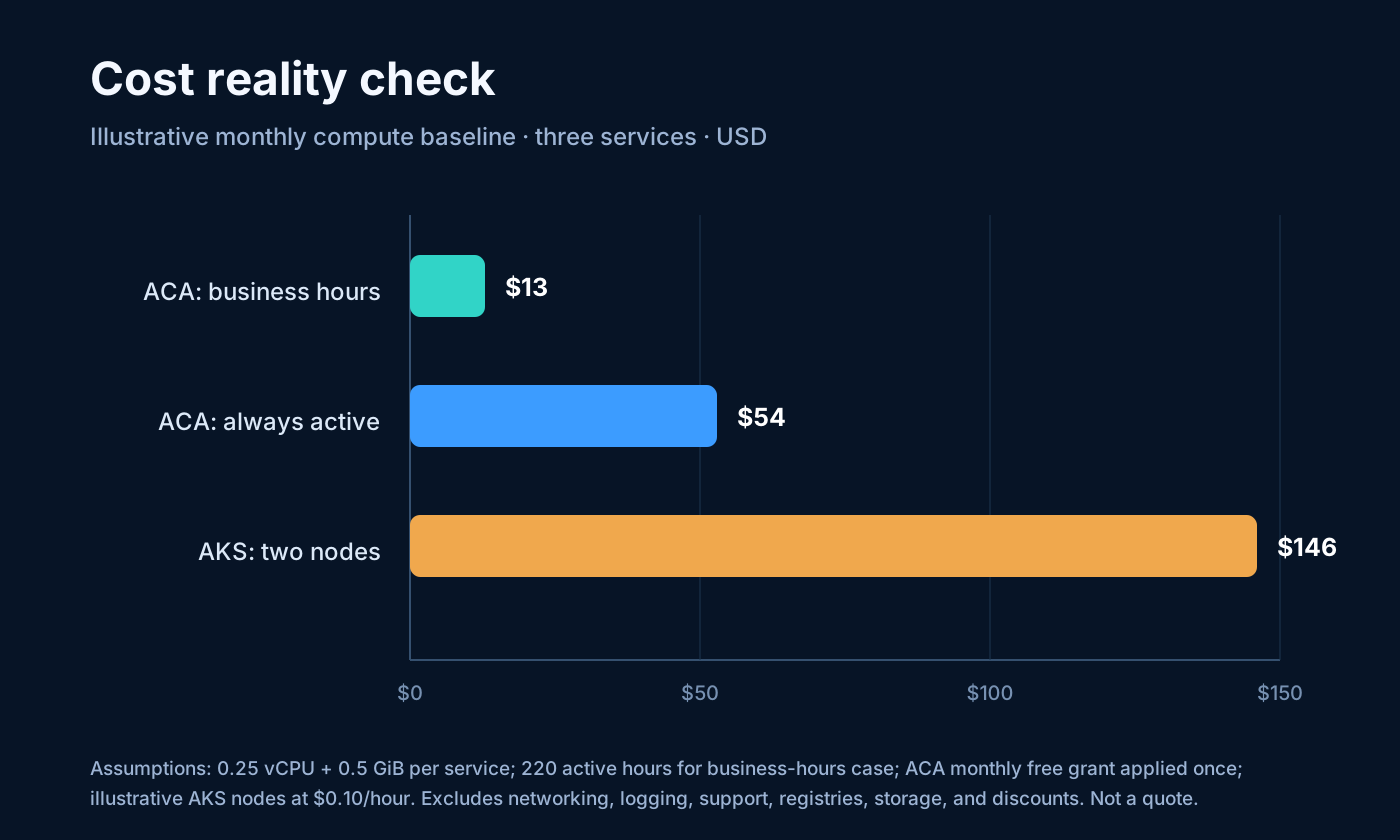
This model is not an Azure quote. Prices differ based on region, agreement, savings plan, reservation, VM family, and duration. ACA’s free grant applies to the entire subscription, not on a per-app basis, so other apps might already be using it. The example assumes active billing during the specified hours; actual costs may vary due to idle times, cold starts, and changes in replica concurrency. Always verify with the Azure pricing calculator and actual utilization.
The pattern is more significant than the exact figure. ACA performs best when services are idle for extended periods and can scale down to zero. As replicas stay active continuously, the difference lessens. During sustained use, compare ACA Dedicated, Consumption savings plans, and a well-optimized AKS node pool. If an existing AKS cluster has spare capacity, the extra cost of running a small service is likely minimal. Cost is a factor, but not the sole consideration; aspects like control, isolation, reliability, and team skills are more important.
Ask these five questions before defaulting to AKS
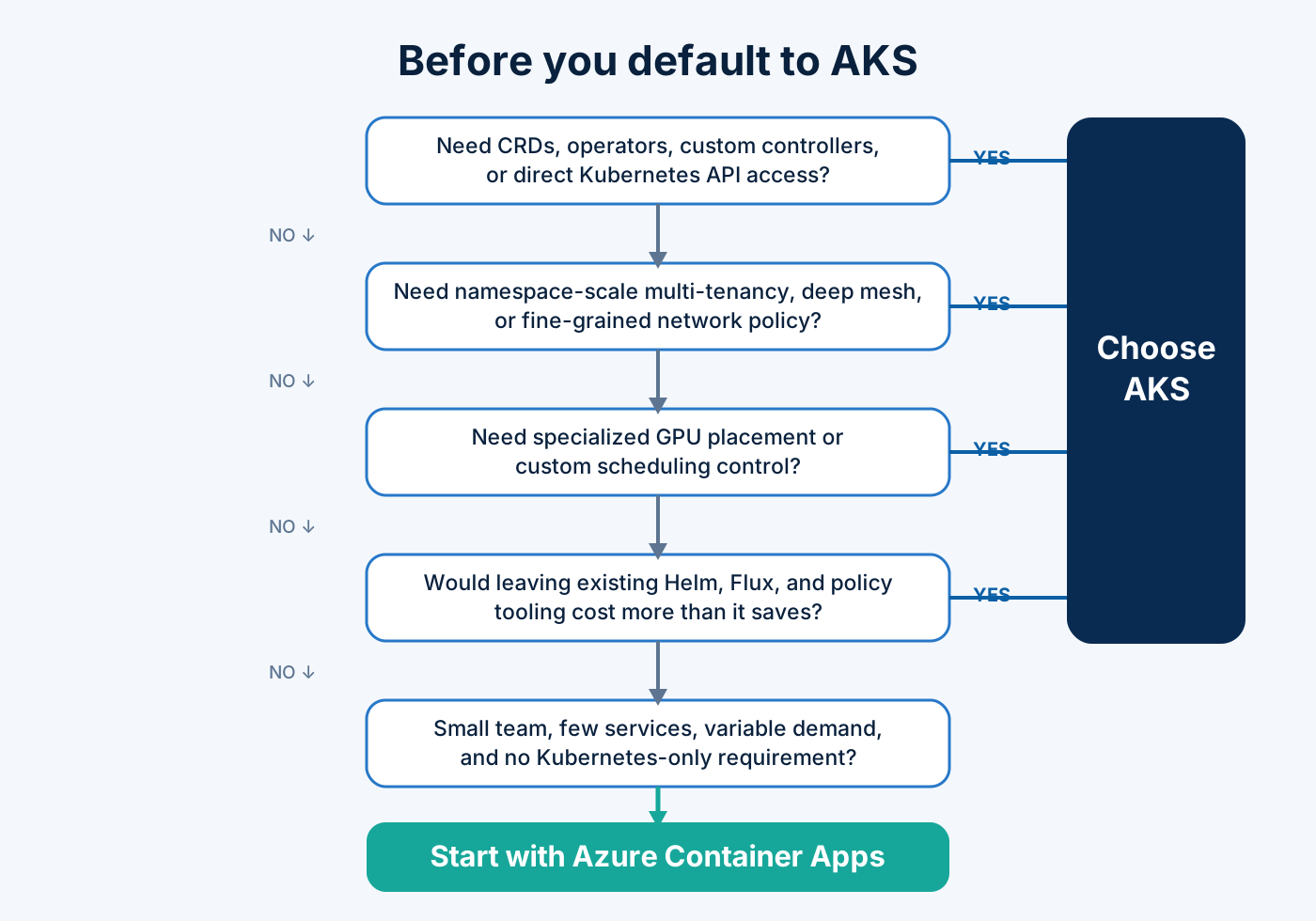
- Do we need the Kubernetes API? If a CRD, operator, custom controller, admission webhook, or Kubernetes-native platform contract is required, choose AKS.
- Do we need deep tenant or network control? Namespace-scale isolation, custom scheduling, pod-level policy, or a sophisticated mesh points to AKS.
- What does demand look like? Bursty and business-hours workloads favor ACA Consumption. Steady, high utilization deserves a measured comparison.
- What have we already built? A mature AKS platform can make another workload cheap and safe. A team with no Kubernetes operating model should count the platform build honestly.
- Where will this workload be in 18 months? Choose for the credible growth path, not an imagined hyperscale future. Moving later has a cost; over-platforming from day one has one too.
Start with ACA when the answers reveal an application problem. Start with AKS when they reveal a platform problem.
My take
Yes: Azure Container Apps is taking over smaller workloads from AKS, which is a positive development. It does not replace AKS; instead, it handles the APIs, workers, scheduled jobs, and small service setups that never required a full Kubernetes platform in the first place.
AKS remains the better foundation when extensibility, scheduling, isolation, networking depth, or ecosystem compatibility is required. But choosing it out of habit is no longer conservative. For a small team, unnecessary Kubernetes can be riskier because each additional layer requires ownership during upgrades, incidents, and staff changes.
I would reconsider this balance if AKS Automatic delivered true workload-level scale-to-zero economics without a persistent cluster baseline, or if ACA exposed substantially deeper policy, networking, and GitOps primitives without losing its application-platform simplicity. Until then, the default should be deliberate: ACA for the application-shaped problem; AKS for the Kubernetes-shaped one.
Related reading
- Optimizing Azure Container Apps Costs: Scaling to Zero, Workload Profiles, and FinOps
- Reducing AKS Costs: Autoscaling, Spot Nodes, Rightsizing, and FinOps Practices
- Azure Kubernetes Application Network, Part 1
- Azure Kubernetes Application Network, Part 2
- Azure Kubernetes Application Network, Part 3