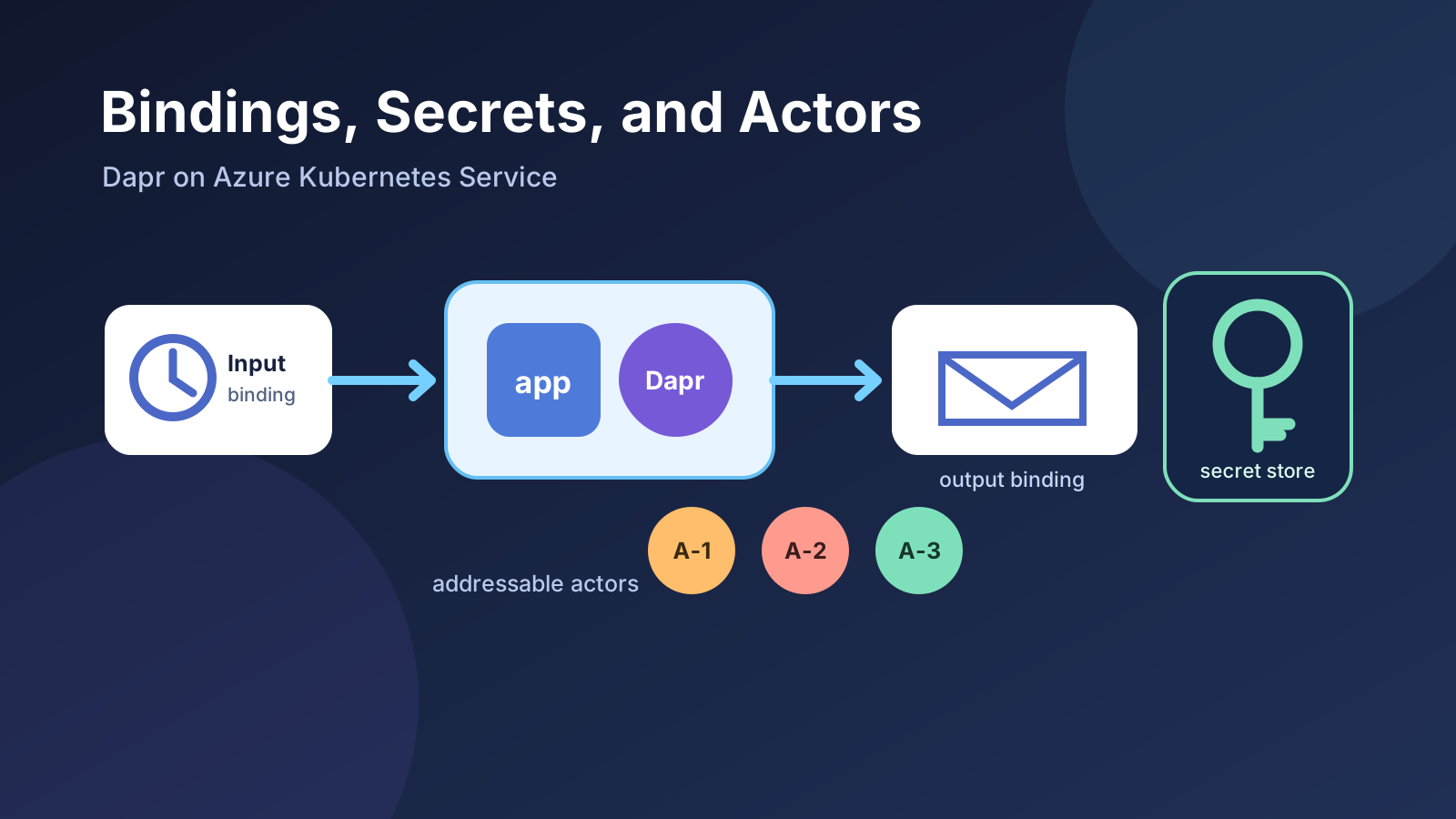
The first six parts of this series covered Dapr’s most familiar building blocks: service invocation, state management, and pub/sub. They solve application-to-application calls, state, and asynchronous messaging. Three other capabilities often appear beside them, but they solve different problems.
Bindings connect an application to an external system through a trigger or an operation. Secret stores keep credentials out of component manifests. Actors give stateful entities an address and a single-threaded execution boundary. Dapr Workflow then coordinates longer-running, multi-step processes, including work performed by actors.
Putting these features into one post does not mean that every application should use all of them. The useful question is where each abstraction removes repeated infrastructure code without obscuring an important platform capability.
Outcome: Deploy a scheduled input binding and an authenticated HTTP output binding, see how a Dapr component resolves a secret without exposing its value, prepare the same pattern for Azure Key Vault and Workload ID, and learn when actors or workflows are the right next step.
This is Part 7 of the Dapr on Kubernetes and AKS series. It follows Pub/Sub Messaging with Dapr and Azure Service Bus on AKS, but the local lab only requires a Kubernetes cluster with Dapr installed.
Choose the building block from the interaction
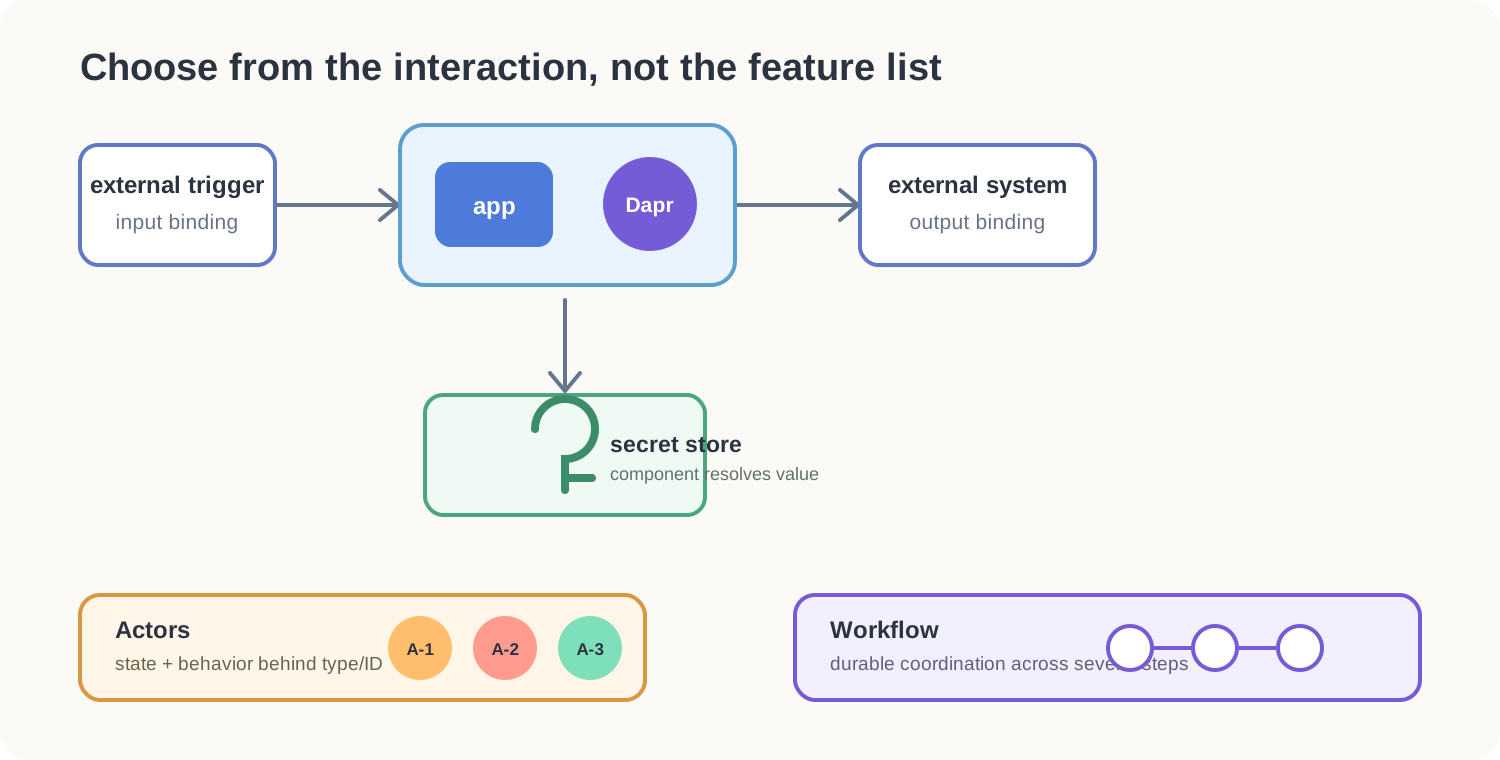
The shortest useful distinction is:
| Need | Dapr capability | The application owns |
|---|---|---|
| React when an external system produces an event | Input binding | The handler and its business rules |
| Perform an operation against an external system | Output binding | The operation, payload, and failure policy |
| Resolve credentials or configuration securely | Secret store | Which secret may be used and by which app |
| Model many addressable stateful entities | Actors | Actor methods, state, and idempotency |
| Coordinate a durable sequence of steps | Workflow | The orchestration and compensation logic |
Bindings are not a replacement for pub/sub. A binding connects an application to a resource-specific trigger or operation. Pub/sub distributes messages through named topics to one or more subscribers and makes the event contract central. If several independently deployed consumers need the same business event, pub/sub is generally the clearer model.
The binding lab
The sample has two ordinary Python containers and two Dapr components:
- The
inventory-scheduleinput binding calls/inventory-scheduleonmaintenance-apievery 30 seconds. - The application creates a small audit record and invokes the
audit-webhookoutput binding through its local sidecar. - The HTTP binding sends the record to
audit-sinkwith anX-Audit-Tokenheader. - The token is resolved from a Kubernetes Secret when the component is initialized. It is not written into the component YAML.
The HTTP sink represents an external API. It deliberately does not have a Dapr sidecar. In a real system, the output could instead be Azure Blob Storage, SendGrid, Kafka, a database, or another supported binding.
The sample token is not production-grade. It exists only to make the secret reference visible and testable.
Download the complete bindings manifest, then apply it:
kubectl apply \
  --filename bindings.yaml

kubectl rollout status \
  deployment/audit-sink \
  --namespace dapr-demo

kubectl rollout status \
  deployment/maintenance-api \
  --namespace dapr-demo
Inspect the components and the two containers in the Dapr-enabled pod:
kubectl get components.dapr.io \
  --namespace dapr-demo

kubectl get pods \
  --namespace dapr-demo \
  --selector app=maintenance-api \
  --output jsonpath='{range .items[*]}{.metadata.name}{"  "}{.spec.containers[*].name}{"\n"}{end}'
The pod should contain maintenance-api and daprd. The audit sink has only its application container.
Follow the two application logs:
kubectl logs \
  deployment/maintenance-api \
  --container maintenance-api \
  --namespace dapr-demo \
  --follow
In another terminal:
kubectl logs \
  deployment/audit-sink \
  --container audit-sink \
  --namespace dapr-demo \
  --follow
Within 30 seconds, the first log shows a scheduled run and the second shows the authenticated audit record. The generated run ID will differ:
maintenance-api: binding inventory-schedule started run 7db9...
maintenance-api: audit binding accepted run 7db9...

audit-sink: accepted run 7db9... with X-Audit-Token
How the input binding reaches the application
The component name becomes the application route:
apiVersion: dapr.io/v1alpha1
kind: Component
metadata:
  name: inventory-schedule
  namespace: dapr-demo
spec:
  type: bindings.cron
  version: v1
  metadata:
    - name: schedule
      value: "@every 30s"
    - name: direction
      value: "input"
scopes:
  - maintenance-api
When inventory-schedule fires, Dapr sends an HTTP POST to /inventory-schedule on the application port. At startup, Dapr can send an OPTIONS request to discover whether the route exists. The sample therefore implements both methods.
The scopes entry matters. Without it, every Dapr sidecar in the namespace may try to load the component. Scoping reduces accidental access and prevents an unrelated workload from receiving the trigger.
Cron is convenient for seeing an input binding work, but it is deliberately simple. Use a Kubernetes CronJob when the scheduled unit should be a separate pod with Kubernetes job history, concurrency policy, and retry controls. Use Dapr Jobs when the application needs the scheduling semantics of that Dapr building block. The cron binding is most useful for a lightweight recurring trigger on an already-running application.
Invoke the output binding
The application sends this request to its local Dapr HTTP port:
POST /v1.0/bindings/audit-webhook
Content-Type: application/json

{
  "operation": "post",
  "data": {
    "runId": "7db9...",
    "task": "inventory-sweep",
    "status": "completed"
  },
  "metadata": {
    "Content-Type": "application/json"
  }
}
The component maps that stable Dapr request to the external endpoint:
apiVersion: dapr.io/v1alpha1
kind: Component
metadata:
  name: audit-webhook
  namespace: dapr-demo
spec:
  type: bindings.http
  version: v1
  metadata:
    - name: url
      value: http://audit-sink.dapr-demo.svc.cluster.local:8080/events
    - name: securityToken
      secretKeyRef:
        name: audit-credentials
        key: token
    - name: securityTokenHeader
      value: X-Audit-Token
    - name: errorIfNot2XX
      value: "true"
scopes:
  - maintenance-api
The application does not construct the external URL, load the token, or add its authentication header. It still decides when to call the binding, what data to send, and what a failure means.
You can also invoke the output binding directly. Forward the sidecar port:
kubectl port-forward \
  deployment/maintenance-api \
  3500:3500 \
  --namespace dapr-demo
From a second terminal:
curl --fail --show-error \
  --request POST \
  --header 'Content-Type: application/json' \
  --data '{
    "operation": "post",
    "data": {
      "runId": "manual-1001",
      "task": "manual-check",
      "status": "completed"
    },
    "metadata": {
      "Content-Type": "application/json"
    }
  }' \
  http://localhost:3500/v1.0/bindings/audit-webhook
Then confirm that the sink received it:
kubectl logs \
  deployment/audit-sink \
  --container audit-sink \
  --namespace dapr-demo \
  --since 2m \
  | grep manual-1001
What the secret reference protects
The learning manifest creates the token with stringData so that the example is self-contained:
apiVersion: v1
kind: Secret
metadata:
  name: audit-credentials
  namespace: dapr-demo
type: Opaque
stringData:
  token: replace-this-demo-token
Do not commit a real token this way. In the component, secretKeyRef is the important part: it contains a secret name and key, not the secret value. On Kubernetes, the built-in Kubernetes secret store is used when auth.secretStore is omitted.
The separation is useful, but it does not make Kubernetes Secrets a complete secrets-management strategy. Access is still controlled through Kubernetes RBAC, values must be encrypted appropriately at rest, and the mechanism that creates or synchronizes the Secret needs its own security model.
Confirm that the component contains only the reference:
kubectl get component audit-webhook \
  --namespace dapr-demo \
  --output jsonpath='{.spec.metadata[?(@.name=="securityToken")].secretKeyRef}'
Expected output:
{"key":"token","name":"audit-credentials"}
Do not use kubectl get secret ... --output yaml as a security check. Base64 encoding is not encryption, and printing a secret increases the chance that it enters shell history, logs, or a screenshot.
Move secret resolution to Azure Key Vault
On AKS, Azure Key Vault is a natural external secret store. Dapr authenticates to it with Microsoft Entra ID. Prefer Workload ID over storing a client secret in Kubernetes.
This changes where Dapr obtains the token, not how the application invokes the binding. The application continues to call /v1.0/bindings/audit-webhook. When the sidecar initializes that component, it asks the azurekeyvault secret-store component for audit-token, then places the returned value in the configured X-Audit-Token header.
The secret does not first pass through the application container, and it does not need to exist as a Kubernetes Secret. The Dapr sidecar performs the lookup because it is the process loading the component.
Understand the identity chain
Workload ID connects four identities or authorization boundaries:
- The AKS OIDC issuer signs a short-lived Kubernetes service-account token for the pod.
- A federated credential on a user-assigned managed identity says that the exact Kubernetes subject
system:serviceaccount:dapr-demo:maintenance-apimay exchange that token. - Microsoft Entra ID returns an Azure access token for that managed identity.
- Key Vault accepts the token only if the identity has a suitable data-plane role, in this case
Key Vault Secrets User.
The client ID identifies the managed identity. The principal ID is the identity object to which Azure RBAC is assigned. They are different values and are not interchangeable.
The token-exchange path is:
maintenance-api pod
  -> projected Kubernetes service-account token
  -> Microsoft Entra federated token exchange
  -> managed-identity access token
  -> Azure Key Vault
  -> audit-token returned to the Dapr sidecar
  -> HTTP binding adds X-Audit-Token
There is no managed-identity password or client secret in this chain.
Step 1: Check the AKS prerequisites
Set the values for the existing cluster and the Azure resources you will use:
AKS_RESOURCE_GROUP=<aks-resource-group>
AKS_CLUSTER_NAME=<aks-cluster-name>
KEY_VAULT_RESOURCE_GROUP=<key-vault-resource-group>
KEY_VAULT_NAME=<globally-unique-key-vault-name>
IDENTITY_NAME=dapr-key-vault
AZURE_LOCATION=westeurope
Confirm that the cluster exposes an OIDC issuer:
AKS_OIDC_ISSUER="$(
  az aks show \
    --resource-group "$AKS_RESOURCE_GROUP" \
    --name "$AKS_CLUSTER_NAME" \
    --query oidcIssuerProfile.issuerUrl \
    --output tsv
)"

printf 'OIDC issuer: %s\n' "$AKS_OIDC_ISSUER"
An empty value means the cluster is not ready for this path. On an existing AKS Standard cluster, enable the OIDC issuer and Workload ID before continuing:
az aks update \
  --resource-group "$AKS_RESOURCE_GROUP" \
  --name "$AKS_CLUSTER_NAME" \
  --enable-oidc-issuer \
  --enable-workload-identity
AKS Automatic has these capabilities preconfigured. Enabling them is a cluster-level change, so validate it against your platform change process.
Optional: Create a dedicated Key Vault
Skip this subsection when you already have an RBAC-enabled Key Vault that you are allowed to use. Confirm the existing vault first:
az keyvault show \
  --resource-group "$KEY_VAULT_RESOURCE_GROUP" \
  --name "$KEY_VAULT_NAME" \
  --query '{name:name,rbac:properties.enableRbacAuthorization}' \
  --output table
The Rbac column should be true for the role assignments used below. Do not change the permission model of a shared vault just for this walkthrough; switching an existing vault from access policies to Azure RBAC can invalidate existing access.
For a self-contained learning environment, create a dedicated resource group and vault.
Create the resource group
The resource group contains the Key Vault and managed identity created in this walkthrough. Keeping them together makes ownership and cleanup clear. If the resource group already exists, az group create returns its current details without replacing its resources.
az group create \
  --name "$KEY_VAULT_RESOURCE_GROUP" \
  --location "$AZURE_LOCATION" \
  --output none
Confirm that the group is available in the expected region:
az group show \
  --name "$KEY_VAULT_RESOURCE_GROUP" \
  --query '{name:name,location:location,provisioningState:properties.provisioningState}' \
  --output table
If you use an existing shared resource group, skip the creation command and set KEY_VAULT_RESOURCE_GROUP to its name. Cleanup later must then remove only the resources created for this walkthrough, not the entire group.
Create the Key Vault
az keyvault create \
  --resource-group "$KEY_VAULT_RESOURCE_GROUP" \
  --name "$KEY_VAULT_NAME" \
  --location "$AZURE_LOCATION" \
  --enable-rbac-authorization true \
  --enable-purge-protection true \
  --output none
Key Vault names are globally unique. If the name is unavailable, choose another value for KEY_VAULT_NAME. Purge protection is intentionally enabled; deleting the walkthrough resource group does not immediately make that vault name reusable.
Whether you use an existing or new vault, capture its resource ID for the role assignment in Step 2:
KEY_VAULT_RESOURCE_ID="$(
  az keyvault show \
    --resource-group "$KEY_VAULT_RESOURCE_GROUP" \
    --name "$KEY_VAULT_NAME" \
    --query id \
    --output tsv
)"
Step 2: Create the identity and secret
Create a user-assigned managed identity in the Key Vault resource group:
az identity create \
  --resource-group "$KEY_VAULT_RESOURCE_GROUP" \
  --name "$IDENTITY_NAME"

IDENTITY_CLIENT_ID="$(
  az identity show \
    --resource-group "$KEY_VAULT_RESOURCE_GROUP" \
    --name "$IDENTITY_NAME" \
    --query clientId \
    --output tsv
)"

IDENTITY_PRINCIPAL_ID="$(
  az identity show \
    --resource-group "$KEY_VAULT_RESOURCE_GROUP" \
    --name "$IDENTITY_NAME" \
    --query principalId \
    --output tsv
)"
Creating the vault does not automatically grant its creator access to secret values. Azure control-plane roles such as Contributor or Key Vault Contributor can manage the vault resource but do not permit the setSecret data-plane action.
Grant the signed-in user the Key Vault Secrets Officer role at this vault’s scope:
CALLER_OBJECT_ID="$(
  az ad signed-in-user show \
    --query id \
    --output tsv
)"

az role assignment create \
  --assignee-object-id "$CALLER_OBJECT_ID" \
  --assignee-principal-type User \
  --role "Key Vault Secrets Officer" \
  --scope "$KEY_VAULT_RESOURCE_ID" \
  --output none
This command requires permission to create role assignments, such as Owner, User Access Administrator, or an appropriately scoped Key Vault Data Access Administrator assignment. If it returns an authorization error, ask the Azure administrator for the Key Vault Secrets Officer role on this vault.
Confirm that Azure can see the assignment:
az role assignment list \
  --assignee "$CALLER_OBJECT_ID" \
  --scope "$KEY_VAULT_RESOURCE_ID" \
  --include-inherited \
  --query "[?roleDefinitionName=='Key Vault Secrets Officer'].{role:roleDefinitionName,scope:scope}" \
  --output table
Role assignment and Key Vault authorization caches are not updated instantly. If the assignment appears but secret creation still returns ForbiddenByRbac, wait several minutes and retry.
Now generate a demo token without placing the value directly in the command line:
AUDIT_TOKEN="$(openssl rand -hex 24)"

az keyvault secret set \
  --vault-name "$KEY_VAULT_NAME" \
  --name audit-token \
  --value "$AUDIT_TOKEN" \
  --output none

unset AUDIT_TOKEN
If this still returns 403 Forbidden, compare the caller object ID in the error with CALLER_OBJECT_ID, confirm that KEY_VAULT_RESOURCE_ID identifies the same vault, and allow time for RBAC propagation.
Grant the managed identity read access to secrets. This role does not allow it to create or delete them:
az role assignment create \
  --assignee-object-id "$IDENTITY_PRINCIPAL_ID" \
  --assignee-principal-type ServicePrincipal \
  --role "Key Vault Secrets User" \
  --scope "$KEY_VAULT_RESOURCE_ID"
Azure RBAC changes can take several minutes to propagate.
Step 3: Trust one Kubernetes service account
Create the federated credential. Its subject must match the Kubernetes namespace and service-account name exactly, including case:
az identity federated-credential create \
  --resource-group "$KEY_VAULT_RESOURCE_GROUP" \
  --identity-name "$IDENTITY_NAME" \
  --name maintenance-api-key-vault \
  --issuer "$AKS_OIDC_ISSUER" \
  --subject system:serviceaccount:dapr-demo:maintenance-api \
  --audience api://AzureADTokenExchange
Now create the service account and connect it to the managed identity. The first command is safe to repeat:
kubectl create serviceaccount maintenance-api \
  --namespace dapr-demo \
  --dry-run=client \
  --output yaml \
  | kubectl apply --filename -

kubectl annotate serviceaccount maintenance-api \
  --namespace dapr-demo \
  azure.workload.identity/client-id="$IDENTITY_CLIENT_ID" \
  --overwrite
Creating a ServiceAccount does not make an existing Deployment use it. Patch the maintenance-api pod template with both the service-account name and the required Workload ID label:
kubectl patch deployment maintenance-api \
  --namespace dapr-demo \
  --type merge \
  --patch '{
    "spec": {
      "template": {
        "metadata": {
          "labels": {
            "azure.workload.identity/use": "true"
          }
        },
        "spec": {
          "serviceAccountName": "maintenance-api"
        }
      }
    }
  }'
The service-account annotation selects the Azure identity. The pod label tells the AKS Workload ID webhook to inject the projected token and Azure environment variables. serviceAccountName makes this Deployment use that Kubernetes identity. All three are required parts of the configuration.
Changing the pod template starts a rollout automatically. Wait for the replacement pod:
kubectl rollout status \
  deployment/maintenance-api \
  --namespace dapr-demo
Verify the Deployment template and the annotation before continuing:
kubectl get deployment maintenance-api \
  --namespace dapr-demo \
  --output jsonpath='{.spec.template.spec.serviceAccountName}{"\n"}'

kubectl get serviceaccount maintenance-api \
  --namespace dapr-demo \
  --output jsonpath='{.metadata.annotations.azure\.workload\.identity/client-id}{"\n"}'

kubectl get deployment maintenance-api \
  --namespace dapr-demo \
  --output jsonpath='{.spec.template.metadata.labels.azure\.workload\.identity/use}{"\n"}'
The three outputs should be maintenance-api, the managed identity client ID, and true. A blank first output means the Deployment still uses the implicit default service account; it does not mean that the ServiceAccount resource is missing.
Step 4: Add the Key Vault secret-store component
Before creating the component, verify that the new pod uses the intended service account. This confirms that Step 3 changed the Deployment template and not only the standalone ServiceAccount object:
kubectl get deployment maintenance-api \
  --namespace dapr-demo \
  --output jsonpath='{.spec.template.spec.serviceAccountName}{"\n"}'
Expected output:
maintenance-api
Also confirm that the pod template has the Workload ID label:
kubectl get deployment maintenance-api \
  --namespace dapr-demo \
  --output jsonpath='{.spec.template.metadata.labels.azure\.workload\.identity/use}{"\n"}'
Expected output is true. If either check is empty, return to Step 3 before creating the Dapr component. The sidecar cannot exchange its projected service-account token when the pod was not mutated for Workload ID.
Create the azurekeyvault component with the shell variables already set in Steps 1 and 2. Copy the complete block, including EOF:
kubectl apply --filename - <<EOF
apiVersion: dapr.io/v1alpha1
kind: Component
metadata:
  name: azurekeyvault
  namespace: dapr-demo
spec:
  type: secretstores.azure.keyvault
  version: v1
  metadata:
    - name: vaultName
      value: "${KEY_VAULT_NAME}"
    - name: azureClientId
      value: "${IDENTITY_CLIENT_ID}"
scopes:
  - maintenance-api
EOF
This creates the following Kubernetes custom resource after substituting the two shell variables:
apiVersion: dapr.io/v1alpha1
kind: Component
metadata:
  name: azurekeyvault
  namespace: dapr-demo
spec:
  type: secretstores.azure.keyvault
  version: v1
  metadata:
    - name: vaultName
      value: <key-vault-name>
    - name: azureClientId
      value: <managed-identity-client-id>
scopes:
  - maintenance-api
vaultName tells Dapr which vault to contact. azureClientId tells the Azure identity library which user-assigned identity to use. The scopes list ensures only the maintenance-api sidecar loads this component.
This component is not the secret itself. It is the authenticated route to the external secret store.
Check the stored resource. This output contains names and IDs, but no secret value:
kubectl get component azurekeyvault \
  --namespace dapr-demo \
  --output yaml
Restart maintenance-api so that its sidecar initializes the new component with a fresh Workload ID token projection:
kubectl rollout restart \
  deployment/maintenance-api \
  --namespace dapr-demo

kubectl rollout status \
  deployment/maintenance-api \
  --namespace dapr-demo
Inspect the sidecar before changing the binding:
kubectl logs \
  deployment/maintenance-api \
  --container daprd \
  --namespace dapr-demo \
  --since 5m \
  | grep azurekeyvault
If the component cannot initialize, do not continue to Step 5. Check the federated credential subject, service-account annotation, pod label, azureClientId, Key Vault role assignment, and RBAC propagation first.
Step 5: Point the binding at Key Vault
The original audit-webhook component uses the Kubernetes secret store implicitly:
- name: securityToken
  secretKeyRef:
    name: audit-credentials
    key: token
Replace that component with a complete definition that explicitly selects azurekeyvault. For the runnable lab, keep the URL pointing to the in-cluster audit-sink:
kubectl apply --filename - <<'EOF'
apiVersion: dapr.io/v1alpha1
kind: Component
metadata:
  name: audit-webhook
  namespace: dapr-demo
spec:
  type: bindings.http
  version: v1
  metadata:
    - name: url
      value: http://audit-sink.dapr-demo.svc.cluster.local:8080/events
    - name: securityToken
      secretKeyRef:
        name: audit-token
        key: audit-token
    - name: securityTokenHeader
      value: X-Audit-Token
    - name: errorIfNot2XX
      value: "true"
auth:
  secretStore: azurekeyvault
scopes:
  - maintenance-api
EOF
Using a quoted <<'EOF' is intentional here: this manifest has no shell variables to expand.
For a real external audit API, replace only the URL with its HTTPS endpoint. The resulting component has this shape:
spec:
  type: bindings.http
  version: v1
  metadata:
    - name: url
      value: https://audit.example.com/events
    - name: securityToken
      secretKeyRef:
        name: audit-token
        key: audit-token
    - name: securityTokenHeader
      value: X-Audit-Token
auth:
  secretStore: azurekeyvault
auth.secretStore: azurekeyvault changes the meaning of secretKeyRef. Without it, Dapr searches the built-in Kubernetes secret store for a Secret named audit-token. With it, Dapr asks the component named azurekeyvault instead.
The name is the Key Vault secret name. Azure Key Vault stores one value per secret, so the key normally repeats that name. Neither field contains the secret value.
Keep the local audit sink in sync
In production, the external audit system already knows the token against which it validates requests. The lab’s audit-sink is only a simulation. It reads its expected token from the Kubernetes Secret named audit-credentials, while the Dapr binding now reads its sending token from Key Vault. Those two values must match for the local test to return 202 Accepted.
Copy the Key Vault value into the mock sink’s Kubernetes Secret, restart only the sink, and immediately clear the shell variable:
AUDIT_TOKEN="$(
  az keyvault secret show \
    --vault-name "$KEY_VAULT_NAME" \
    --name audit-token \
    --query value \
    --output tsv
)"

kubectl create secret generic audit-credentials \
  --namespace dapr-demo \
  --from-literal="token=$AUDIT_TOKEN" \
  --dry-run=client \
  --output yaml \
  | kubectl apply --filename -

unset AUDIT_TOKEN

kubectl rollout restart \
  deployment/audit-sink \
  --namespace dapr-demo

kubectl rollout status \
  deployment/audit-sink \
  --namespace dapr-demo
This duplication is needed only because the tutorial controls both ends of the HTTP call. It does not mean that the Dapr sidecar is reading the Kubernetes Secret; auth.secretStore: azurekeyvault makes its source explicit.
Confirm the installed binding references Key Vault:
kubectl get component audit-webhook \
  --namespace dapr-demo \
  --output jsonpath='{.auth.secretStore}{"\n"}'
Expected output:
azurekeyvault
auth is a top-level field in the Dapr Component resource, alongside spec and scopes. If the command prints nothing, inspect both possible locations:
kubectl get component audit-webhook \
  --namespace dapr-demo \
  --output yaml
If auth is absent, or appears indented beneath spec, reapply the complete corrected manifest above. Kubernetes may have pruned an unsupported spec.auth field, leaving Dapr to use the default Kubernetes secret store.
Apply resources in this order:
- Service account and Deployment changes.
- The
azurekeyvaultsecret-store component. - The updated
audit-webhookbinding. - A restart of
maintenance-apiso both the application and Dapr containers receive the Workload ID projection. - For the local lab only, synchronize the mock sink’s expected token and restart
audit-sink.
kubectl rollout restart \
  deployment/maintenance-api \
  --namespace dapr-demo

kubectl rollout status \
  deployment/maintenance-api \
  --namespace dapr-demo
Step 6: Verify resolution before testing the binding
First check whether the sidecar initialized both components:
kubectl logs \
  deployment/maintenance-api \
  --container daprd \
  --namespace dapr-demo \
  --since 5m \
  | grep -E 'azurekeyvault|audit-webhook'
Then invoke audit-webhook through the same Dapr endpoint used earlier. A successful request proves the entire path: projected token, federation, Azure RBAC, Key Vault lookup, component initialization, and output binding.
When troubleshooting, separate authentication from authorization:
AADSTSor token-exchange errors usually indicate an issuer, audience, subject, service-account, or pod-label mismatch.403 Forbiddenfrom Key Vault usually indicates a missing data-plane role or RBAC propagation delay.secret not foundmeans authentication worked, but the vault name or secret name is wrong.- A component that appears only in some sidecars is often incorrectly scoped or loaded by pods that do not use the intended service account.
Scope both components to maintenance-api. An unscoped Key Vault component may be loaded by sidecars whose pods do not have the federated identity, generating authorization noise and widening the intended trust boundary.
External secret references are resolved when the component initializes. Unlike Kubernetes Secret references, they are not automatically hot-reloaded by Dapr. Plan how a rotated Key Vault value causes the component or workload to be reloaded, or synchronize the value into Kubernetes with a mechanism whose rotation behavior you operate explicitly.
When a binding is better than an SDK
Use a binding when:
- the application needs a small, stable operation such as
create,post, ordelete; - several applications would otherwise repeat connection, authentication, and retry plumbing;
- changing the backing integration through component configuration is valuable; and
- the component exposes the capability and operational controls you need.
Use the service’s native SDK when:
- the service-specific feature is part of the application design;
- you need transactions, streaming, batching, sessions, advanced queries, or fine-grained error information not exposed by the binding;
- performance depends on client-level connection or concurrency tuning; or
- hiding the service semantics would make failures harder to understand.
The right abstraction is the smallest one that preserves the behavior the application actually depends on.
Actors: state and behavior behind an identity
Dapr actors implement the virtual actor model. An actor type and ID form an address such as CartActor/cart-1001. The runtime activates that actor when called, routes subsequent calls to its current host, and can deactivate it after an idle period. Application code does not create a Deployment per actor or maintain a registry of actor locations.
Within one actor instance, Dapr uses turn-based access: one actor method executes at a time. Different actor IDs can run concurrently. This makes an actor useful when a single entity owns mutable state and its operations should be serialized.
Typical fits include:
- one actor per device that tracks its latest state and schedules a reminder;
- one actor per game session or collaborative room;
- one actor per order that owns a compact state machine; and
- many mostly idle entities that should activate only when addressed.
Actors are usually overkill for a stateless CRUD API, a bulk data pipeline, relational queries across many entities, or a workload that needs unrestricted parallel writes to one entity. The single-actor turn boundary is a consistency tool, not a universal scaling technique.
An actor host registers its actor types with Dapr. Clients invoke an actor through the sidecar.
Conceptual example: The bindings lab in this post does not deploy a
CartActorhost or an actor state store. Do not expect the following command to succeed against themaintenance-apiport-forward. It demonstrates the request that a client could send after a separate actor service has registeredCartActorand implementedaddItem.
curl --fail --show-error \
  --request POST \
  --header 'Content-Type: application/json' \
  --data '{"sku":"coffee-001","quantity":1}' \
  http://localhost:3500/v1.0/actors/CartActor/cart-1001/method/addItem
On success, Dapr returns HTTP 200 OK. The response body is whatever the actor’s addItem method returns. For example, an implementation that returns the updated cart could respond with:
{
  "actorId": "cart-1001",
  "items": [
    {
      "sku": "coffee-001",
      "quantity": 1
    }
  ],
  "itemCount": 1
}
That JSON shape is an application contract, not a response generated automatically by Dapr. An addItem method that returns no value could instead produce an empty 200 response.
Against the environment built in this post, Dapr has no registered runtime for CartActor. The call therefore fails, commonly with HTTP 500 and an actor error such as ERR_ACTOR_RUNTIME_NOT_FOUND or ERR_ACTOR_INVOKE_METHOD. To inspect the error body rather than having --fail suppress it, use:
curl --include --show-error \
  --request POST \
  --header 'Content-Type: application/json' \
  --data '{"sku":"coffee-001","quantity":1}' \
  http://localhost:3500/v1.0/actors/CartActor/cart-1001/method/addItem
The actor host normally uses a Dapr SDK to implement activation, method dispatch, state, timers, and reminders. Avoid building the actor runtime protocol by hand merely to avoid an SDK; unlike the generic HTTP building blocks, the actor lifecycle is application behavior.
Actors require a state-store component marked for actor state:
apiVersion: dapr.io/v1alpha1
kind: Component
metadata:
  name: actorstore
  namespace: dapr-demo
spec:
  type: state.redis
  version: v1
  metadata:
    - name: redisHost
      value: redis.dapr-demo.svc.cluster.local:6379
    - name: redisPassword
      value: ""
    - name: actorStateStore
      value: "true"
scopes:
  - cart-actor-service
Use one actor state store for an actor-enabled application. Verify that the selected store supports the actor capability and transactional operations required by the runtime. The single Redis pod shown in earlier posts is suitable only for learning, not for durable actor state.
Timers and reminders are different
An actor timer is tied to the active actor instance and disappears when that actor deactivates. A reminder is durable and can reactivate the actor later. Use a timer for short-lived work that matters only while the actor is active; use a reminder for a business event that must survive deactivation and failover.
Do not assume that “scheduled” means “exactly once.” Actor methods and reminder handlers should still be safe to retry, and external side effects need idempotency.
Where Dapr Workflow fits
An actor owns the behavior of one addressable entity. A workflow coordinates a sequence of activities over time. A workflow can wait, retry an activity, call services, compensate a completed step, and recover its orchestration state after a process restart.
For example, an order workflow might:
- reserve stock;
- request payment;
- wait for confirmation;
- arrange shipment; and
- release stock if payment fails.
That is different from an OrderActor owning the current state and serialized commands for one order. The two models can work together, but using both increases the number of runtime concepts the team must operate. Start with the simpler model whose failure and ownership boundaries match the business process.
Dapr Workflow is authored through a language SDK, and its engine runs in the Dapr sidecar. It uses internal actor infrastructure and a state store, so state-store availability and upgrade planning are part of workflow reliability.
Production checklist
Before adopting these building blocks on AKS:
- Scope every component to the app IDs that need it.
- Prefer Workload ID and data-plane RBAC over stored Azure credentials.
- Keep real secret values out of Git, component YAML, command history, logs, and screenshots.
- Define how secret rotation reaches running sidecars.
- Bound binding retries and timeouts, and make handlers idempotent.
- Monitor input delivery failures, output-binding latency, component initialization, and secret-store authorization.
- Confirm component capabilities and maturity against the exact Dapr runtime version you deploy.
- Use an actor state store that meets durability and transaction requirements.
- Plan actor placement, graceful shutdown, reminders, and rebalancing under node disruption.
- Load-test the application and sidecar together; actors and bindings still consume pod CPU, memory, sockets, and downstream capacity.
Clean up
Stop port forwarding with Ctrl+C, then remove the learning environment:
kubectl delete namespace dapr-demo
That command does not delete a Key Vault, managed identity, federated credential, or Azure role assignment. If you created those resources while adapting the optional Key Vault section, remove them separately when they are no longer used.
The boundary matters more than the feature count
Bindings, secret stores, actors, and workflows are useful because they establish distinct boundaries:
- A binding keeps a focused external integration behind a local API.
- A secret store separates a component’s configuration from the credential that unlocks it.
- An actor puts state and serialized behavior behind an entity identity.
- A workflow makes a durable, multi-step process explicit.
Adopt them independently. A service that only needs a secret-backed output binding does not become better by also becoming an actor. The goal is not to maximize the number of Dapr building blocks; it is to make distributed behavior easier to understand, secure, and operate.
Next in the series, we will make that behavior visible with traces, metrics, logs, and the Dapr dashboard on AKS.
Return to the Dapr on Kubernetes and AKS series index.
Sources
- Dapr Docs — Bindings overview
- Dapr Docs — Bindings component specifications
- Dapr Docs — HTTP output binding
- Dapr Docs — Reference secrets in components
- Dapr Docs — Azure Key Vault secret store
- Dapr Docs — Authenticate Azure components with managed identities
- Microsoft Learn — Use Microsoft Entra Workload ID on AKS
- Dapr Docs — Actors overview
- Dapr Docs — Actor timers and reminders
- Dapr Docs — Workflow overview