
Transferring a Dapr-enabled application from local Kubernetes to AKS should be straightforward. The annotations, app ID, application port, sidecar API, and workload manifest stay familiar. The key difference is ownership: a temporary local setup transforms into a shared runtime that requires a version policy, availability plan, network access, identity strategy, and support structure.
This post moves the sample from Installing Dapr on Kubernetes Locally with OrbStack to an existing AKS cluster. We will compare the open-source installation path with the AKS Dapr extension, install the extension, verify the control plane, and deploy the same NGINX workload.
Outcome: an existing AKS cluster will run the Dapr control plane through the managed cluster-extension mechanism, and the same
hello-daprapplication will start with an injected sidecar.
This is Part 3 of the Dapr on Kubernetes and AKS series. It assumes you are familiar with the sidecar model and have access to an AKS cluster. Setting up a production-ready cluster is a different architectural task; this article concentrates specifically on Dapr.
What moves and what changes
The application boundary moves cleanly. Your Deployment still requests injection with dapr.io/enabled, identifies itself with dapr.io/app-id, and tells Dapr where the application listens with dapr.io/app-port.
The environment around that Deployment changes substantially:
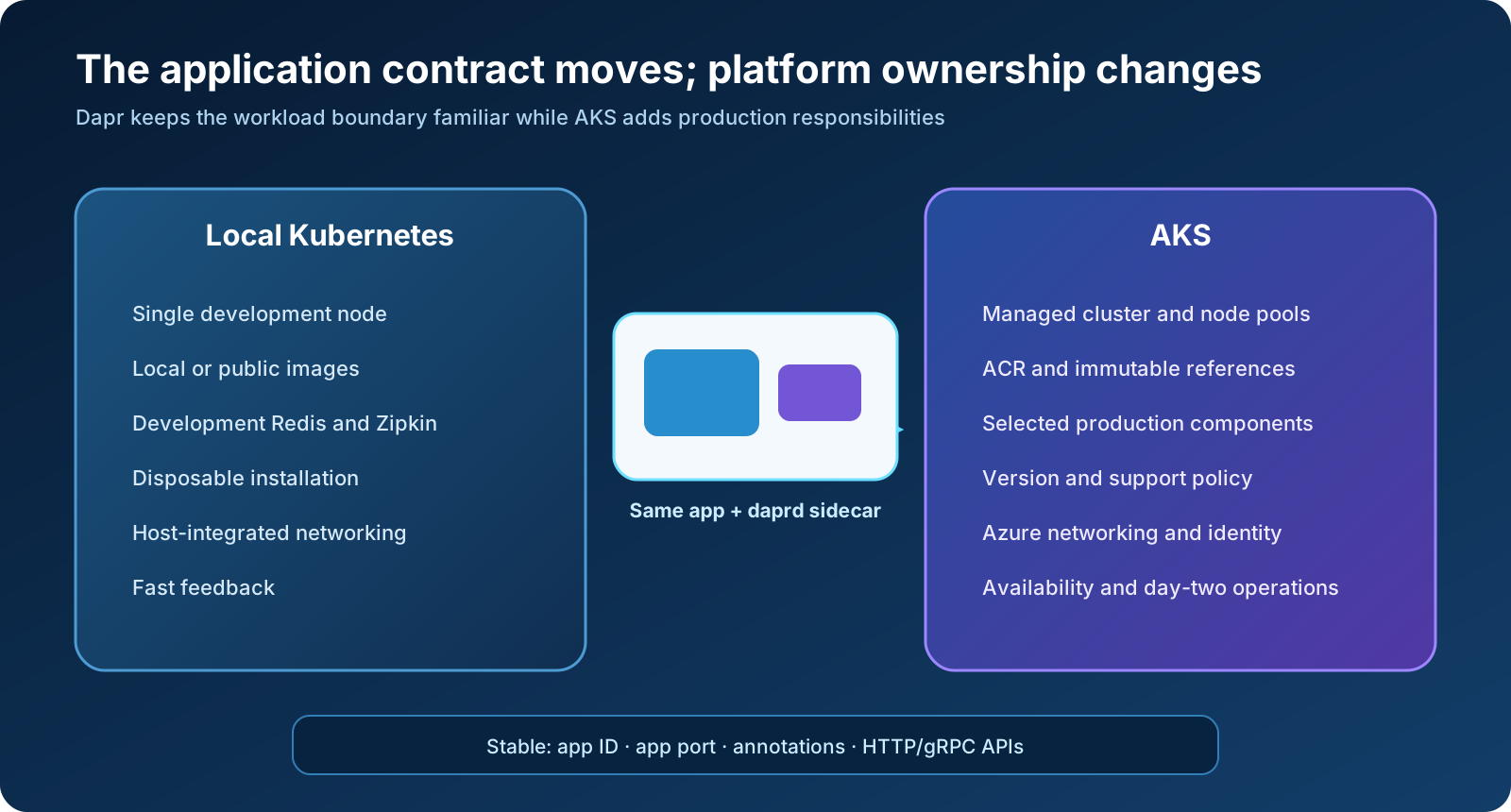
| Concern | OrbStack development cluster | AKS cluster |
|---|---|---|
| Cluster | Local, single node, disposable | Remote, managed Kubernetes control plane with production node pools |
| Dapr installation | Dapr CLI with --dev | Prefer the AKS Dapr extension for Azure-managed lifecycle integration |
| Runtime dependencies | Development Redis and Zipkin | Deliberately selected state, pub/sub, secret, and telemetry services |
| Images | Local image store or public registry | Normally Azure Container Registry or another reachable registry |
| Identity | Local credentials and development components | Microsoft Entra Workload Identity and least-privilege Azure access |
| Networking | Host-integrated local networking | Azure CNI, ingress, egress, private endpoints, DNS, and policy choices |
| Availability | One node and no meaningful failure-domain test | Multiple nodes and zones where the workload requires them |
| Upgrades | Reinstall when convenient | Planned control-plane and sidecar version lifecycle |
The lesson is subtle: you are not migrating a local Dapr installation. You are deploying the same application contract into a differently operated environment.
Choose one Dapr owner
AKS supports two broad installation approaches:
- Install open-source Dapr with the Dapr CLI or Helm.
- Install the Microsoft Dapr cluster extension through Azure CLI or infrastructure as code.
Both produce Dapr control-plane workloads inside Kubernetes. The difference is how those resources are installed, configured, upgraded, and supported.
| Decision | Dapr CLI or Helm | AKS Dapr extension |
|---|---|---|
| Best fit | Portable Kubernetes ownership, custom Helm lifecycle, non-Azure consistency | AKS platforms that want Azure cluster-extension lifecycle and support integration |
| Installation owner | Your platform automation | Azure cluster-extension resource |
| Version management | You select and upgrade charts/runtime | Extension version and release-train settings |
| Default HA posture | Must be selected deliberately | HA is enabled by default in current extension defaults |
| Configuration | CLI flags or Helm values | Extension configuration settings or Bicep properties |
| Support entry point | Dapr open-source project and your platform process | Azure for extension operations; upstream Dapr for runtime behavior where applicable |
For this series, I use the AKS Dapr extension. It fits the managed-cluster operating model and makes the installation visible as an Azure resource. That does not make every Dapr runtime concern Microsoft’s responsibility, nor does it remove the need to test upgrades.
The non-negotiable rule is to choose one lifecycle owner. Microsoft explicitly recommends continuing to manage an extension-installed Dapr runtime through the extension. Running dapr upgrade -k or an unrelated Helm upgrade against the same installation can create configuration drift and conflicting ownership.
If your AKS cluster already contains Dapr installed with Helm or the CLI, do not install a second control plane. Use Microsoft’s documented OSS-to-extension migration path, which can adopt an existing Helm release. Inventory the release name, namespace, values, Dapr resources, and version before changing ownership.
Prerequisites and variables
You need:
- an Azure subscription and permission to manage the target AKS cluster;
- an existing AKS cluster;
- a current Azure CLI and
kubectl; - the
k8s-extensionAzure CLI extension; and - the Dapr CLI if you want to use
dapr status -kfor verification.
Set explicit variables rather than scattering resource names through commands:
export SUBSCRIPTION_ID="<subscription-id>"
export AKS_RESOURCE_GROUP="<aks-resource-group>"
export AKS_CLUSTER_NAME="<aks-cluster-name>"
export DAPR_EXTENSION_NAME="dapr"
Select the subscription and confirm the active identity:
az account set --subscription "$SUBSCRIPTION_ID"
az account show \
  --query '{subscription:name, subscriptionId:id, tenantId:tenantId}' \
  --output table
Install or update the cluster-extension CLI support:
az extension add --name k8s-extension --upgrade
Register the required resource provider and feature if they are not already registered:
az provider register \
  --namespace Microsoft.KubernetesConfiguration \
  --wait

az feature registration create \
  --namespace Microsoft.KubernetesConfiguration \
  --name ExtensionTypes
Registration is subscription-scoped and may take time. Check both states before continuing:
az provider show \
  --namespace Microsoft.KubernetesConfiguration \
  --query registrationState \
  --output tsv

az feature show \
  --namespace Microsoft.KubernetesConfiguration \
  --name ExtensionTypes \
  --query properties.state \
  --output tsv
Both should report Registered.
Point kubectl at the intended AKS cluster
Retrieve credentials and verify the context before installing a cluster-wide runtime:
az aks get-credentials \
  --resource-group "$AKS_RESOURCE_GROUP" \
  --name "$AKS_CLUSTER_NAME" \
  --overwrite-existing

kubectl config current-context
kubectl get nodes -o wide
This check matters even more after the local tutorial: the same workstation may have OrbStack, test AKS, and production AKS contexts. Never infer the target from the terminal prompt.
Before installing, look for an existing Dapr owner:
az k8s-extension list \
  --cluster-type managedClusters \
  --cluster-name "$AKS_CLUSTER_NAME" \
  --resource-group "$AKS_RESOURCE_GROUP" \
  --output table

helm list --all-namespaces
kubectl get namespace dapr-system --ignore-not-found
If an extension or Helm release already owns Dapr, stop and understand it. The correct next step may be an update or migration, not creation.
Install the Dapr extension
For a production-oriented baseline, use the stable release train and disable automatic minor-version upgrades. Microsoft currently warns that automatic control-plane minor upgrades are more appropriate for development and test environments; production upgrades should be deliberate.
az k8s-extension create \
  --cluster-type managedClusters \
  --cluster-name "$AKS_CLUSTER_NAME" \
  --resource-group "$AKS_RESOURCE_GROUP" \
  --name "$DAPR_EXTENSION_NAME" \
  --extension-type Microsoft.Dapr \
  --release-train stable \
  --auto-upgrade-mode none
No --dev flag appears here. The extension installs the Dapr runtime, not a tutorial Redis or Zipkin stack. That is intentional: production dependencies should have explicit topology, security, persistence, backup, and ownership.
The extension’s current defaults enable high availability, Prometheus metrics, and mTLS. Do not mistake a default for a complete design. Review placement and Scheduler storage, topology spread, disruption budgets, resource requests, certificate lifecycle, and monitoring against your cluster standards before calling the runtime production-ready.
The extension needs outbound HTTPS access to Microsoft’s Dapr artifact location under mcr.microsoft.com/daprio, in addition to the normal AKS outbound requirements. Restricted-egress clusters must account for that dependency.
Verify Azure and Kubernetes state
First verify the Azure resource:
az k8s-extension show \
  --cluster-type managedClusters \
  --cluster-name "$AKS_CLUSTER_NAME" \
  --resource-group "$AKS_RESOURCE_GROUP" \
  --name "$DAPR_EXTENSION_NAME" \
  --query '{state:provisioningState, version:version, autoUpgradeMode:autoUpgradeMode}' \
  --output table
The provisioning state should become Succeeded. Then inspect the Kubernetes side:
kubectl get pods -n dapr-system -o wide
kubectl get deployments,statefulsets,services -n dapr-system
dapr status -k
You should recognize the same responsibilities from the OrbStack installation: operator, sidecar injector, Sentry, placement, and Scheduler. Replica counts and workload shapes differ because the extension uses an HA-oriented baseline.
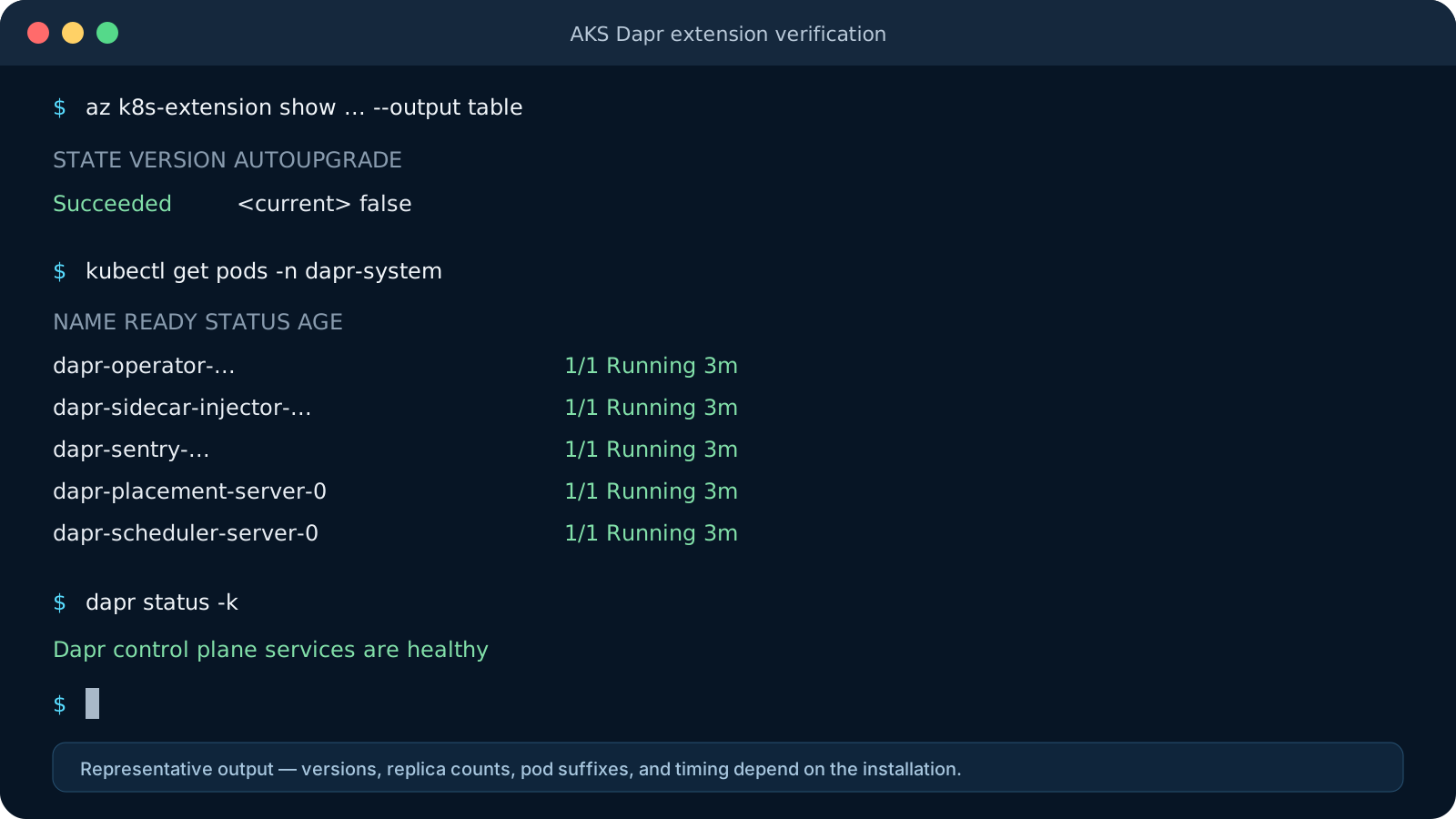 Representative output. Extension versions, replica counts, pod suffixes, nodes, and timing vary.
Also inspect the effective extension settings rather than relying on memory:
az k8s-extension show \
  --cluster-type managedClusters \
  --cluster-name "$AKS_CLUSTER_NAME" \
  --resource-group "$AKS_RESOURCE_GROUP" \
  --name "$DAPR_EXTENSION_NAME" \
  --output json
Store the desired configuration in Bicep, Terraform, or another reviewed deployment definition. A successful interactive command is a useful experiment, not a long-term source of truth.
Redeploy the local sample
The local sample used the public nginx:1.27-alpine image, so AKS can pull it without ACR integration in an unrestricted cluster. Create a namespace and deploy the companion manifest:
kubectl create namespace dapr-demo \
  --dry-run=client \
  --output yaml | kubectl apply --filename -

kubectl apply \
  --namespace dapr-demo \
  --filename hello-dapr-aks.yaml

kubectl rollout status \
  deployment/hello-dapr \
  --namespace dapr-demo
Download the AKS sample manifest, or save this YAML:
apiVersion: apps/v1
kind: Deployment
metadata:
  name: hello-dapr
spec:
  replicas: 2
  selector:
    matchLabels:
      app: hello-dapr
  template:
    metadata:
      labels:
        app: hello-dapr
      annotations:
        dapr.io/enabled: "true"
        dapr.io/app-id: "hello-dapr"
        dapr.io/app-port: "80"
        dapr.io/sidecar-cpu-request: "100m"
        dapr.io/sidecar-memory-request: "128Mi"
        dapr.io/sidecar-cpu-limit: "500m"
        dapr.io/sidecar-memory-limit: "256Mi"
    spec:
      containers:
        - name: web
          image: nginx:1.27-alpine
          ports:
            - name: http
              containerPort: 80
          resources:
            requests:
              cpu: 50m
              memory: 64Mi
            limits:
              cpu: 250m
              memory: 128Mi
          readinessProbe:
            httpGet:
              path: /
              port: http
            initialDelaySeconds: 2
            periodSeconds: 5
---
apiVersion: v1
kind: Service
metadata:
  name: hello-dapr
spec:
  selector:
    app: hello-dapr
  ports:
    - name: http
      port: 80
      targetPort: http
The essential Dapr annotations are unchanged. The AKS version adds a second replica and explicit resource requests and limits for both the application and sidecar. These values are safe starting points for a tiny sample, not sizing recommendations for real workloads.
Verify that both pods contain web and daprd:
kubectl get pods \
  --namespace dapr-demo \
  --selector app=hello-dapr

kubectl get pods \
  --namespace dapr-demo \
  --selector app=hello-dapr \
  --output jsonpath='{range .items[*]}{.metadata.name}{"  "}{.spec.containers[*].name}{"\n"}{end}'
Each pod should report 2/2 ready. Invoke the service through one Dapr sidecar using a temporary port forward:
kubectl port-forward \
  --namespace dapr-demo \
  deployment/hello-dapr \
  3500:3500
In another terminal:
curl --fail --show-error \
  http://localhost:3500/v1.0/invoke/hello-dapr/method/
The NGINX welcome page proves that the same Dapr invocation contract works on AKS.
Where ACR enters the path
The public sample image hides an important production difference. Your own application image normally lives in Azure Container Registry. OrbStack can use a local build directly; AKS nodes need registry access.
If you want to exercise the ACR path without building a custom application yet, import the tutorial’s public NGINX image into your registry. ACR performs this copy directly, so Docker does not need to be running on your workstation:
export ACR_NAME="<acr-name>"

az acr import \
  --name "$ACR_NAME" \
  --source docker.io/library/nginx:1.27-alpine \
  --image hello-dapr:1.0.0
Confirm that the repository and tag are present:
az acr manifest list-metadata \
  --registry "$ACR_NAME" \
  --name hello-dapr \
  --output table
Resolve the tag to its immutable manifest digest and construct the complete image reference:
DIGEST="$(
  az acr manifest show-metadata \
    --registry "$ACR_NAME" \
    --name "hello-dapr:1.0.0" \
    --query digest \
    --output tsv
)"

ACR_LOGIN_SERVER="$(
  az acr show \
    --name "$ACR_NAME" \
    --query loginServer \
    --output tsv
)"

IMAGE="${ACR_LOGIN_SERVER}/hello-dapr@${DIGEST}"
printf '%s\n' "$IMAGE"
The result has this form:
<acr-name>.azurecr.io/hello-dapr@sha256:<digest>
In hello-dapr-aks.yaml, replace the image in the web container:
containers:
  - name: web
    image: <acr-name>.azurecr.io/hello-dapr@sha256:<digest>
Use the actual value printed by the preceding command; do not include the angle brackets. Keeping the digest in the manifest makes the deployed image immutable, while the 1.0.0 tag remains a convenient name for finding that digest.
For a registry in the same tenant, attach ACR to AKS to grant the cluster identity pull access, and then verify that access:
az aks update \
  --resource-group "$AKS_RESOURCE_GROUP" \
  --name "$AKS_CLUSTER_NAME" \
  --attach-acr "$ACR_NAME"

az aks check-acr \
  --resource-group "$AKS_RESOURCE_GROUP" \
  --name "$AKS_CLUSTER_NAME" \
  --acr "${ACR_NAME}.azurecr.io"
Apply the updated manifest and wait for the new image to roll out:
kubectl apply \
  --namespace dapr-demo \
  --filename hello-dapr-aks.yaml

kubectl rollout status \
  deployment/hello-dapr \
  --namespace dapr-demo
Registry access belongs to the AKS node or kubelet identity. Dapr does not pull the application image and does not replace Kubernetes image authentication.
When you have your own application and a Dockerfile, replace the import step with an ACR build. The command builds the image in Azure and pushes it to the same repository:
az acr build \
  --registry "$ACR_NAME" \
  --image hello-dapr:1.0.0 \
  --file Dockerfile \
  .
After the build, repeat the digest lookup and update the image reference in the manifest.
Components should change even when the app does not
The OrbStack tutorial installed Redis and Zipkin for convenience. Do not export those development components and call the result production-ready.
On AKS, decide separately:
- which state store and pub/sub broker meet durability and delivery requirements;
- whether components authenticate with Microsoft Entra Workload Identity instead of keys;
- how secrets are stored and scoped;
- where traces, metrics, and logs are collected;
- which namespaces and app IDs may use each Dapr component; and
- who owns backup, recovery, upgrades, and incident response for every backing service.
The application API may stay stable while the components become Azure Service Bus, Azure Cosmos DB, Azure Managed Redis, Azure Key Vault, and an OpenTelemetry pipeline. That separation is one of Dapr’s advantages, but it does not remove the operational characteristics of those services.
Versioning is a two-step operation
The extension manages the Dapr control plane. Existing application pods keep the sidecar image injected when they were created. After a tested control-plane update, restart Dapr-enabled workloads so newly created pods receive the intended sidecar version:
kubectl rollout restart \
  deployment/hello-dapr \
  --namespace dapr-demo
That control-plane/sidecar distinction is why production upgrades need a rollout plan, compatibility validation, and non-production rehearsal. Installing through a managed mechanism does not make application restarts disappear.
The AKS extension currently supports a rolling window that includes the current and previous Dapr versions. Check the versions available to your cluster rather than copying a version number from an article. The preview command under az k8s-extension extension-types can fail when its embedded API version is retired. The newer az aks extension type command does not currently allow Dapr, so query the documented cluster-extension API directly with az rest:
if AKS_RESOURCE_ID="$(
  az aks show \
    --resource-group "$AKS_RESOURCE_GROUP" \
    --name "$AKS_CLUSTER_NAME" \
    --query id \
    --output tsv
)" && [ -n "$AKS_RESOURCE_ID" ]; then
  az rest \
    --method get \
    --url "${AKS_RESOURCE_ID}/providers/Microsoft.KubernetesConfiguration/extensionTypes/Microsoft.Dapr/versions" \
    --url-parameters \
      api-version=2024-11-01-preview \
      releaseTrain=stable \
      showLatest=true \
    --query 'value[].properties.version' \
    --output table
else
  echo "Could not resolve the AKS resource ID." >&2
fi
If az aks show warns that its behavior has been altered by aks-preview and then reports an unsupported API version, remove that optional extension before retrying. It is not required for this article:
az extension remove \
  --name aks-preview
The clean handoff
The move from OrbStack to AKS preserves the part developers depend on: the Dapr application contract. It replaces the disposable platform around that contract with an explicit operating model.
The practical rules are:
- Choose the extension or open-source lifecycle and keep one owner.
- Verify the Azure extension resource and the Kubernetes control plane.
- Keep application annotations portable.
- Replace development components with production services deliberately.
- Treat control-plane upgrades and sidecar rollouts as related but separate steps.
Next in the series, we will use two services to explore Dapr service invocation, named discovery, namespaces, HTTP and gRPC choices, and resiliency policies.
Return to the Dapr on Kubernetes and AKS series index.
Sources
- Microsoft Learn — Install the Dapr extension for AKS
- Microsoft Learn — Configure the Dapr extension
- Microsoft Learn — Dapr extension overview
- Microsoft Learn — Migrate Dapr OSS to the AKS extension
- Microsoft Learn — Integrate Azure Container Registry with AKS
- Dapr Docs — Production guidelines on Kubernetes