For years, the answer to “how do we get traffic into the cluster?” was the same in almost every team I worked with: install ingress-nginx, add a few annotations, done. It was the default in tutorials, the default in Helm charts, and on AKS it was even the engine behind the application routing add-on.
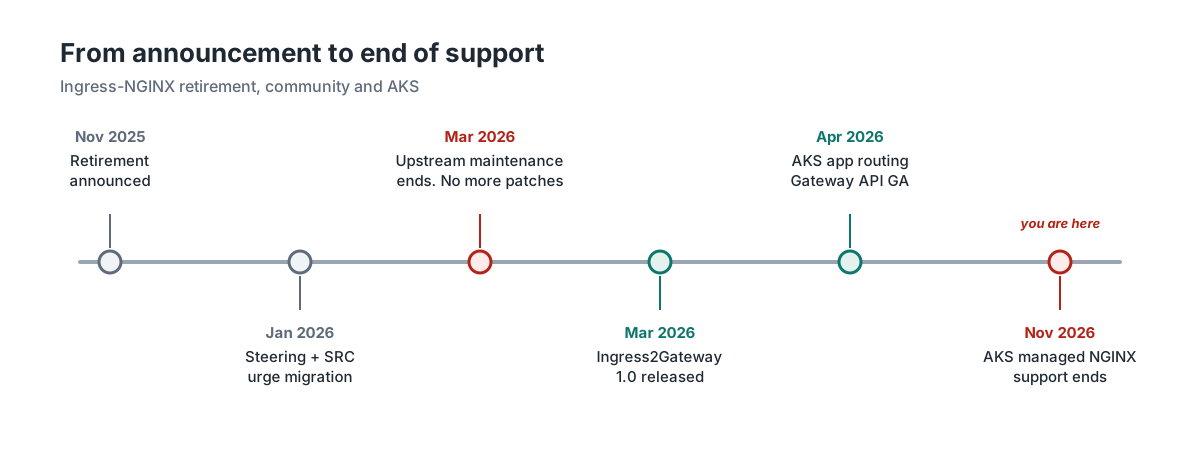
That default is gone. The Kubernetes project stopped maintaining Ingress-NGINX in March 2026. No more bug fixes, no more security patches. On AKS, Microsoft has kept the managed NGINX in the application routing add-on alive with critical patches, but that support ends this month.
The controller keeps running, of course. Nothing switches off. That is exactly what makes this risky: a component in front of every application, exposed to the internet, that will never be patched again. And it doesn’t announce itself. Nobody gets paged because a controller is out of support.
I tested the migration paths against a real Kubernetes API server and controllers. A few results surprised me; I’ll call those out as we go.
Validation note: Dates, versions and feature status were checked against Kubernetes, Microsoft Learn and vendor documentation in early November 2026. Several Azure features mentioned here move quickly, so check the current docs before you build on them.
What “retired” actually means
The retirement was announced in November 2025 by SIG Network and the Security Response Committee. In January 2026, the Steering and Security Response Committees published a joint statement that was unusually direct: about half of cloud-native environments depend on Ingress-NGINX, and teams should start migrating now rather than at the last minute. Maintenance ended in March 2026.
The reasons are not mysterious. A handful of volunteers maintained a project that half the industry relied on. Features such as snippet annotations, which let anyone who can create an Ingress inject raw NGINX configuration, made the attack surface very large. The “IngressNightmare” vulnerabilities in early 2025 showed what that could lead to.
In discussions about this, I keep running into the same three misunderstandings, so let me clear them up first.
The retirement applies to the community controller, kubernetes/ingress-nginx, not to everything with NGINX in its name. F5’s NGINX Ingress Controller and NGINX Gateway Fabric are separate products that are still maintained. They use their own annotations, though, so neither is a drop-in replacement.
The Ingress API itself is not deprecated either. networking.k8s.io/v1 Ingress keeps working and plenty of controllers still support it. It is feature-frozen, however, and all new work happens in Gateway API.
And if you run AKS with the application routing add-on, you are affected too. Its managed NGINX is built on the same code, and Microsoft’s support for it ends in November 2026.
Not sure whether you are affected? Two commands tell you enough to start:
kubectl get pods -A -l app.kubernetes.io/name=ingress-nginx
kubectl get ingressclass
If the first returns pods, or the second shows a controller of k8s.io/ingress-nginx or a class called webapprouting.kubernetes.azure.com, this article is for you.
Ingress and Gateway API in five minutes
Most of the replacement options push you towards Gateway API, so it helps to understand what changes.
An Ingress is a single object that holds host and path rules plus a pile of controller-specific annotations. Everything that isn’t host, path or TLS ends up in those annotations: rewrites, redirects, timeouts, body size limits, CORS, authentication, canary releases. The API server doesn’t validate any of them. They are strings, and each controller interprets them in its own way.
Gateway API splits that single object into resources with different owners. A GatewayClass says which implementation handles the traffic; the infrastructure provider or platform team owns it. A Gateway describes the listeners: ports, hostnames, TLS certificates and which namespaces are allowed to attach routes. That is typically the platform team’s resource. HTTPRoutes, and their siblings such as GRPCRoute and TCPRoute, describe how requests for a hostname are matched and where they go, and those belong to the application teams. Whatever the standard doesn’t cover, such as body size limits, external authentication, rate limiting or WAF, lives in policy resources from the implementation you choose, attached to a Gateway or a route.
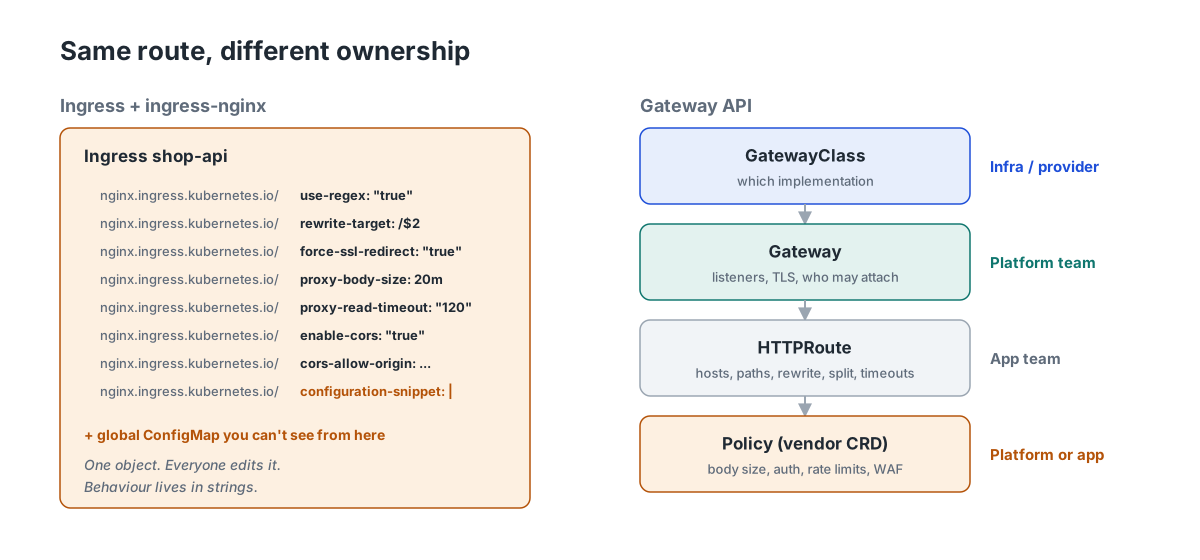
Things that needed annotations before are now typed fields that the API server validates: header matching, redirects, prefix rewrites, weighted traffic splitting, request mirroring, timeouts, and, since recent releases, CORS. Gateway API v1.6 also promoted TCPRoute and UDPRoute to the standard channel, which helps teams that used the TCP and UDP ConfigMaps of ingress-nginx.
It’s not all good news. Authentication, rate limiting and body size limits are still implementation-specific. That is where most of the migration work hides.
Start with an inventory, not a product choice
The most common mistake I see is choosing the replacement first. Which product fits depends on what your Ingresses actually do, and in most clusters nobody knows that precisely. Some of it is in annotations, and some is in a global ConfigMap that applies to every Ingress without being visible on any of them.
This read-only script lists the controllers, their global ConfigMap settings, the Ingresses in scope, how often each annotation is used, and every snippet:
#!/usr/bin/env bash
# Read-only inventory of Ingress-NGINX usage in the current kube-context.
# Requires kubectl and jq.
set -euo pipefail
tmp=$(mktemp -d); trap 'rm -rf "$tmp"' EXIT

kubectl get ingressclass -o json > "$tmp/classes.json"
kubectl get ingress -A -o json  > "$tmp/ingresses.json"

# IngressClasses served by community ingress-nginx or the AKS app routing add-on
classes=$(jq -c '[.items[]
  | select((.spec.controller | test("ingress-nginx|approuting")) or (.metadata.name | test("webapprouting")))
  | .metadata.name]' "$tmp/classes.json")

echo "== IngressClasses handled by ingress-nginx: $classes"

echo; echo "== Controller pods and their global ConfigMap"
kubectl get pods -A -l app.kubernetes.io/name=ingress-nginx -o json | jq -r '.items[]
  | .metadata.namespace as $ns
  | "\($ns)/\(.metadata.name)  \(.spec.containers[0].image)  configmap=\(
      [.spec.containers[0].args[]? | select(startswith("--configmap="))
       | sub("--configmap="; "") | sub("\\$\\(POD_NAMESPACE\\)"; $ns)] | first // "none")"'

echo; echo "== Settings in those ConfigMaps (these apply to every Ingress)"
kubectl get pods -A -l app.kubernetes.io/name=ingress-nginx -o json | jq -r '.items[]
  | .metadata.namespace as $ns | .spec.containers[0].args[]?
  | select(startswith("--configmap=")) | sub("--configmap="; "") | sub("\\$\\(POD_NAMESPACE\\)"; $ns)' \
  | sort -u | while IFS=/ read -r ns name; do
      echo "-- $ns/$name"
      kubectl -n "$ns" get configmap "$name" -o json | jq -r '.data // {} | to_entries[] | "   \(.key)=\(.value)"'
    done

echo; echo "== Ingresses in scope"
jq -r --argjson c "$classes" '.items[]
  | select((.spec.ingressClassName // .metadata.annotations["kubernetes.io/ingress.class"] // "") as $k
           | $c | index($k))
  | "\(.metadata.namespace)/\(.metadata.name)"' "$tmp/ingresses.json"

echo; echo "== Annotation usage"
jq -r --argjson c "$classes" '.items[]
  | select((.spec.ingressClassName // .metadata.annotations["kubernetes.io/ingress.class"] // "") as $k
           | $c | index($k))
  | (.metadata.annotations // {}) | keys[]
  | select(startswith("nginx.ingress.kubernetes.io/"))
  | sub("nginx.ingress.kubernetes.io/"; "")' "$tmp/ingresses.json" | sort | uniq -c | sort -rn

echo; echo "== Snippets: redesign these, don't translate them"
jq -r --argjson c "$classes" '.items[]
  | select((.spec.ingressClassName // .metadata.annotations["kubernetes.io/ingress.class"] // "") as $k
           | $c | index($k))
  | . as $i | (.metadata.annotations // {}) | keys[]
  | select(startswith("nginx.ingress.kubernetes.io/") and test("snippet"))
  | "\($i.metadata.namespace)/\($i.metadata.name)  \(sub("nginx.ingress.kubernetes.io/"; ""))"' "$tmp/ingresses.json"
On a small test cluster, the output looks like this:
== IngressClasses handled by ingress-nginx: ["nginx"]

== Controller pods and their global ConfigMap
ingress-nginx/ingress-nginx-controller-7d9f8-abcde  registry.k8s.io/ingress-nginx/controller:v1.13.3  configmap=ingress-nginx/ingress-nginx-controller

== Settings in those ConfigMaps (these apply to every Ingress)
-- ingress-nginx/ingress-nginx-controller
   allow-snippet-annotations=true
   proxy-body-size=8m
   use-forwarded-headers=true

== Ingresses in scope
shop/shop-api
web/docs
web/www

== Annotation usage
      1 use-regex
      1 ssl-redirect
      1 server-snippet
      1 rewrite-target
      ...

== Snippets: redesign these, don't translate them
shop/shop-api  configuration-snippet
web/www  server-snippet
Run it against every cluster and put the results in a spreadsheet. Then sort each annotation into one of three buckets. The bucket tells you more about the effort than the number of Ingresses does.
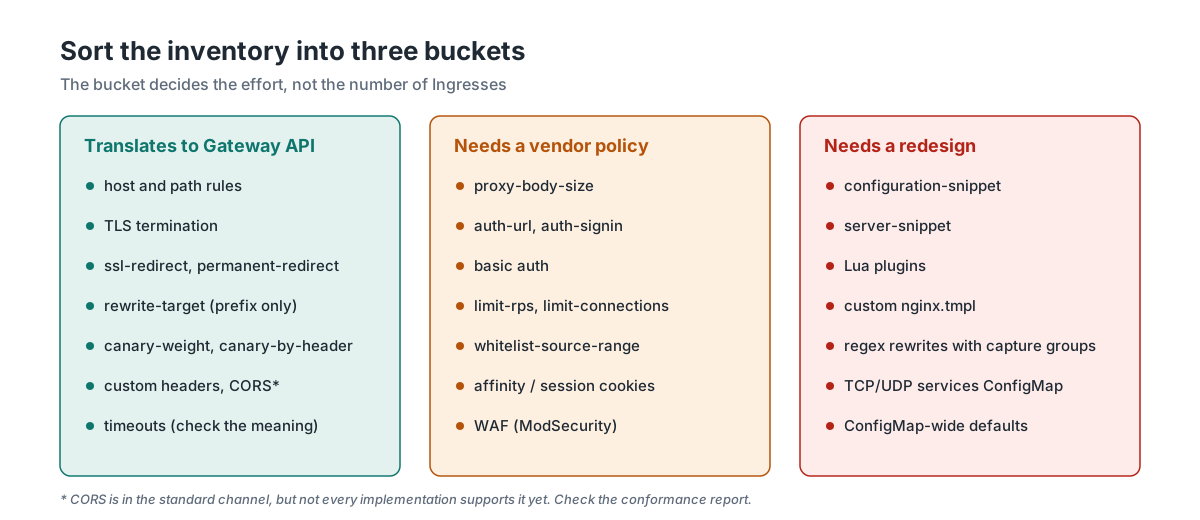
The rest of this article uses one Ingress as a running example. It’s deliberately a bit messy, because that’s what real ones look like:
apiVersion: networking.k8s.io/v1
kind: Ingress
metadata:
  name: shop-api
  namespace: shop
  annotations:
    nginx.ingress.kubernetes.io/use-regex: "true"
    nginx.ingress.kubernetes.io/rewrite-target: /$2
    nginx.ingress.kubernetes.io/force-ssl-redirect: "true"
    nginx.ingress.kubernetes.io/proxy-body-size: 20m
    nginx.ingress.kubernetes.io/proxy-read-timeout: "120"
    nginx.ingress.kubernetes.io/enable-cors: "true"
    nginx.ingress.kubernetes.io/cors-allow-origin: "https://www.example.com"
    nginx.ingress.kubernetes.io/configuration-snippet: |
      more_set_headers "X-Frame-Options: DENY";
spec:
  ingressClassName: nginx
  tls:
    - hosts:
        - shop.example.com
      secretName: shop-example-com-tls
  rules:
    - host: shop.example.com
      http:
        paths:
          - path: /api(/|$)(.*)
            pathType: ImplementationSpecific
            backend:
              service:
                name: shop-api
                port:
                  number: 80
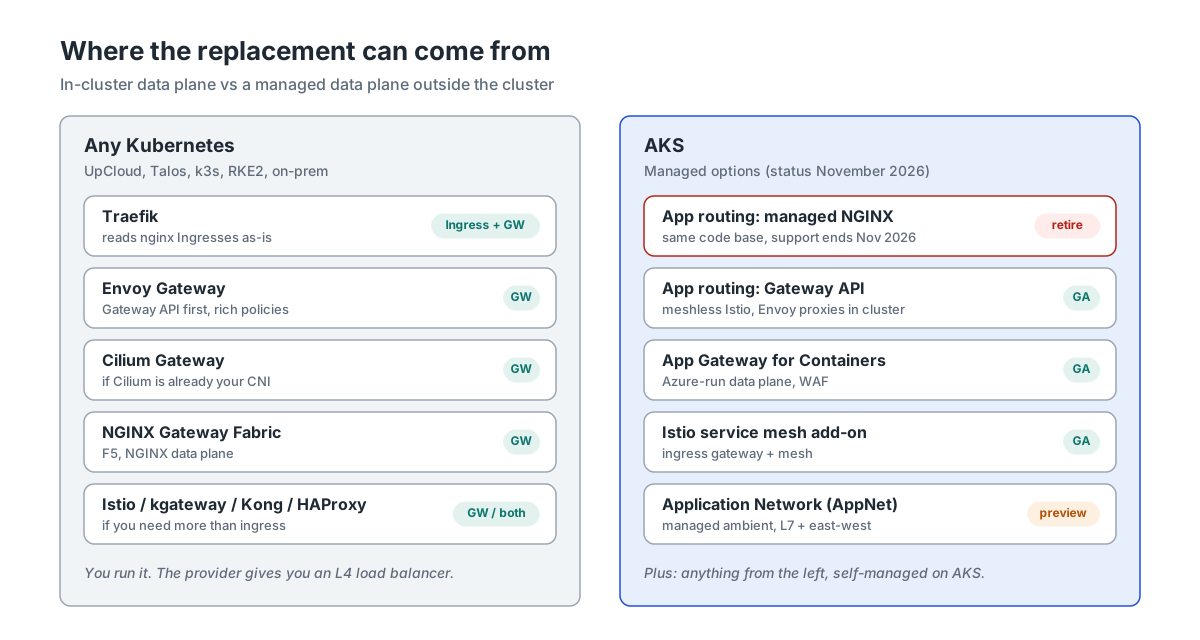
Alternatives when you don’t run on a hyperscaler
Here I’m thinking of managed Kubernetes at a hosting provider, typically a European provider that runs the control plane for you and offers a load balancer and block storage, but not much more. Everything in this section applies equally to Talos, k3s, RKE2 or a cluster in your own data centre.
The important difference with a hyperscaler is that there is no managed Layer 7 product to fall back on. A hosting provider usually gives you a managed load balancer at Layer 4. On bare metal you might use MetalLB or Cilium’s LB IPAM. The controller behind it is yours to choose, run, patch and monitor. That is a cost, but it also means your choice is portable.
The candidates I would look at:
Traefik is the lowest-friction option if you need ingress-nginx gone quickly. Since v3.6 it has a Kubernetes Ingress NGINX provider that reads your existing Ingresses with class nginx and translates the common annotations. You can swap the controller without touching the Ingress objects. It also supports Gateway API and is the default ingress in k3s. For RKE2, SUSE publishes a migration guide from ingress-nginx to Traefik.
Envoy Gateway is a Gateway API-first implementation from the Envoy project. Its policy CRDs cover external authorisation, JWT, rate limiting, request buffering and much more. If you plan to standardise on Gateway API, this is a strong default.
Cilium Gateway API makes sense when Cilium is already your CNI. You get Gateway API without adding another product, using the Envoy proxy that Cilium already ships. Its policy surface is narrower than Envoy Gateway’s.
NGINX Gateway Fabric is F5’s Gateway API implementation on an NGINX data plane. If your team knows NGINX well and wants to keep that behaviour, it’s worth a look.
F5 NGINX Ingress Controller stays on the Ingress API, but its annotations live under nginx.org/ and behave differently. Moving to it is a migration, not a swap.
Istio, kgateway, Kong or HAProxy are reasonable choices when you need more than ingress, such as a service mesh, an API gateway or existing HAProxy expertise. I wouldn’t pick any of them just to replace ingress-nginx.
| Ingress API | Gateway API | Reads nginx annotations | Auth, limits | Backed by | |
|---|---|---|---|---|---|
| Traefik | Yes | Yes | Yes, common ones | Middlewares | Traefik Labs |
| Envoy Gateway | No | Yes | No | Policy CRDs | CNCF (Envoy) |
| Cilium | Yes | Yes | No | Limited | CNCF |
| NGINX Gateway Fabric | No | Yes | No | NGF policies | F5 |
| F5 NGINX IC | Yes | No | No, uses nginx.org/* | Policy CRD | F5 |
All five have commercial support available, either from the vendor or from companies around the project. Cilium is the only one that doesn’t add a component if it’s already your CNI.
Check each project’s current Gateway API conformance report for the features you use. “Supports Gateway API” can mean very different things, as you’ll see below.
All of these can run self-hosted. If sovereignty is part of your reason for leaving a hyperscaler, check who provides commercial support and under which jurisdiction, not just the licence.
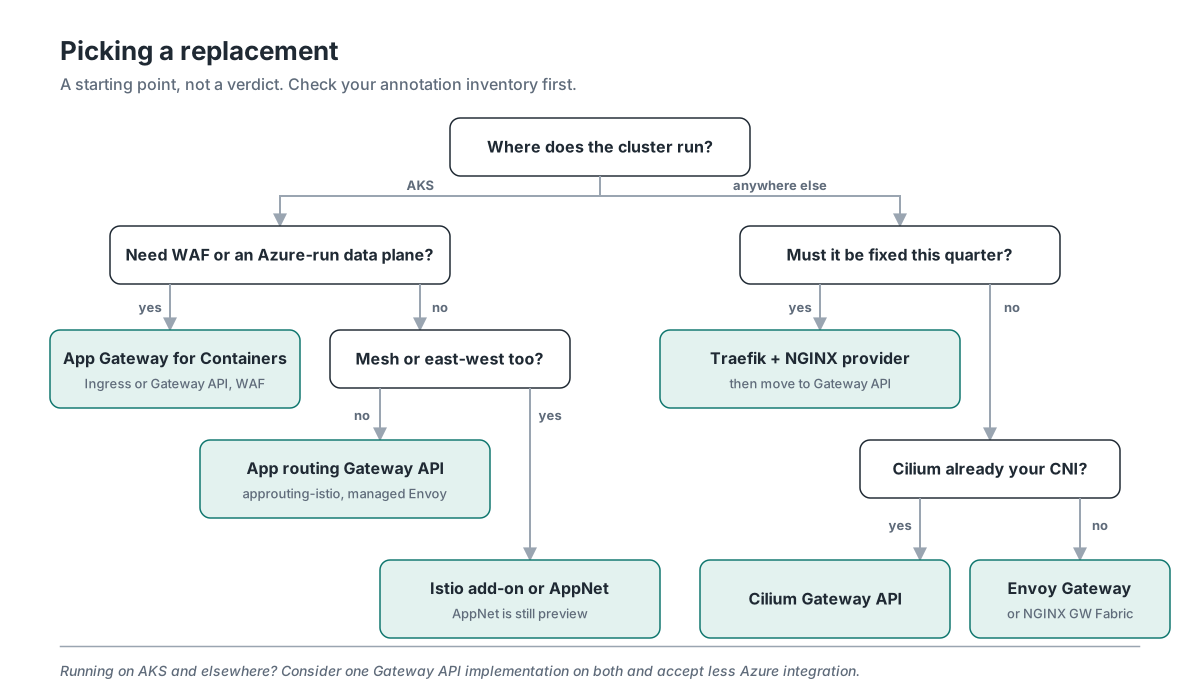
My short version: if it has to be fixed this quarter, use Traefik with the NGINX provider and plan a second step to Gateway API. If you have a bit more time, go straight to Envoy Gateway, or Cilium if it’s already there.
The options on Azure
On AKS the picture is different, because Microsoft offers several managed routes. Not all of them are good destinations.
Application routing add-on with managed NGINX. This is the trap. It’s ingress-nginx under a Microsoft label, and support ends in November 2026. I still see teams move workloads from a self-managed ingress-nginx to the add-on “because then Microsoft takes care of it”. That only moves the problem.
Application routing with Gateway API. This became generally available in the AKS release of 28 April 2026 and is Microsoft’s recommended replacement. It uses a “meshless” Istio control plane: you create a Gateway with the approuting-istio GatewayClass, and AKS deploys Envoy proxies with a LoadBalancer Service, an HPA and a PodDisruptionBudget. Since the May 2026 release, it can also sync certificates from Key Vault and create Azure DNS records. Read the limitations, though. Body size limits, header size limits and rate limiting can’t be configured, EnvoyFilter isn’t available, and upgrades happen in place without canary revisions. It also can’t run next to the Istio service mesh add-on.
Application Gateway for Containers (AGC). Here the data plane runs outside your cluster, managed by Azure. The ALB Controller in the cluster translates Ingress or Gateway API resources into AGC configuration. It supports both APIs, WAF policies, mTLS towards clients and backends, weighted routing, mirroring and gRPC. It needs a delegated subnet and a managed identity, and Gateway listeners are limited to ports 80 and 443. Listener certificates come from Kubernetes Secrets. If you pair ingress-nginx with an Application Gateway WAF today, this is the natural successor. The managed AKS add-on for the ALB Controller is still in preview. The Helm-based installation is GA.
Istio service mesh add-on. If you want a mesh anyway, its ingress gateway supports Gateway API, and the gateway-scoped EnvoyFilter covers some of what app routing can’t do. You do take on Istio’s canary upgrades for minor revisions, even if you only use it for ingress.
Azure Kubernetes Application Network (AppNet). I covered this in a three-part series. It’s the right direction when ingress and east-west security come together, but it’s still in public preview. I wouldn’t make it the target for a migration with a deadline.
AGIC (Application Gateway Ingress Controller) is the older Application Gateway integration. I’d only mention it to steer you towards AGC.
And of course, every option from the previous section also runs on AKS. If you operate clusters on Azure and somewhere else, one implementation on both may be worth more than the deepest Azure integration.
| Status (Nov 2026) | API | Data plane | WAF | Key Vault certs | |
|---|---|---|---|---|---|
| App routing, NGINX | Support ends | Ingress | NGINX pods in cluster | No | Yes |
| App routing, Gateway API | GA | Gateway API | Envoy pods in cluster | No | Yes, via operator |
| App Gateway for Containers | GA, add-on in preview | Both | Azure-managed, outside | Yes | No, Secrets |
| Istio add-on | GA | Gateway API, Istio | Envoy pods in cluster | No | Yes, via CSI |
| AppNet | Preview | Gateway API, Istio | Managed ambient | No | Check docs |
Two differences don’t fit in the table. App routing upgrades its gateways in place, while the Istio add-on uses canary revisions. And the routes themselves are portable everywhere, but the Azure extras, such as the operator’s TLS options, the AGC annotations and the WAF policy, are not.
For the options without WAF, Azure Front Door in front is a common pattern, and it works with any of them.
If you run clusters on Azure and elsewhere, the choice is less about features and more about who carries which responsibility:
| Managed option on AKS | Self-run controller (any cluster) | |
|---|---|---|
| Who patches the data plane | Microsoft | You |
| Cloud integration | Key Vault, Azure DNS, WAF, Entra | Whatever you configure: cert-manager, external-dns |
| Portability | Routes yes, Azure extras no | Same setup on every cluster |
| Cost model | AGC: hourly plus capacity units. App routing: gateway pods on your nodes | Controller pods on your nodes, plus an L4 load balancer |
| Upgrade timing | On Azure’s schedule, within maintenance windows | On your schedule, and your responsibility |
| Best fit | Azure-only estates that value integration | Mixed estates and sovereignty-driven setups |
Where migrations get difficult
Swapping a controller is mostly mechanical. What causes outages is behaviour that nobody wrote down, and in my experience it hides in a few predictable places.
The first is annotations without a direct equivalent. rewrite-target with regex capture groups is the classic example: Gateway API’s URLRewrite only replaces a prefix or a full path, so /$2-style rewrites have to be rethought. Snippets are harder still. configuration-snippet and server-snippet contain raw NGINX configuration that no other product can execute, so each one becomes a small design question: what was it for, and where does that belong now?
Then there are the defaults you never see. ingress-nginx limits request bodies to 1 MB, uses 60-second proxy timeouts and buffers request bodies before passing them on. Many teams raised those limits globally in the ConfigMap years ago and forgot about it. A new controller comes with its own defaults, and the difference only surfaces when somebody uploads a large file or runs a long report.
Path matching and timeouts change meaning in subtle ways. With use-regex, ingress-nginx matches paths as case-insensitive regular expressions, and a single regex Ingress can turn every path for that host into a regex. Gateway API’s PathPrefix is case-sensitive and matches on whole path segments. That is usually the better behaviour, but it is different behaviour. Likewise, proxy-read-timeout is the time allowed between two reads, while Gateway API’s timeouts.request is the total time for a request. Translating one into the other is a decision, not a conversion.
Authentication and other edge features, such as auth-url, basic auth, IP allowlists, rate limits and session affinity, all move into vendor-specific policies with their own semantics. Client IP handling deserves attention too: externalTrafficPolicy, the PROXY protocol and X-Forwarded-For all affect what your application and your allowlists see, especially behind Front Door, AGC or your hosting provider’s load balancer.
Certificates and DNS need some preparation. cert-manager and external-dns both support Gateway API, but have to be configured for it (external-dns, for example, needs the gateway-httproute source), and during a parallel run an HTTP-01 challenge can easily end up at the wrong controller. Observability breaks quietly as well: log formats and metric names change, so dashboards and alerts built on NGINX metrics stop working on the day you switch, which is exactly when you need them most.
Finally, there is ownership. Gateway API forces the question of who owns the Gateway and who owns the routes. In many organisations that conversation takes longer than the technical work, so start it early.
Migration paths
There are four realistic paths. Most organisations combine them: a quick fix for most of the estate, and a proper redesign for the handful of complex applications.
1. Swap the controller, keep the Ingress objects
This is the fastest way to stop running unpatched software. Traefik’s NGINX provider reads your existing Ingresses, so the objects in Git don’t change. The Helm values I used look like this:
providers:
  kubernetesIngressNGINX:
    enabled: true
    # ingress-nginx buffers request bodies by default; Traefik does not.
    # Without this, proxy-body-size is not enforced.
    proxyRequestBuffering: true
    # Leave Ingress status alone while ingress-nginx still owns it.
    publishService:
      enabled: false
    # Keep this false and fix the snippets instead (see below).
    allowSnippetAnnotations: false
service:
  type: LoadBalancer
helm repo add traefik https://traefik.github.io/charts
helm upgrade --install traefik traefik/traefik \
  --namespace traefik --create-namespace \
  --version 42.2.0 -f traefik-values.yaml
I validated these values against the chart’s schema (chart 42.2.0, Traefik v3.7.16) and tested the provider with Traefik v3.7.17 against the example Ingress. Three results are worth knowing before you try this yourself.
The first one caught me off guard: an Ingress with a snippet annotation is skipped completely. It doesn’t just lose the snippet. With allowSnippetAnnotations: false, Traefik logs snippet annotations are not allowed when allowSnippetAnnotations is disabled and the entire host stops routing. Run the inventory first and deal with the snippets before you switch.
When I did allow snippets, simple ones actually worked. My more_set_headers snippet produced an X-Frame-Options: DENY header, and a server-snippet with location /healthz { return 200; } returned a 200. That’s impressive, but I’d treat it as a bridge rather than a destination, because you keep the security risk that made snippets a problem in the first place.
The third result is the one that could hurt in production. proxy-body-size was not enforced until I enabled request buffering. With Traefik’s default of proxyRequestBuffering: false, a 25 MB upload passed straight through, despite proxy-body-size: 20m. ingress-nginx would have returned a 413. After setting proxyRequestBuffering: true, a 15 MB upload went through and the 25 MB one got its 413, as expected.
The rest behaved as before. The regex rewrite delivered /api/orders/42 to the backend as /orders/42, the case-insensitive match still accepted /API/orders, the HTTP-to-HTTPS redirect returned a 308, CORS headers were set for the allowed origin, and auth-url was translated into forward authentication.
This path leaves you on the Ingress API. That’s fine as a first step. Just don’t let it become the last one.
2. Translate to Gateway API with Ingress2Gateway
Ingress2Gateway 1.0 was released in March 2026, and v1.2 is current. It reads Ingresses from the cluster or from files and generates Gateway API resources. Using an emitter, it can also generate implementation-specific policies:
ingress2gateway print --providers=ingress-nginx --input-file ingress.yaml
ingress2gateway print --providers=ingress-nginx --emitter envoy-gateway -A
On the example Ingress, the tool did a good job of the routine parts. It generated a Gateway with HTTP and HTTPS listeners, a redirect route, the CORS filter and the TLS reference. The Envoy Gateway emitter even produced a BackendTrafficPolicy with a 20 MiB request buffer for proxy-body-size. It was also honest in its warnings. What it did with the rest of the Ingress is the reason I wouldn’t apply its output without reading it.
The rewrite-target: /$2 annotation was dropped, with the warning “Path rewrites with capture group references are not supported”. The generated YAML is valid and the API server accepts it, but every request would now hit the backend with /api still in the path. The proxy-read-timeout: "120" became timeouts.request: 20m0s. That turned out to be deliberate: the tool multiplies the per-read timeout by ten to approximate a total request timeout. It’s a defensible choice, but it should be your choice, not something you inherit. The path became the regex (?i)/api(/|$)(.*).*, and regex matching is an implementation-specific feature in Gateway API, so not every implementation will accept it. The Gateway itself was named nginx, with GatewayClass nginx, in the application namespace, and the configuration-snippet was reported as unsupported and skipped.
So treat the output as a first draft. Commit it to a branch, review it like any other pull request, and fix it. After review, my version of the example looks like this. The platform team owns the Gateway and the HTTP-to-HTTPS redirect:
apiVersion: gateway.networking.k8s.io/v1
kind: Gateway
metadata:
  name: public
  namespace: gateway-infra
spec:
  gatewayClassName: envoy-gateway   # or approuting-istio, azure-alb-external, traefik, ...
  listeners:
    - name: http
      protocol: HTTP
      port: 80
      allowedRoutes:
        namespaces:
          from: Same
    - name: https-shop
      protocol: HTTPS
      port: 443
      hostname: shop.example.com
      tls:
        mode: Terminate
        certificateRefs:
          - name: shop-example-com-tls
      allowedRoutes:
        namespaces:
          from: Selector
          selector:
            matchLabels:
              gateway-access/public: "true"
---
apiVersion: gateway.networking.k8s.io/v1
kind: HTTPRoute
metadata:
  name: http-to-https
  namespace: gateway-infra
spec:
  parentRefs:
    - name: public
      sectionName: http
  rules:
    - filters:
        - type: RequestRedirect
          requestRedirect:
            scheme: https
            statusCode: 301
The application team owns the route. The regex rewrite becomes a prefix match with ReplacePrefixMatch, and the snippet becomes a ResponseHeaderModifier:
apiVersion: gateway.networking.k8s.io/v1
kind: HTTPRoute
metadata:
  name: shop-api
  namespace: shop
spec:
  parentRefs:
    - name: public
      namespace: gateway-infra
      sectionName: https-shop
  hostnames:
    - shop.example.com
  rules:
    - matches:
        - path:
            type: PathPrefix
            value: /api
      filters:
        - type: URLRewrite
          urlRewrite:
            path:
              type: ReplacePrefixMatch
              replacePrefixMatch: /
        - type: ResponseHeaderModifier
          responseHeaderModifier:
            set:
              - name: X-Frame-Options
                value: DENY
        - type: CORS
          cors:
            allowOrigins:
              - https://www.example.com
            allowMethods: [GET, POST, PUT, DELETE, PATCH, OPTIONS]
            allowHeaders: [Authorization, Content-Type]
            allowCredentials: true
            maxAge: 3600
      timeouts:
        request: 120s
      backendRefs:
        - name: shop-api
          port: 80
The shop namespace needs the gateway-access/public: "true" label before the route can attach. That is the point: the platform team decides who may publish on the public Gateway.
I applied these resources to an API server with the Gateway API v1.7.0 CRDs, then sent real requests through an implementation. /api/orders/42 arrived as /orders/42, /api and /api/ arrived as /, /apiv2 was not matched, the redirect returned a 301 and the header was set. One behaviour changed compared with the regex version: /API/orders, which the case-insensitive regex accepted, now returns 404. Small difference, but exactly the kind that only shows up in production when some client turns out to send uppercase paths.
I also hit a pitfall I hadn’t expected. The implementation I tested with, Traefik v3.7.17, doesn’t support the CORS filter yet. The HTTPRoute still reported Accepted=True and ResolvedRefs=True, but every request to that rule returned a 500. A green status doesn’t mean every filter works. Check the conformance report of your implementation for each feature you use, and test with real requests.
Everything Gateway API doesn’t standardise goes into the implementation’s policies. For Envoy Gateway, the body size limit and the auth-url login of another Ingress look like this:
# proxy-body-size: 20m  ->  reject anything above 20 MiB with a 413
apiVersion: gateway.envoyproxy.io/v1alpha1
kind: BackendTrafficPolicy
metadata:
  name: shop-api-limits
  namespace: shop
spec:
  targetRefs:
    - group: gateway.networking.k8s.io
      kind: HTTPRoute
      name: shop-api
  requestBuffer:
    limit: 20Mi
---
# auth-url + oauth2-proxy  ->  Envoy Gateway's built-in OIDC login
apiVersion: gateway.envoyproxy.io/v1alpha1
kind: SecurityPolicy
metadata:
  name: docs-oidc
  namespace: web
spec:
  targetRefs:
    - group: gateway.networking.k8s.io
      kind: HTTPRoute
      name: docs
  oidc:
    provider:
      issuer: https://login.microsoftonline.com/<tenant-id>/v2.0
    clientID: <client-id>
    clientSecret:
      name: docs-oidc-client-secret   # key: client-secret
    redirectURL: https://docs.example.com/oauth2/callback
    logoutPath: /logout
One not. Request buffering doesn’t work with streaming, gRPC streams or WebSockets, so don’t apply it to routes that need those.
If you used canary annotations, weighted backends replace them. This route sends requests with X-Canary: always to the new version and splits the rest 90/10. Over 1,000 test requests, I saw exactly 900 and 100:
apiVersion: gateway.networking.k8s.io/v1
kind: HTTPRoute
metadata:
  name: shop-api
  namespace: shop
spec:
  parentRefs:
    - name: public
      namespace: gateway-infra
      sectionName: https-shop
  hostnames:
    - shop.example.com
  rules:
    # Testers opt in with a header, like canary-by-header
    - matches:
        - path: {type: PathPrefix, value: /api}
          headers:
            - name: X-Canary
              value: "always"
      filters:
        - type: URLRewrite
          urlRewrite:
            path: {type: ReplacePrefixMatch, replacePrefixMatch: /}
      backendRefs:
        - name: shop-api-v2
          port: 80
    # Everyone else: 90/10, like canary-weight: "10"
    - matches:
        - path: {type: PathPrefix, value: /api}
      filters:
        - type: URLRewrite
          urlRewrite:
            path: {type: ReplacePrefixMatch, replacePrefixMatch: /}
      backendRefs:
        - name: shop-api
          port: 80
          weight: 90
        - name: shop-api-v2
          port: 80
          weight: 10
On AKS: app routing with Gateway API
On AKS, the same routes work with the managed implementation. You need Azure CLI 2.86.0 or later. Enable the managed Gateway API CRDs and the Istio-based implementation together. Self-managed Gateway API CRDs are not supported with the add-on:
az aks update --resource-group rg-platform --name aks-prod \
  --enable-gateway-api --enable-app-routing-istio
The Application Routing add-on provides the operator that reconciles Key Vault certificates and DNS resources. Enable it separately; --enable-kv enables the CSI provider used by the certificate example, and --nginx None avoids enabling the legacy NGINX controller:
az aks approuting enable --resource-group rg-platform --name aks-prod \
  --enable-kv --nginx None
For Key Vault certificates and DNS records, the cluster also needs the OIDC issuer and workload identity:
az aks update --resource-group rg-platform --name aks-prod \
  --enable-oidc-issuer --enable-workload-identity
The Gateway then uses the approuting-istio class. Instead of a certificateRefs entry, the listener points to a Key Vault certificate and a service account with a federated identity. The operator creates the Secret and fills in the reference:
apiVersion: gateway.networking.k8s.io/v1
kind: Gateway
metadata:
  name: public
  namespace: gateway-infra
spec:
  gatewayClassName: approuting-istio
  listeners:
    - name: https-shop
      hostname: shop.example.com
      port: 443
      protocol: HTTPS
      tls:
        mode: Terminate
        options:
          kubernetes.azure.com/tls-cert-keyvault-uri: https://kv-shop-prod.vault.azure.net/certificates/shop-example-com
          kubernetes.azure.com/tls-cert-service-account: gateway-certs
      allowedRoutes:
        namespaces:
          from: Selector
          selector:
            matchLabels:
              gateway-access/public: "true"
Use the certificate URI without a version so rotations are picked up. Setting up the identity, role assignments and the ClusterExternalDNS resource for DNS records is described step by step in the DNS and TLS guide. Remember that body size limits and rate limiting can’t be configured here. If your inventory shows you rely on those, AGC or the Istio add-on may fit better.
For AGC, the routes stay the same and the Gateway uses the azure-alb-external class, with two annotations pointing to the ApplicationLoadBalancer resource. WAF is a separate WebApplicationFirewallPolicy resource that references an Azure WAF policy. Microsoft’s quickstarts cover both the add-on and the Helm installation.
3. Run both side by side and move DNS per hostname
For production, this is the path I’d recommend, whichever target you pick. Install the new implementation next to ingress-nginx with its own class and its own load balancer IP. Create the routes, test them against the new IP, then move DNS one hostname at a time.
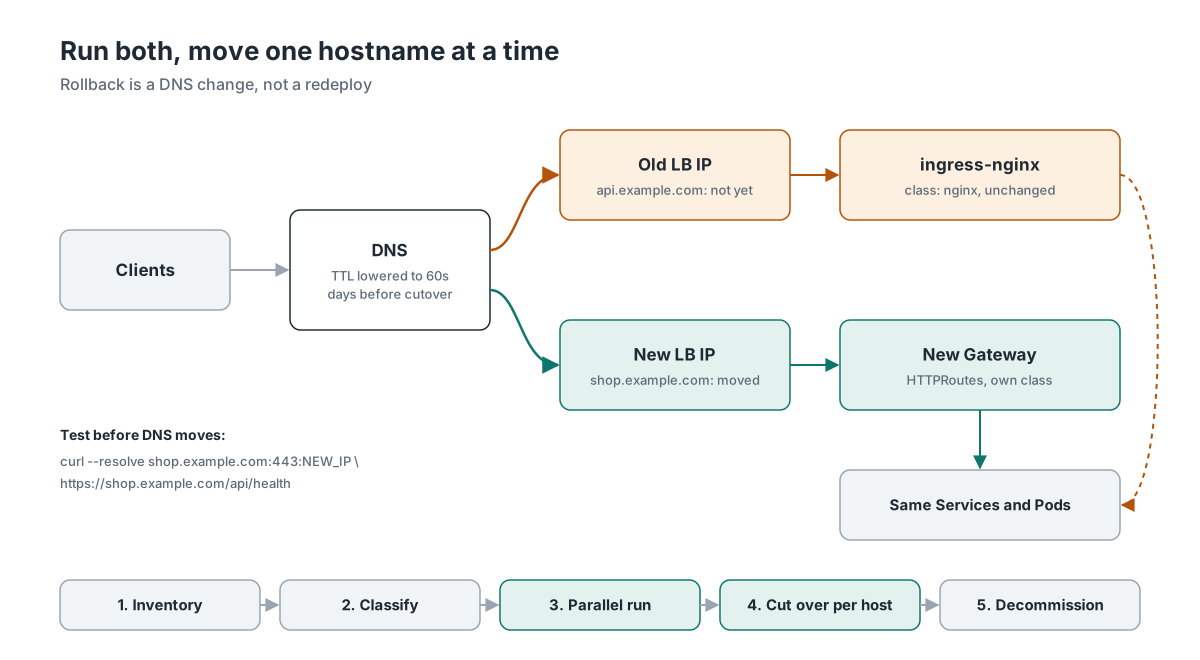
Before DNS moves, test the new path directly. curl --resolve sends the request to the new IP while keeping the correct hostname for TLS and routing:
curl --resolve shop.example.com:443:NEW_IP https://shop.example.com/api/health
A few practical details make this smoother. Lower the DNS TTLs a few days before the first cutover, so a rollback takes a minute rather than an hour. Make sure only one controller writes the Ingress status, which is why publishService is disabled in the Traefik values above. Be careful with hostnames that use HTTP-01 certificate challenges: issue the certificate on the new path first, or switch those hostnames to DNS-01. And keep ingress-nginx running until the dashboards and alerts for the new path work, plus a quiet period after the last hostname has moved.
4. Combine it with a bigger platform change
If you are moving platforms anyway, such as from AKS to managed Kubernetes at a hosting provider, adopting a mesh, or rebuilding clusters with GitOps, migrate ingress as part of that move. Do it once, on the new platform, instead of twice. This only works if the bigger change has a realistic date. If it doesn’t, do path 1 now and rely on this later.
Stop the problem from growing
While the migration runs, teams will keep creating Ingresses for ingress-nginx unless something stops them. A ValidatingAdmissionPolicy is built into Kubernetes, so it works on AKS, at a hosting provider and anywhere else without extra components:
apiVersion: admissionregistration.k8s.io/v1
kind: ValidatingAdmissionPolicy
metadata:
  name: no-new-ingress-nginx
spec:
  failurePolicy: Fail
  matchConstraints:
    resourceRules:
      - apiGroups: ["networking.k8s.io"]
        apiVersions: ["v1"]
        operations: ["CREATE"]   # existing Ingresses can still be updated
        resources: ["ingresses"]
  variables:
    - name: ingressClass
      expression: >-
        has(object.spec.ingressClassName) ? object.spec.ingressClassName :
        (has(object.metadata.annotations) &&
         'kubernetes.io/ingress.class' in object.metadata.annotations
           ? object.metadata.annotations['kubernetes.io/ingress.class'] : '')
  validations:
    - expression: "!(variables.ingressClass in ['nginx', 'webapprouting.kubernetes.azure.com'])"
      messageExpression: "'Ingress class ' + variables.ingressClass + ' is being retired. Create an HTTPRoute on the shared Gateway instead.'"
---
apiVersion: admissionregistration.k8s.io/v1
kind: ValidatingAdmissionPolicyBinding
metadata:
  name: no-new-ingress-nginx
spec:
  policyName: no-new-ingress-nginx
  validationActions: ["Deny"]   # start with ["Warn", "Audit"] if you want a grace period
In my tests, this blocked new Ingresses with ingressClassName: nginx, with the old kubernetes.io/ingress.class annotation, and with the AKS add-on class. Updates to existing Ingresses still went through, and other classes were unaffected. One gap: an Ingress without any class is allowed. If nginx is your default IngressClass, those still end up at ingress-nginx, so remove the ingressclass.kubernetes.io/is-default-class annotation as well. If you already use Azure Policy, Kyverno or Gatekeeper, put the same rule there.
Pitfalls
Most of these I ran into while testing for this article.
The most painful one is moving to the wrong destination. Migrating to the AKS add-on’s managed NGINX because it feels safe only buys you a few weeks, since it’s the same code and its support ends this month. Expecting F5’s NGINX Ingress Controller to understand your existing annotations is a similar mistake: it’s a different project with different annotations.
During the parallel run, two controllers can claim the same IngressClass or fight over the Ingress status. Give the new one its own class, or disable status publishing until cutover. Snippet Ingresses can vanish entirely, as the Traefik test showed, and limits can quietly relax: a body size limit that ingress-nginx enforced may not be enforced at all by its replacement.
Be wary of anything that looks green. Ingress2Gateway output passes API validation while dropping a rewrite, and an HTTPRoute can report Accepted while a rule returns 500 for every request. Small semantic changes slip through the same way: /API/orders worked with the case-insensitive regex and returned a 404 after moving to PathPrefix, and a per-read timeout of 120 seconds is not a request timeout of 120 seconds, let alone 20 minutes.
On the networking side, losing the real client IP breaks IP allowlists, rate limits and audit logs. Certificate challenges can be routed to the wrong controller during the parallel run. On AGC, applications that expect custom ports on the ingress don’t fit the 80/443 listener limit. Cross-namespace references without a ReferenceGrant get accepted, but the backend never resolves.
And then the operational ones: DNS TTLs that are still at a day turn a quick rollback into a long wait, and switching off the old controller before monitoring has been rebuilt leaves you blind at the worst possible moment.
Do’s and don’ts
Start with an inventory on every cluster, and choose Gateway API as the end state even if the first step is a controller swap. Run the replacement alongside ingress-nginx, test it with production-like traffic, and move one hostname at a time through GitOps. Agree early on who owns Gateways, routes and policies.
Don’t combine the ingress migration with a CNI or Kubernetes upgrade, and rehearse the rollback. Include TCP and UDP services and the global ConfigMap in your inventory; they’re easy to miss because they aren’t attached to any Ingress.
Conclusion
On AKS, start by evaluating Application Routing with Gateway API if you don’t need WAF or advanced limits; choose Application Gateway for Containers if you do. Outside the hyperscalers, Traefik can get you off ingress-nginx quickly, while Envoy Gateway or Cilium are strong longer-term choices.
Whichever you choose, inventory first, test the replacement alongside the old controller, and cut over one hostname at a time. The inventory script is a good place to start.
In the follow, I walk through a complete migration on both platforms: AKS to Application Gateway for Containers, and managed Kubernetes at a hosting provider to Envoy Gateway.
References
- Kubernetes blog: Ingress NGINX Retirement: What You Need to Know
- Kubernetes blog: Ingress NGINX: Statement from the Kubernetes Steering and Security Response Committees
- Kubernetes blog: Announcing Ingress2Gateway 1.0: Your Path to Gateway API
- Kubernetes blog: Gateway API v1.6: TCPRoute and UDPRoute Graduate to Standard
- AKS blog: Update on the AKS Application Routing add-on and Ingress-NGINX
- AKS blog: Application Routing with Gateway API
- AKS blog: Application Routing Gateway API GA
- Microsoft Learn: Application Routing Gateway API: DNS and TLS
- Microsoft Learn: Application Gateway for Containers overview
- Microsoft Learn: Application Gateway for Containers AKS add-on quickstart
- Traefik docs: Migrate from Ingress NGINX Controller to Traefik
- SUSE: Ingress NGINX to Traefik Migration Guide (RKE2)
- AKS release notes: AppNet release 2026-08-19