In the previous post I looked at why Ingress-NGINX had to go and which replacements make sense. This one is the practical follow-up. I use the same three applications to work through two migration paths: Envoy Gateway on a hosting provider’s managed Kubernetes and Application Gateway for Containers (AGC) on AKS. The Envoy examples were exercised in standalone mode. The AGC path is a walkthrough based on API and CLI checks.
The shop route is the part I could reuse. The docs login and the website’s health endpoint need different implementations at each edge. Certificates and DNS are shared cutover problems: the new edge needs to be ready while the old one is still serving.
Validation note: Envoy Gateway v1.9.3 ran in standalone mode with Envoy 1.39.5, and served the Envoy test requests described below. The original manifests were checked against Kubernetes 1.34 and 1.36 API servers with the CRDs each controller ships. AGC resources were checked against Microsoft’s API reference and Azure CLI commands against CLI 2.91.0, but not deployed to a subscription. Versions are as of early November 2026.
The starting point
The cluster in this example runs three applications behind ingress-nginx. They’re small, but between them they cover most of what I see in real migrations.
shop-api is the running example from the previous post: a regex rewrite, a forced HTTPS redirect, a 20 MB upload limit, a 120-second read timeout, CORS for the web shop, and a configuration-snippet that adds an X-Frame-Options header. docs is an internal documentation site protected with auth-url pointing at oauth2-proxy. www is the public website, with a server-snippet that answers /healthz directly from NGINX for an external uptime monitor.
The inventory script from the previous post found exactly that: one controller, three Ingresses, and two snippets.
What both migrations share
One Gateway, owned by the platform team
Both platforms get the same Gateway layout: one listener on port 80 for redirects and certificate challenges, and one HTTPS listener per hostname. Application namespaces can only attach routes if they carry the gateway-access/public: "true" label. Create the platform namespace before applying the Gateway or copying TLS Secrets into it. Label the existing application namespaces before applying their routes:
kubectl create namespace gateway-infra
kubectl label namespace shop web gateway-access/public=true --overwrite
Here is the full version for Envoy Gateway; the AGC version differs only in two annotations and the GatewayClass, which I’ll show later.
apiVersion: gateway.networking.k8s.io/v1
kind: Gateway
metadata:
  name: public
  namespace: gateway-infra
spec:
  gatewayClassName: envoy-gateway
  listeners:
    - name: http
      protocol: HTTP
      port: 80
      allowedRoutes:
        namespaces:
          from: Same
    - name: https-shop
      protocol: HTTPS
      port: 443
      hostname: shop.example.com
      tls:
        mode: Terminate
        certificateRefs:
          - name: shop-example-com-tls
      allowedRoutes:
        namespaces:
          from: Selector
          selector:
            matchLabels:
              gateway-access/public: "true"
    - name: https-docs
      protocol: HTTPS
      port: 443
      hostname: docs.example.com
      tls:
        mode: Terminate
        certificateRefs:
          - name: docs-example-com-tls
      allowedRoutes:
        namespaces:
          from: Selector
          selector:
            matchLabels:
              gateway-access/public: "true"
    - name: https-www
      protocol: HTTPS
      port: 443
      hostname: www.example.com
      tls:
        mode: Terminate
        certificateRefs:
          - name: www-example-com-tls
      allowedRoutes:
        namespaces:
          from: Selector
          selector:
            matchLabels:
              gateway-access/public: "true"
---
apiVersion: gateway.networking.k8s.io/v1
kind: HTTPRoute
metadata:
  name: http-to-https
  namespace: gateway-infra
  annotations:
    external-dns.kubernetes.io/controller: ignore
spec:
  parentRefs:
    - name: public
      sectionName: http
  # List the hostnames. A route without them loses to cert-manager's
  # challenge route for that host, and plain HTTP returns 404 meanwhile.
  hostnames:
    - shop.example.com
    - docs.example.com
    - www.example.com
  rules:
    - filters:
        - type: RequestRedirect
          requestRedirect:
            scheme: https
            statusCode: 301
The comment on the redirect route comes from a test. My first version had no hostnames: one catch-all route that redirects everything on port 80. I then simulated what cert-manager does during an HTTP-01 challenge: it adds an HTTPRoute for shop.example.com with an exact match on /.well-known/acme-challenge/<token>. The challenge was answered correctly, but every other plain-HTTP request to shop.example.com suddenly returned a 404 instead of a redirect. A route with a specific hostname takes over that host, and the catch-all no longer applies. With the hostnames listed on the redirect route, both routes end up in the same place, the exact path wins for the challenge, and everything else is still redirected. Add each new hostname to the redirect route as well. The ExternalDNS annotation leaves DNS publishing to the application routes.
The shop route doesn’t change
Both examples use the same shop-api HTTPRoute from the previous post: the prefix rewrite that replaced the regex, the X-Frame-Options header that replaced the snippet, the CORS filter and the 120-second request timeout. That is the real payoff of Gateway API. What the route can’t express, the body size limit, is where the platforms go different ways.
Certificates during the parallel run
This one caught me while planning the cutover. cert-manager’s HTTP-01 challenge is validated by Let’s Encrypt against wherever DNS points. During the parallel run, DNS still points to ingress-nginx, so the new Gateway can’t get its own certificate that way until the hostname has moved. And the hostname shouldn’t move before the new path has been tested with a valid certificate.
There are two ways out. If your DNS provider is supported, use a DNS-01 solver and the problem disappears. Otherwise, copy the certificate that cert-manager already issued for the Ingress into the Gateway’s namespace, and let cert-manager take over renewals once the hostname has moved:
kubectl get secret shop-example-com-tls -n shop -o json \
  | jq '{apiVersion, kind, type, data, metadata: {name: .metadata.name}}' \
  | kubectl create -n gateway-infra -f -
The jq filter keeps the resource kind, API version, type, data and name, so the copy has no owner reference to the old Certificate and no stale annotations. I use kubectl create rather than apply on purpose: apply would store the entire Secret, private key included, in a last-applied-configuration annotation. Repeat the copy for the docs and www certificates from their source namespaces. Check the remaining validity of all three certificates before starting, and finish the migration before any expires. The Gateway examples deliberately omit the cert-manager issuer annotation during the parallel run. Once all three hostnames resolve to the new Gateway, enable certificate management:
kubectl annotate gateway public -n gateway-infra \
  cert-manager.io/cluster-issuer=letsencrypt-prod --overwrite
The annotation applies to all eligible listeners, so adding it after only the first hostname moves would also start certificate management for the other two. If you need renewals during a longer staged migration, create an explicit Certificate in gateway-infra for each hostname after its DNS has moved instead of enabling the Gateway-wide annotation early.
The admission policy from the previous post, which blocks new Ingresses for ingress-nginx, applies unchanged on both platforms. I’d put it in place before starting.
From a hosting provider’s ingress-nginx to Envoy Gateway
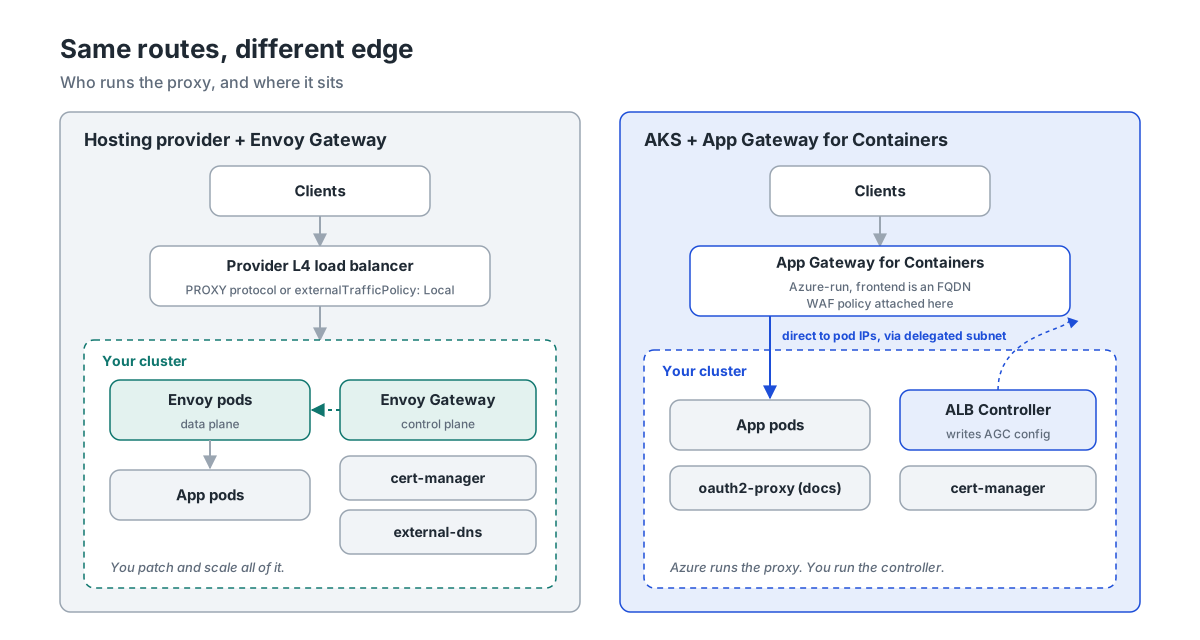
The starting point is a managed cluster at a European hosting provider: a managed control plane, a Layer 4 load balancer for Services of type LoadBalancer, and nothing at Layer 7. Envoy Gateway runs in the cluster, cert-manager handles certificates, and external-dns manages the records at the DNS provider.
Install, and mind the CRDs
The first surprise came before any routing. The default Envoy Gateway Helm chart installs the Gateway API CRDs from the experimental channel. The standard-channel install of recent Gateway API versions (I checked v1.5 and later) includes a ValidatingAdmissionPolicy called safe-upgrades that blocks exactly that. On a cluster that already had the standard v1.7.0 CRDs, applying Envoy Gateway’s experimental CRDs failed with “Installing experimental CRDs on top of standard channel CRDs is prohibited by default.” Applying Envoy Gateway’s standard v1.6.1 CRDs over v1.7.0 failed as well, because the same policy blocks downgrades.
Some providers install Gateway API CRDs for you, and some teams already installed them for another tool. So check what’s there first:
kubectl get crd gateways.gateway.networking.k8s.io \
  -o jsonpath='{.metadata.annotations.gateway\.networking\.k8s\.io/bundle-version} {.metadata.annotations.gateway\.networking\.k8s\.io/channel}{"\n"}'
On a cluster without Gateway API CRDs, or with an older standard-channel version, I install the CRDs separately from Envoy Gateway’s CRD chart, on the standard channel, and then the controller without its own CRDs. That is the approach Envoy Gateway documents for exactly this situation:
# CRDs first, standard channel, from Envoy Gateway's CRD chart
helm template eg-crds oci://docker.io/envoyproxy/gateway-crds-helm --version v1.9.3 \
  --set crds.gatewayAPI.enabled=true \
  --set crds.gatewayAPI.channel=standard \
  --set crds.envoyGateway.enabled=true \
  | kubectl apply --server-side -f -

helm install eg oci://docker.io/envoyproxy/gateway-helm --version v1.9.3 \
  -n envoy-gateway-system --create-namespace \
  --set crds.enabled=false
If the cluster already has a newer standard version than Envoy Gateway was built against (v1.6.1 for v1.9.3), leave those CRDs alone, set crds.gatewayAPI.enabled=false, and check the compatibility matrix.
The proxy and the client IP
The GatewayClass points to an EnvoyProxy resource, which is where provider-specific settings live: replicas, a disruption budget, and the Service that the hosting provider turns into a load balancer.
apiVersion: gateway.envoyproxy.io/v1alpha1
kind: EnvoyProxy
metadata:
  name: public-proxy
  namespace: envoy-gateway-system
spec:
  provider:
    type: Kubernetes
    kubernetes:
      envoyDeployment:
        replicas: 2
      envoyPDB:
        minAvailable: 1
      envoyService:
        type: LoadBalancer
        # Keeps the client IP without PROXY protocol: the provider's load
        # balancer only sends traffic to nodes that run an Envoy pod.
        externalTrafficPolicy: Local
        annotations: {}   # provider-specific load balancer settings go here
---
apiVersion: gateway.networking.k8s.io/v1
kind: GatewayClass
metadata:
  name: envoy-gateway
spec:
  controllerName: gateway.envoyproxy.io/gatewayclass-controller
  parametersRef:
    group: gateway.envoyproxy.io
    kind: EnvoyProxy
    name: public-proxy
    namespace: envoy-gateway-system
Client IP addresses need a deliberate choice at a hosting provider. With externalTrafficPolicy: Local, the load balancer only sends traffic to nodes that run an Envoy pod, and the original source address survives. Many providers also offer PROXY protocol on their load balancers, usually through an annotation on the Service. If yours does and you turn it on, Envoy has to expect it too:
# Only if your provider's load balancer sends PROXY protocol (and only then).
apiVersion: gateway.envoyproxy.io/v1alpha1
kind: ClientTrafficPolicy
metadata:
  name: proxy-protocol
  namespace: gateway-infra
spec:
  targetRefs:
    - group: gateway.networking.k8s.io
      kind: Gateway
      name: public
  proxyProtocol: {}
The comment is there for a reason. In my test, a connection with a PROXY header for 203.0.113.7 arrived at the backend with exactly that address in X-Forwarded-For. A connection without the header was simply reset. The load balancer annotation and this policy have to change together, or the whole Gateway goes dark.
Shop, docs and www
shop-api uses the route from the previous post as is, plus the one thing Gateway API can’t express:
apiVersion: gateway.envoyproxy.io/v1alpha1
kind: BackendTrafficPolicy
metadata:
  name: shop-api-limits
  namespace: shop
spec:
  targetRefs:
    - group: gateway.networking.k8s.io
      kind: HTTPRoute
      name: shop-api
  requestBuffer:
    limit: 20Mi
With real requests through Envoy, the route and the policy behaved as intended. /api/orders/42 reached the backend as /orders/42, X-Frame-Options: DENY was set, the CORS preflight from the allowed origin got the right headers and one from another origin didn’t, a 15 MB upload went through and a 25 MB upload got a 413. Plain HTTP was redirected with a 301. And, as noted last time, /API/orders now returns 404 because matching is case-sensitive.
docs needed a rethink. The oauth2-proxy setup with auth-url relies on NGINX’s auth_request, which accepts any 2xx answer from the auth service. oauth2-proxy answers a valid session with 202 Accepted; I checked its source to be sure. Envoy’s HTTP external authorisation is stricter: only a 200 lets the request through. Anything else, including that 202, goes back to the browser as the response. In my test, a signed-in user got an empty 202 page, and only after I changed my stand-in auth service to answer 200 did the request reach the docs site, complete with the user’s identity headers. Two more details make the combination awkward: Envoy appends the original request path to the auth URL (my auth service saw /oauth2/auth/guide/intro), and it only forwards the Host, Method, Path, Content-Length and Authorization headers unless you list more in headersToExtAuth. That means no session cookie by default.
Envoy Gateway can do the OIDC login itself, which removes oauth2-proxy from this setup altogether:
apiVersion: gateway.networking.k8s.io/v1
kind: HTTPRoute
metadata:
  name: docs
  namespace: web
spec:
  parentRefs:
    - name: public
      namespace: gateway-infra
      sectionName: https-docs
  hostnames:
    - docs.example.com
  rules:
    - backendRefs:
        - name: docs
          port: 80
---
# Replaces auth-url + oauth2-proxy: Envoy does the OIDC login itself
apiVersion: gateway.envoyproxy.io/v1alpha1
kind: SecurityPolicy
metadata:
  name: docs-oidc
  namespace: web
spec:
  targetRefs:
    - group: gateway.networking.k8s.io
      kind: HTTPRoute
      name: docs
  oidc:
    provider:
      issuer: https://login.microsoftonline.com/<tenant-id>/v2.0
    clientID: <client-id>
    clientSecret:
      name: docs-oidc-client-secret   # key: client-secret
    redirectURL: https://docs.example.com/oauth2/callback
    logoutPath: /logout
An unauthenticated request now gets a 302 to the identity provider, with PKCE, scope=openid and the callback URL on docs.example.com. The client secret lives in a Secret with the key client-secret in the same namespace. Register the redirect URL with your identity provider, and keep the callback and logout paths inside the route’s hostname. The test covered the redirect to the identity provider. Before moving the docs hostname, complete the callback and confirm that an authenticated browser can reach the docs backend.
www had the server-snippet that answers /healthz from NGINX. Envoy Gateway’s HTTPRouteFilter can do the same with a direct response:
apiVersion: gateway.networking.k8s.io/v1
kind: HTTPRoute
metadata:
  name: www
  namespace: web
spec:
  parentRefs:
    - name: public
      namespace: gateway-infra
      sectionName: https-www
  hostnames:
    - www.example.com
  rules:
    # Replaces: server-snippet "location /healthz { return 200; }"
    - matches:
        - path:
            type: Exact
            value: /healthz
      filters:
        - type: ExtensionRef
          extensionRef:
            group: gateway.envoyproxy.io
            kind: HTTPRouteFilter
            name: healthz-ok
    - backendRefs:
        - name: www
          port: 80
---
apiVersion: gateway.envoyproxy.io/v1alpha1
kind: HTTPRouteFilter
metadata:
  name: healthz-ok
  namespace: web
spec:
  directResponse:
    contentType: text/plain
    statusCode: 200
    body:
      type: Inline
      inline: "ok"
/healthz returns ok with a 200, /healthz/x and everything else go to the website. Whether an uptime monitor should check the proxy rather than the application is a fair question, but that’s a conversation to have after the migration, not during it.
Certificates and DNS
cert-manager needs its Gateway API integration switched on. In cert-manager v1.21, the setting moved: the enableGatewayAPI flag you’ll find in many guides, Microsoft’s AGC docs included, is deprecated in favour of gatewayAPI.enabled.
crds:
  enabled: true
config:
  gatewayAPI:
    enabled: true   # replaces the deprecated enableGatewayAPI
The ClusterIssuer sends HTTP-01 challenges to the port-80 listener of the shared Gateway:
apiVersion: cert-manager.io/v1
kind: ClusterIssuer
metadata:
  name: letsencrypt-prod
spec:
  acme:
    server: https://acme-v02.api.letsencrypt.org/directory
    email: platform@example.com
    privateKeySecretRef:
      name: letsencrypt-prod-account-key
    solvers:
      - http01:
          gatewayHTTPRoute:
            parentRefs:
              - name: public
                namespace: gateway-infra
                kind: Gateway
                sectionName: http
ExternalDNS v0.23 keeps an existing TXT-owned record pointed at the resource that first claimed it while that resource still publishes the name. I checked that behavior in the planner and upstream documentation. Keep one instance watching both sources and preserve the existing TXT owner ID when you upgrade it. During the parallel run, add external-dns.kubernetes.io/controller: ignore to each new application HTTPRoute. The shared redirect route keeps that annotation permanently. These annotations affect DNS discovery only, so both edges can serve the hostname during the switch.
provider:
  name: cloudflare   # the DNS provider you use
sources:
  - ingress            # keep this until the last Ingress is gone
  - gateway-httproute
policy: upsert-only
registry: txt
txtOwnerId: prod-cluster-1   # use the current instance’s TXT owner ID
domainFilters:
  - example.com
helm install cert-manager oci://quay.io/jetstack/charts/cert-manager --version v1.21.3 \
  -n cert-manager --create-namespace -f cert-manager-values.yaml

helm repo add external-dns https://kubernetes-sigs.github.io/external-dns/
helm upgrade --install external-dns external-dns/external-dns --version 1.23.0 \
  -n external-dns --create-namespace -f external-dns-values.yaml
Both values files validated against the charts’ schemas. The provider credentials for external-dns depend on your DNS provider and aren’t shown here.
Cutover
With routes and certificates in place, move one hostname at a time. Test the new path first, directly against the Gateway’s address:
GW_IP=$(kubectl get gateway public -n gateway-infra -o jsonpath='{.status.addresses[0].value}')
curl --resolve "shop.example.com:443:$GW_IP" https://shop.example.com/api/health
Before the switch, lower the DNS TTL if your provider allows it and give the previous TTL time to expire. For this example, the Ingress and Envoy both publish an A record. Enable publishing on the new route, then stop the old Ingress from publishing while keeping its routing rules active:
kubectl annotate httproute shop-api -n shop external-dns.kubernetes.io/controller-
kubectl annotate ingress shop-api -n shop external-dns.kubernetes.io/controller=ignore --overwrite
Check that authoritative DNS points to Envoy after ExternalDNS reconciles. Keep ingress-nginx serving through the cache window, and check traffic on both edges before removing the old Ingress. Once DNS for all three hostnames points to the Gateway and HTTP-01 is reachable there, add the cert-manager annotation shown above and check that the Certificates become Ready.
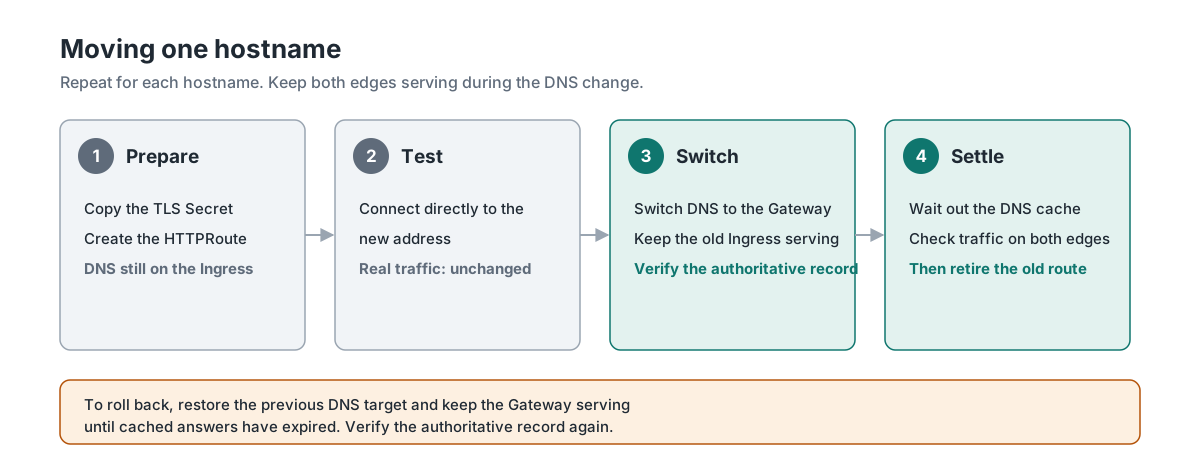
To roll back, make sure the old Ingress still serves the hostname and re-enable its DNS publishing. Then suppress publishing on the new application route and check for other routes claiming the hostname, including any temporary ACME solver route. Verify the authoritative record and keep Envoy serving through the cache window.
When the last hostname has moved and the dashboards for the new path work, remove ingress-nginx and take ingress out of the external-dns sources:
helm uninstall ingress-nginx -n ingress-nginx
kubectl delete ingressclass nginx
From AKS to Application Gateway for Containers
On AKS, the reason to pick AGC over app routing with Gateway API is usually WAF: AGC can attach an Azure WAF policy per Gateway, listener or route. The data plane runs outside the cluster, managed by Azure, and reaches pods directly through a delegated subnet. The cluster runs only the ALB Controller, which translates Gateway API resources into AGC configuration.
The controller
AGC needs Azure CNI or Azure CNI Overlay, and workload identity for the controller. Check the network plugin before anything else; a cluster on kubenet has a bigger migration ahead of it.
RG=rg-platform
AKS=aks-prod

# AGC needs Azure CNI or Azure CNI Overlay, plus workload identity
az aks show -g "$RG" -n "$AKS" \
  --query "{plugin: networkProfile.networkPlugin, mode: networkProfile.networkPluginMode}" -o table

for ns in Microsoft.ContainerService Microsoft.Network Microsoft.NetworkFunction Microsoft.ServiceNetworking; do
  az provider register --namespace "$ns"
done

az aks update -g "$RG" -n "$AKS" --enable-oidc-issuer --enable-workload-identity
The controller gets a user-assigned identity, federated to its service account:
NODE_RG=$(az aks show -g "$RG" -n "$AKS" --query nodeResourceGroup -o tsv)
NODE_RG_ID=$(az group show -n "$NODE_RG" --query id -o tsv)
OIDC_ISSUER=$(az aks show -g "$RG" -n "$AKS" --query oidcIssuerProfile.issuerUrl -o tsv)

az identity create -g "$RG" -n azure-alb-identity
PRINCIPAL_ID=$(az identity show -g "$RG" -n azure-alb-identity --query principalId -o tsv)
sleep 60   # let the identity replicate in Entra ID before assigning roles

az role assignment create --assignee-object-id "$PRINCIPAL_ID" \
  --assignee-principal-type ServicePrincipal --scope "$NODE_RG_ID" --role Reader

az identity federated-credential create -g "$RG" --identity-name azure-alb-identity \
  --name azure-alb-identity --issuer "$OIDC_ISSUER" \
  --subject system:serviceaccount:azure-alb-system:alb-controller-sa
ALB Controller 1.13.0 ships with Gateway API v1.6.2. Check the cluster’s installed bundle before installing the controller. The shared shop route needs CORS, which entered the Standard channel in v1.5. AKS-managed Gateway API on AKS 1.34 supplies v1.3.0, so that combination cannot run the shop manifest as shown. The command below assumes Helm owns the Gateway API CRDs. If AKS already owns them, keep that ownership. Use a compatible controller installation that leaves the managed CRDs in place, and confirm that the installed bundle supports the route features before applying the manifests. Check the AKS bundle matrix and the ALB release notes when picking that combination.
az aks get-credentials -g "$RG" -n "$AKS"
kubectl config current-context

helm install alb-controller oci://mcr.microsoft.com/application-lb/charts/alb-controller \
  --namespace azure-alb-system --create-namespace \
  --version 1.13.0 \
  --set albController.namespace=azure-alb-system \
  --set albController.podIdentity.clientID="$(az identity show -g "$RG" -n azure-alb-identity --query clientId -o tsv)"
There’s also an AKS add-on for the ALB Controller, which manages the identity and the version for you. It’s still in preview, and Microsoft doesn’t support changing its identity or namespace, so this walkthrough uses the pinned Helm release.
The subnet and the AGC resource
AGC needs its own subnet, delegated to Microsoft.ServiceNetworking/trafficControllers, with at least 250 free addresses. Make it exactly a /24 if you might ever move the cluster from Azure CNI to CNI Overlay: Microsoft warns that doing so with a larger AGC subnet causes an outage. The controller needs permission to create AGC resources in the node resource group and to join that subnet.
VNET_RG=rg-network
VNET=vnet-aks

az network vnet subnet create -g "$VNET_RG" --vnet-name "$VNET" -n snet-agc \
  --address-prefixes 10.225.0.0/24 \
  --delegations Microsoft.ServiceNetworking/trafficControllers
SUBNET_ID=$(az network vnet subnet show -g "$VNET_RG" --vnet-name "$VNET" -n snet-agc --query id -o tsv)

# Let the controller create AGC resources and join them to the subnet
az role assignment create --assignee-object-id "$PRINCIPAL_ID" \
  --assignee-principal-type ServicePrincipal --scope "$NODE_RG_ID" \
  --role "AppGw for Containers Configuration Manager"
az role assignment create --assignee-object-id "$PRINCIPAL_ID" \
  --assignee-principal-type ServicePrincipal --scope "$SUBNET_ID" \
  --role "Network Contributor"
With the ALB-managed deployment, a Kubernetes resource creates the AGC resource and its association in Azure. Wait for provisioning to succeed before applying the Gateway.
apiVersion: v1
kind: Namespace
metadata:
  name: alb-infra
---
apiVersion: alb.networking.azure.io/v1
kind: ApplicationLoadBalancer
metadata:
  name: alb-public
  namespace: alb-infra
spec:
  associations:
    - /subscriptions/<sub-id>/resourceGroups/rg-network/providers/Microsoft.Network/virtualNetworks/vnet-aks/subnets/snet-agc
If your organisation wants the Azure resources in Terraform or Bicep with names of its own choosing, use the bring-your-own deployment instead and point the Gateway at the AGC resource ID.
The Gateway
Use the full shared Gateway and redirect route from earlier. The fragment below shows the metadata and class to change. Keep the full spec.listeners list when applying it:
apiVersion: gateway.networking.k8s.io/v1
kind: Gateway
metadata:
  name: public
  namespace: gateway-infra
  annotations:
    alb.networking.azure.io/alb-namespace: alb-infra
    alb.networking.azure.io/alb-name: alb-public
spec:
  gatewayClassName: azure-alb-external
cert-manager works the same way as at the hosting provider. The ClusterIssuer and the values file above are identical on AKS, and so is the certificate catch-22 during the parallel run. AGC’s listeners read certificates from Kubernetes Secrets, not from Key Vault.
Shop, docs and www
The AGC example uses the shop-api route unchanged with the supported CRD bundle. AGC has supported the CORS filter and HTTPRoute timeouts since ALB Controller 1.11.1, and URL rewrites and header changes are standard features. The application still needs a health probe and an upload limit.
The first is health probes. AGC uses a HealthCheckPolicy when one is configured, otherwise the pod’s readiness probe, and finally a default probe with GET / and Host: localhost. shop-api answers / with a 404 because it only serves /api paths and /health. If it has no suitable readiness probe, that fallback would mark every pod unhealthy and return errors for the whole route. A HealthCheckPolicy makes the probe explicit:
# Override readiness/default probing with an explicit application health check.
apiVersion: alb.networking.azure.io/v1
kind: HealthCheckPolicy
metadata:
  name: shop-api-health
  namespace: shop
spec:
  targetRef:
    group: ""
    kind: Service
    name: shop-api
    namespace: shop
  default:
    interval: 10s
    timeout: 3s
    healthyThreshold: 1
    unhealthyThreshold: 3
    http:
      host: shop.example.com
      path: /health
      match:
        statusCodes:
          - start: 200
            end: 299
I’d check the effective probe for every backend before cutover, including its readiness probe. Applications that fall back to the default probe can fail if they redirect / to a login page or serve their homepage only for their real hostname.
The second is the 20 MB upload limit. AGC’s API has no equivalent of proxy-body-size, so the walkthrough puts the limit in the application. Azure WAF policies have request body and file upload limits of their own; if you want to use those as a gate, test them with your largest legitimate upload first.
For docs, AGC has no external authorisation at all. Its JWT validation helps for APIs whose clients send tokens, but not for a browser-based site with a login. So oauth2-proxy stays, but moves from auth_request mode to reverse-proxy mode: AGC sends traffic to oauth2-proxy, which handles the login and passes authenticated requests on to the docs Service.
# AGC has no external auth, so oauth2-proxy sits in front of docs as a reverse proxy.
apiVersion: gateway.networking.k8s.io/v1
kind: HTTPRoute
metadata:
  name: docs
  namespace: web
spec:
  parentRefs:
    - name: public
      namespace: gateway-infra
      sectionName: https-docs
  hostnames:
    - docs.example.com
  rules:
    - backendRefs:
        - name: docs-oauth2-proxy
          port: 4180
---
apiVersion: v1
kind: Service
metadata:
  name: docs-oauth2-proxy
  namespace: web
spec:
  selector:
    app: docs-oauth2-proxy
  ports:
    - name: http
      port: 4180
      targetPort: 4180
---
apiVersion: apps/v1
kind: Deployment
metadata:
  name: docs-oauth2-proxy
  namespace: web
spec:
  replicas: 2
  selector:
    matchLabels:
      app: docs-oauth2-proxy
  template:
    metadata:
      labels:
        app: docs-oauth2-proxy
    spec:
      containers:
        - name: oauth2-proxy
          image: quay.io/oauth2-proxy/oauth2-proxy:v7.15.6
          args:
            - --http-address=0.0.0.0:4180
            - --upstream=http://docs.web.svc.cluster.local:80
            - --provider=oidc
            - --oidc-issuer-url=https://login.microsoftonline.com/<tenant-id>/v2.0
            - --redirect-url=https://docs.example.com/oauth2/callback
            - --email-domain=example.com
            - --reverse-proxy=true
            - --trusted-proxy-ip=10.225.0.0/24   # the AGC subnet
            - --skip-provider-button=true
            - --cookie-secure=true
          envFrom:
            - secretRef:
                name: docs-oauth2-proxy   # OAUTH2_PROXY_CLIENT_ID, _CLIENT_SECRET, _COOKIE_SECRET
          ports:
            - containerPort: 4180
          readinessProbe:
            httpGet:
              path: /ping
              port: 4180
I ran oauth2-proxy v7.15.6 with these arguments against a local upstream: /ping answered 200, and an unauthenticated request got a 302 to the identity provider with the callback on docs.example.com. My first version didn’t have --trusted-proxy-ip, and oauth2-proxy warned at startup that it would then trust X-Forwarded-* headers from any source. The example limits forwarding-header trust to the AGC subnet. Before cutover, confirm the source seen by the pod, complete a real login and check that authenticated requests reach the upstream. The Deployment’s HTTP readiness probe uses /ping, which AGC also uses when no HealthCheckPolicy overrides it. You can make that choice explicit with a HealthCheckPolicy targeting docs-oauth2-proxy and using path: /ping, built like the one for shop-api.
For www, AGC has no direct responses, so the /healthz snippet can’t be reproduced at the edge. In this walkthrough the website serves /healthz itself, which is also a more honest check for an uptime monitor. If you can’t change the application, an Envoy Gateway or app routing Gateway in front is overkill for one URL; I’d change the monitor instead.
WAF
The WAF policy is an Azure resource in the same subscription and region as AGC. Set AGC_NAME to the generated Azure AGC resource name in the node resource group and AGC_LOCATION to its region. AGC supports the Default Rule Set 2.1, not the older CRS rule sets, so a policy you reuse from an Application Gateway may need its managed rules changed.
WAF_ID=$(az network application-gateway waf-policy create -g "$RG" -n waf-agc-public \
  --location "$AGC_LOCATION" --type Microsoft_DefaultRuleSet --version 2.1 \
  --query id -o tsv)
az network application-gateway waf-policy policy-setting update -g "$RG" \
  --policy-name waf-agc-public --mode Detection --state Enabled

az network alb security-policy waf create -g "$NODE_RG" \
  --alb-name "$AGC_NAME" -n public-waf --location "$AGC_LOCATION" \
  --waf-policy-id "$WAF_ID"
The Azure SecurityPolicy makes the WAF policy available to the controller. Apply the Kubernetes resource below to attach that same policy to the Gateway and cover all listeners. Replace the example ID with the value of WAF_ID. You can also target a single listener with sectionNames, or a single HTTPRoute.
apiVersion: alb.networking.azure.io/v1
kind: WebApplicationFirewallPolicy
metadata:
  name: public-waf
  namespace: gateway-infra
spec:
  targetRef:
    group: gateway.networking.k8s.io
    kind: Gateway
    name: public
    namespace: gateway-infra
  webApplicationFirewall:
    id: /subscriptions/<sub-id>/resourceGroups/rg-platform/providers/Microsoft.Network/applicationGatewayWebApplicationFirewallPolicies/waf-agc-public
During the parallel run, confirm that requests are being inspected and review the firewall logs in Detection mode. Switch the WAF policy to Prevention before cutover and verify enforcement on the new frontend.
Cutover
AGC publishes a frontend hostname such as example.fz00.alb.azure.com. To test the new edge without changing public DNS, connect to that frontend while keeping the application hostname for TLS and HTTP:
AGC_FQDN=$(kubectl get gateway public -n gateway-infra -o jsonpath='{.status.addresses[0].value}')
curl --connect-to "shop.example.com:443:$AGC_FQDN:443" https://shop.example.com/api/health
Repeat the checks for the docs login and the website health endpoint. When the new path is ready, publish a CNAME to the AGC hostname and keep the old Ingress serving through the DNS cache window. If the hostname previously had an A record, replace it as part of the same DNS change. Make the change through the owner of the DNS record so an old automation source cannot restore the previous target. To roll back, restore the previous record and keep AGC serving through the cache window.
Behind AGC, applications see the client address in X-Forwarded-For. Update any consumers that depend on NGINX’s X-Real-IP.
If the old controller was the app routing add-on’s managed NGINX, turn off the default NGINX controller once the last hostname has moved, and remove any custom NginxIngressController resources you created:
az aks approuting update -g "$RG" -n "$AKS" --nginx None
Side by side
| Envoy Gateway at a hosting provider | AGC on AKS | |
|---|---|---|
| shop-api route | Unchanged | Unchanged |
| 20 MB upload limit | BackendTrafficPolicy requestBuffer | Moved into the application |
| docs login | Built-in OIDC in a SecurityPolicy | oauth2-proxy as reverse proxy |
/healthz snippet | Direct response at the edge | Served by the application |
| Health probes | Kubernetes readiness | HealthCheckPolicy, then readiness probe, then default probe |
| Client IP | externalTrafficPolicy: Local or PROXY protocol | X-Forwarded-For from AGC |
| DNS record | A record via external-dns | CNAME to the AGC FQDN |
| WAF | Not included | Azure WAF, DRS 2.1 |
| Who runs the proxy | You | Azure |
What I’d tell a team starting this
Test with real requests, not with a status field. Most of what I found here passed validation and showed Accepted: the redirect route that lost to the challenge route, the auth service whose 202 counted as a denial, the PROXY protocol policy that drops plain connections. It only showed up when traffic went through.
Read the defaults of your new edge as carefully as you inventoried the old one. AGC’s fallback health probe on / and Envoy’s short list of headers sent to external auth are both documented, but you only go looking once something breaks.
Keep the Gateway layout and the shop route shared. Then give each hostname a cutover check that reflects what actually changed: a rewritten request and an upload for shop, a complete login for docs, and a health response from the intended backend for www.
References
- Wolkwacht: Ingress-NGINX Is Retired: Choosing and Migrating to What Comes Next
- Envoy Gateway: Install with Helm, including the separate CRD chart
- Envoy Gateway: OIDC authentication
- Envoy Gateway: External authorization
- Envoy Gateway: Direct response
- cert-manager: Gateway API support
- external-dns: Gateway API sources
- Microsoft Learn: Deploy the ALB Controller with Helm
- Microsoft Learn: Create AGC managed by the ALB Controller
- Microsoft Learn: Custom health probes for AGC
- Microsoft Learn: WAF on Application Gateway for Containers
- Microsoft Learn: ALB Controller release notes