
A synchronous request establishes a direct dependency: the caller pauses while the destination handles the task. This approach is suitable when an immediate response is required. However, it is less ideal when multiple independent services need to respond to an event that has already occurred.
An order can be accepted immediately without waiting for notification, fulfillment, analytics, or fraud services to complete. Publishing an order placed event allows these consumers to operate independently, scale separately, and recover from temporary failures. However, it also introduces new responsibilities such as managing event contracts, handling duplicate deliveries, setting retry limits, dealing with poison messages, maintaining order, and managing broker operations.
Dapr pub/sub provides a uniform HTTP or gRPC API in front of the broker. Applications publish data to a specified component and topic, while subscribers receive events at defined endpoints. The component can connect to Redis for development purposes and to Azure Service Bus Topics on AKS, all without needing to include the broker’s client library in the application.
Outcome: Deploy an order publisher and notification subscriber, route both normal and priority CloudEvents, ensure at-least-once delivery, force a message to retry into a dead-letter topic, and prepare the same contract for Azure Service Bus with Workload ID.
This is Part 6 of the Dapr on Kubernetes and AKS series. It follows State Management with Dapr on AKS, but the sample only requires a Kubernetes cluster with Dapr installed.
Follow one order event
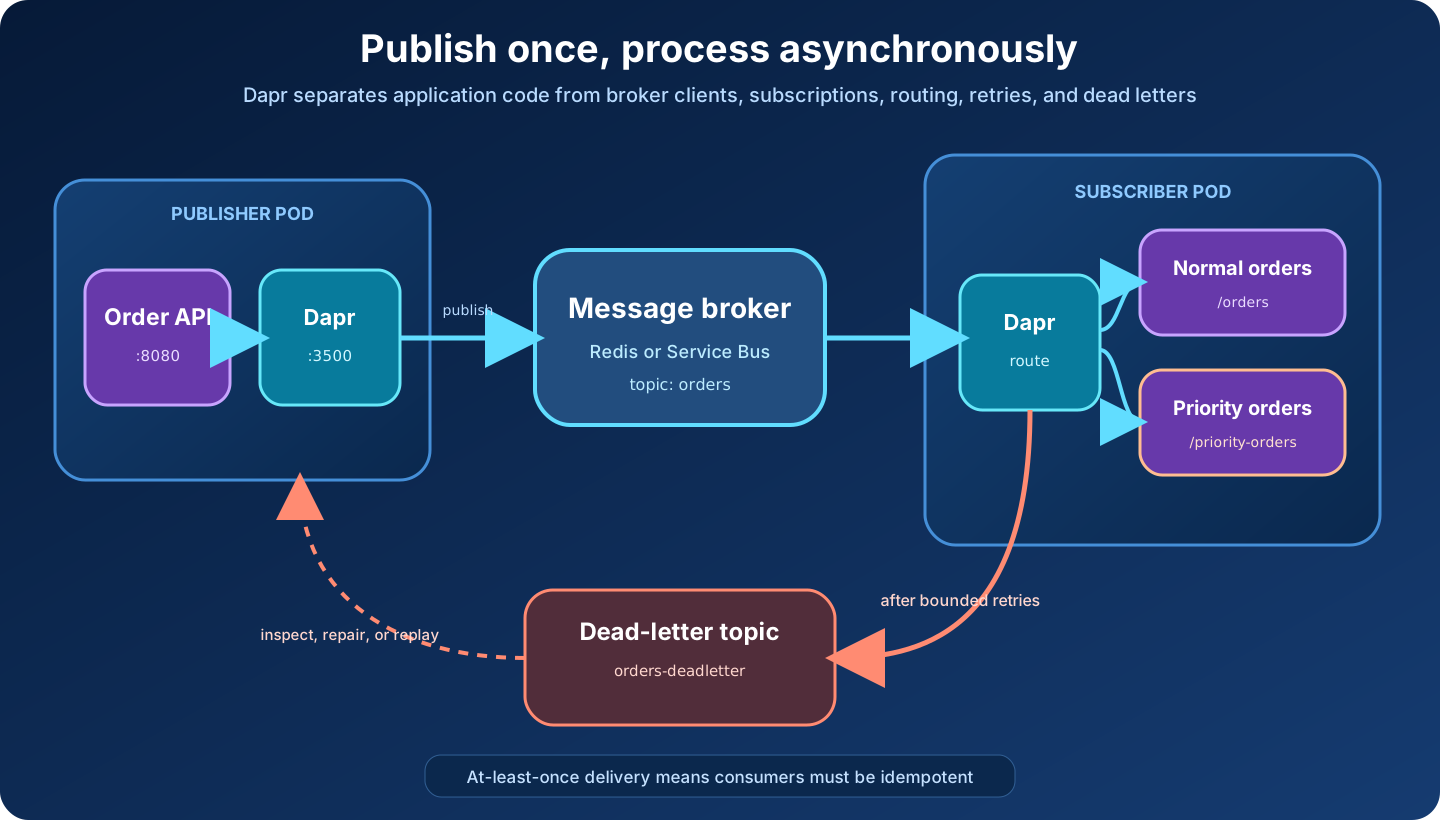
The same architecture can be reduced to a simple pencil sketch: application and sidecar on the left, broker in the middle, subscriber on the right, and a separate path for messages that exhaust their retry budget.
The order and notification services do not call each other:
- A client submits an order to
order-api. - The application publishes JSON to its local Dapr sidecar.
- Dapr wraps the payload in a CloudEvents 1.0 envelope and writes it to the
orderstopic. - The subscriber sidecar receives the event through the configured broker subscription.
- A declarative Dapr subscription routes priority events to
/priority-ordersand other orders to/orders. - The notification application returns
SUCCESS,RETRY, orDROPbehavior through its HTTP response. - A message that still fails after the configured retry policy is published to
orders-deadletter.
The publisher knows the Dapr component name orders-pubsub and the topic orders. It does not know the subscriber’s app ID, address, replica count, or programming language.
What Dapr abstracts
Dapr gives applications a common publish and subscribe contract, CloudEvents integration, routing, and acknowledgment behavior. The Component contains the broker-specific connection details:
apiVersion: dapr.io/v1alpha1
kind: Component
metadata:
  name: orders-pubsub
  namespace: dapr-demo
spec:
  type: pubsub.redis
  version: v1
  metadata:
    - name: redisHost
      value: redis.dapr-demo.svc.cluster.local:6379
    - name: redisPassword
      value: ""
    - name: enableTLS
      value: "false"
scopes:
  - order-api
  - notification-api
Changing spec.type and metadata can move the API contract to another supported broker. It does not erase differences in ordering, partitions, delivery limits, entity management, retention, throughput, or cost. Broker portability is most useful when the application depends on basic topics and explicit delivery behavior rather than every vendor-specific feature.
Deploy the sample
The learning manifest contains:
- one Redis instance for the local broker;
- an
orders-pubsubcomponent; order-api, which publishes order events;notification-api, which consumes them;- subscriptions for
ordersandorders-deadletter; and - a resiliency policy that retries delivery three times before dead-lettering.
Redis has no authentication or durable volume in this example. It is a disposable learning dependency, not a production broker.
Download the complete pub/sub manifest, then apply it:
kubectl apply \
  --filename pubsub.yaml

kubectl rollout status \
  deployment/redis \
  --namespace dapr-demo

kubectl rollout status \
  deployment/notification-api \
  --namespace dapr-demo

kubectl rollout status \
  deployment/order-api \
  --namespace dapr-demo
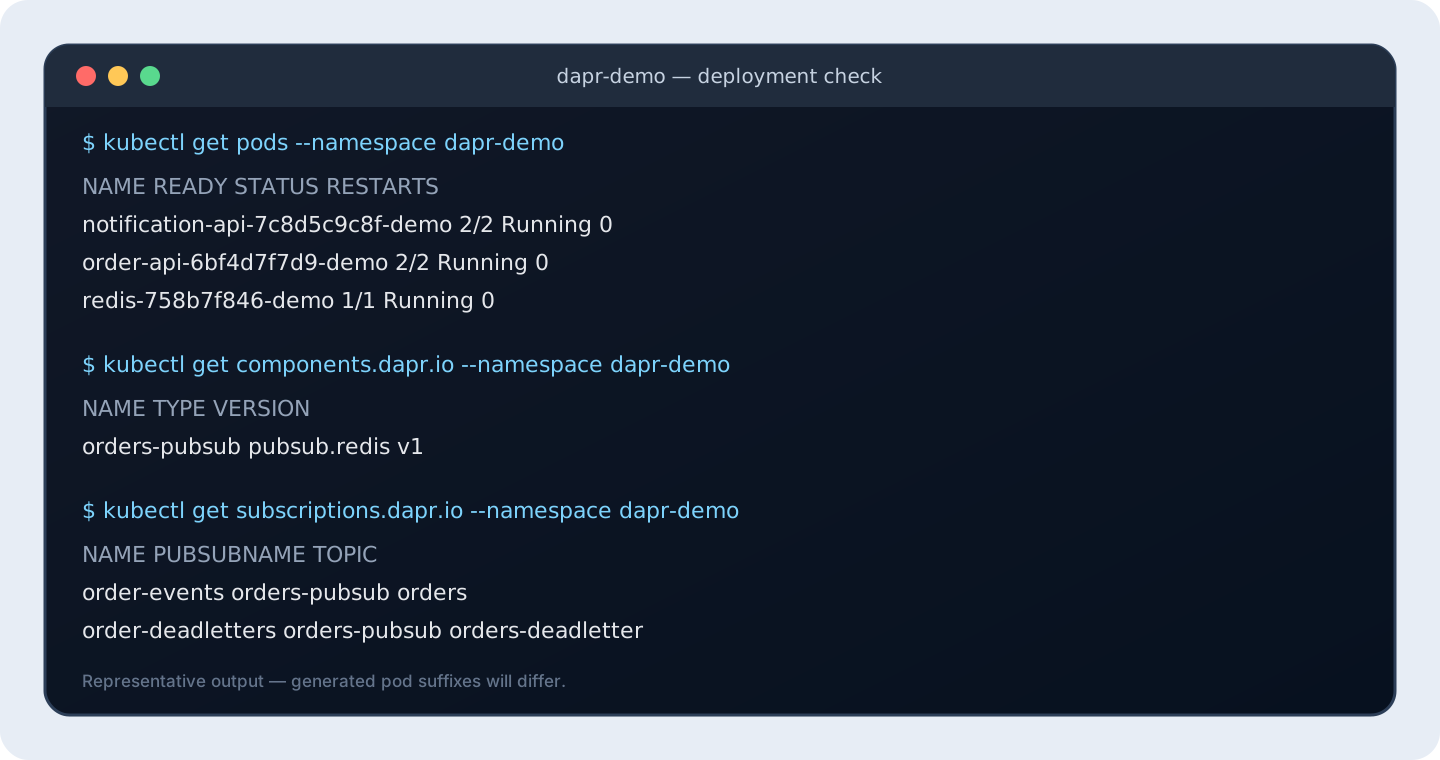
Inspect the Dapr resources and injected containers:
kubectl get components.dapr.io,subscriptions.dapr.io,resiliencies.dapr.io \
  --namespace dapr-demo

kubectl get pods \
  --namespace dapr-demo \
  --output jsonpath='{range .items[*]}{.metadata.name}{"  "}{.spec.containers[*].name}{"\n"}{end}'
Check both sidecars when a subscription is missing or the broker cannot be reached:
kubectl logs \
  deployment/order-api \
  --container daprd \
  --namespace dapr-demo \
  --tail 100

kubectl logs \
  deployment/notification-api \
  --container daprd \
  --namespace dapr-demo \
  --tail 100
The publisher sidecar must load the component. The subscriber sidecar must load the component and discover both declarative subscriptions.
The following screenshot shows representative output after a healthy deployment. Kubernetes generates different pod suffixes in your cluster.
Publish an order
Forward local port 3500 to the Dapr sidecar next to order-api:
kubectl port-forward \
  deployment/order-api \
  3500:3500 \
  --namespace dapr-demo
Keep that terminal open. From another terminal, invoke the order application through Dapr:
curl --fail --show-error \
  --request POST \
  --header 'Content-Type: application/json' \
  --data '{
    "orderId": "order-1001",
    "sku": "coffee-001",
    "quantity": 2,
    "priority": false
  }' \
  http://localhost:3500/v1.0/invoke/order-api/method/orders
The publisher returns 202 Accepted with an event ID after its local sidecar accepts the publish operation:
{"eventId": "<generated-id>", "status": "published"}
That response does not mean the notification has been sent. It means the publish call succeeded. The subscriber executes asynchronously.
Follow the subscriber log:
kubectl logs \
  deployment/notification-api \
  --container notification-api \
  --namespace dapr-demo \
  --follow
The event appears at the normal /orders handler. Publish a priority order:
curl --fail --show-error \
  --request POST \
  --header 'Content-Type: application/json' \
  --data '{
    "orderId": "order-1002",
    "sku": "espresso-002",
    "quantity": 1,
    "priority": true
  }' \
  http://localhost:3500/v1.0/invoke/order-api/method/orders
This event reaches /priority-orders. The publisher did not choose that HTTP endpoint. It assigned an event type, and the subscription applied the route.
Route with a declarative subscription
At this point, keep Redis running. The pubsub.yaml file already created the subscription below; you do not need to copy or apply this YAML separately. This section explains what the installed resource does.
Confirm that it exists:
kubectl get subscriptions.dapr.io \
  order-events \
  --namespace dapr-demo \
  --output yaml
Dapr reads this resource for the notification-api sidecar:
apiVersion: dapr.io/v2alpha1
kind: Subscription
metadata:
  name: order-events
  namespace: dapr-demo
spec:
  pubsubname: orders-pubsub
  topic: orders
  routes:
    rules:
      - match: event.type == "com.wolkwacht.order.priority.v1"
        path: /priority-orders
    default: /orders
  deadLetterTopic: orders-deadletter
scopes:
  - notification-api
Read it from top to bottom:
pubsubnameselects the Dapr component namedorders-pubsub. At this stage, that component points to Redis.topictells Dapr to consume events fromorders.- The rule sends events whose CloudEvent
typeiscom.wolkwacht.order.priority.v1to the application’s/priority-ordersendpoint. defaultsends every other event to/orders.deadLetterTopicnames the topic that receives events that still fail after the retry policy.scopesensures that only the sidecar with app IDnotification-apiloads this subscription.
The subscription connects broker topics to application HTTP endpoints. You do not create a Kubernetes Service for those endpoints: the Dapr sidecar calls the application container over localhost on the annotated app port.
The v2alpha1 subscription API is the current default specification; the older v1alpha1 form is deprecated. Routing expressions can inspect nested JSON in event.data, but a versioned event.type usually produces a clearer contract than routing on incidental payload fields.
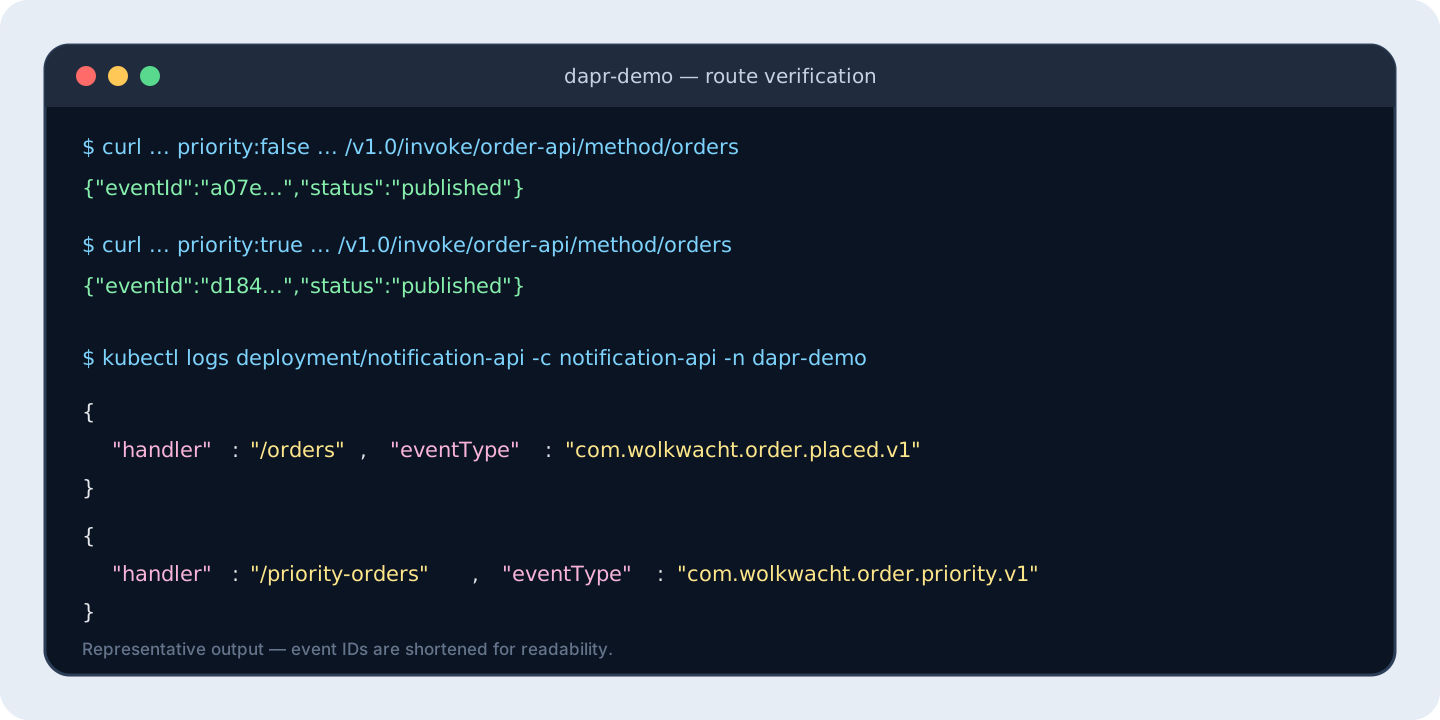
Verify both routes before continuing:
# priority: false -> /orders
curl --fail --show-error \
  --request POST \
  --header 'Content-Type: application/json' \
  --data '{"orderId":"route-normal","sku":"coffee-001","quantity":1,"priority":false}' \
  http://localhost:3500/v1.0/invoke/order-api/method/orders

# priority: true -> /priority-orders
curl --fail --show-error \
  --request POST \
  --header 'Content-Type: application/json' \
  --data '{"orderId":"route-priority","sku":"coffee-001","quantity":1,"priority":true}' \
  http://localhost:3500/v1.0/invoke/order-api/method/orders

kubectl logs \
  deployment/notification-api \
  --container notification-api \
  --namespace dapr-demo \
  --tail 20
The log field handler should show /orders for the first event and /priority-orders for the second. If neither appears, inspect the subscriber’s daprd log and confirm the component and subscription are in dapr-demo.
Understand the CloudEvent envelope
The publisher sends ordinary JSON with Content-Type: application/json. Dapr wraps it in a CloudEvents 1.0 envelope resembling:
{
  "specversion": "1.0",
  "id": "4a493d16-3cf7-4cc0-a95c-b9b9a48cf9aa",
  "source": "order-api",
  "type": "com.wolkwacht.order.placed.v1",
  "datacontenttype": "application/json",
  "topic": "orders",
  "pubsubname": "orders-pubsub",
  "data": {
    "orderId": "order-1001",
    "sku": "coffee-001",
    "quantity": 2,
    "priority": false
  }
}
The sample overrides id, source, and type with publish metadata. The type is a versioned event contract, not the name of the service method that happened to create it. The combination of source and id identifies a distinct event and gives consumers a deduplication key.
CloudEvents also carry content type and tracing context consistently across brokers. Dapr can publish raw payloads for integration with systems that do not use CloudEvents, but raw mode gives up schema-based routing, per-event tracing context, and the standard ID used for deduplication. Prefer CloudEvents unless interoperability requires otherwise.
At-least-once means duplicates are normal
Dapr pub/sub provides at-least-once delivery. A consumer can finish its side effect and crash before its acknowledgement reaches Dapr. The same event may then be delivered again.
The subscriber must therefore be idempotent. Common approaches include:
- storing the CloudEvent
sourceandidin a durable processed-event table; - using the event ID as an idempotency key for an external API;
- making the domain write conditional on a business version; or
- designing naturally idempotent operations, such as setting a desired state rather than incrementing it.
The sample remembers IDs in memory only so duplicate handling is visible in the log. That set disappears during a restart and is not shared between replicas. It is explicitly not a production deduplication store.
Avoid promising exactly-once processing merely because one test produces one log entry. Exactly-once business effects require cooperation between message acknowledgement, durable state, and every external side effect. If publishing an event must be atomic with a state change, evaluate Dapr’s transactional outbox pattern with a compatible state store and pub/sub component.
Acknowledge deliberately
For an HTTP subscriber, an empty 2xx response means success. A JSON response can be explicit:
{"status": "SUCCESS"}
The supported outcomes are:
| Response | Dapr behavior |
|---|---|
2xx with SUCCESS, or an empty 2xx | Acknowledge the event |
2xx with RETRY | Retry delivery |
2xx with DROP | Log and discard the event |
404 | Log and drop the event |
Other non-2xx status | Retry delivery |
Use DROP only when discarding the message is an intentional, observable decision. A malformed event may belong in quarantine for investigation rather than being silently removed.
Retry before dead-lettering
With a deadLetterTopic and no resiliency retry policy, a failed delivery is forwarded to the dead-letter topic immediately. This sample applies a bounded retry policy to inbound deliveries from orders-pubsub:
apiVersion: dapr.io/v1alpha1
kind: Resiliency
metadata:
  name: pubsub-retries
  namespace: dapr-demo
spec:
  policies:
    retries:
      pubsubRetry:
        policy: constant
        duration: 1s
        maxRetries: 3
  targets:
    components:
      orders-pubsub:
        inbound:
          retry: pubsubRetry
Trigger the sample’s controlled failure by using the special SKU:
curl --fail --show-error \
  --request POST \
  --header 'Content-Type: application/json' \
  --data '{
    "orderId": "order-failure-demo",
    "sku": "FAIL-DEMO",
    "quantity": 1,
    "priority": false
  }' \
  http://localhost:3500/v1.0/invoke/order-api/method/orders
The normal handler returns a failure, Dapr retries, and the event is eventually published to orders-deadletter. A second declarative subscription delivers it to /deadletters, where the sample logs it successfully.
Watch both application and sidecar logs:
kubectl logs \
  deployment/notification-api \
  --container notification-api \
  --namespace dapr-demo \
  --follow

kubectl logs \
  deployment/notification-api \
  --container daprd \
  --namespace dapr-demo \
  --tail 150
A dead-letter topic is not a bin nobody checks. Define ownership, retention, alerts, inspection tooling, and a safe replay process. Replaying a poison event without changing the data or consumer only creates another failure loop.
Scale the subscriber
Replicas with the same Dapr app ID act as instances of one logical subscriber. Scale the notification deployment:
kubectl scale \
  deployment/notification-api \
  --replicas 3 \
  --namespace dapr-demo

kubectl rollout status \
  deployment/notification-api \
  --namespace dapr-demo
Publish several orders through the order-api sidecar. This assumes the port-forward to localhost:3500 from the earlier step is still running:
for ORDER_NUMBER in $(seq 1 12); do
  curl --fail --show-error --silent \
    --request POST \
    --header 'Content-Type: application/json' \
    --data "{\"orderId\":\"scale-${ORDER_NUMBER}\",\"sku\":\"coffee-001\",\"quantity\":1,\"priority\":false}" \
    http://localhost:3500/v1.0/invoke/order-api/method/orders

  printf '\n'
done
Each request should return a JSON response with "status":"published". Give the subscriber a few seconds to process the events, then compare the logs from all three pods:
kubectl logs \
  --selector app=notification-api \
  --container notification-api \
  --namespace dapr-demo \
  --prefix \
  --tail 100
The broker and component distribute work across the logical subscriber’s replicas. A different app ID subscribing to the same topic represents another logical consumer and receives its own copy according to the broker’s consumer-group model.
Do not infer global ordering from a small test. Parallel handlers, retries, partitions, and replica scaling can change processing order. When order matters, define the ordering key and check the chosen component’s guarantees and configuration.
Replace Redis with Azure Service Bus
This section is an optional second path. Complete the Redis exercise first so you know that the applications, Dapr subscriptions, routes, and failure handler work. Then change only the broker component.
The end state is:
- the same
order-apiandnotification-apiDeployments; - the same Dapr subscriptions and resiliency policy;
- the same component name,
orders-pubsub; - Azure Service Bus instead of Redis; and
- one demo Workload Identity used by both pods.
You do not delete the Redis component before applying the Service Bus component. Both definitions have the same Kubernetes name, so kubectl apply updates that object in place. Remove the Redis Deployment and Service only after Service Bus works.
Step 1: Create the Service Bus resource group and namespace
The remaining steps expect an Azure Service Bus namespace to exist. Choose a globally unique namespace name and create it before configuring Dapr:
SERVICE_BUS_RESOURCE_GROUP="<service-bus-resource-group>"
SERVICE_BUS_NAMESPACE="<globally-unique-service-bus-namespace>"
AZURE_LOCATION="westeurope"

az group create \
  --name "$SERVICE_BUS_RESOURCE_GROUP" \
  --location "$AZURE_LOCATION"

az servicebus namespace create \
  --resource-group "$SERVICE_BUS_RESOURCE_GROUP" \
  --name "$SERVICE_BUS_NAMESPACE" \
  --location "$AZURE_LOCATION" \
  --sku Standard
The Standard tier is required because this walkthrough uses Service Bus topics and subscriptions; the Basic tier does not support them. The Service Bus namespace may be in the same resource group as AKS or in a different one.
Confirm that the namespace is ready:
az servicebus namespace show \
  --resource-group "$SERVICE_BUS_RESOURCE_GROUP" \
  --name "$SERVICE_BUS_NAMESPACE" \
  --query '{name:name,status:status,sku:sku.name}' \
  --output table
The status should be Active and the SKU should be Standard.
Step 2: Set the remaining Azure values
Keep SERVICE_BUS_RESOURCE_GROUP and SERVICE_BUS_NAMESPACE from Step 1, then set the AKS cluster and managed identity values:
AKS_RESOURCE_GROUP="<resource-group-containing-aks>"
AKS_CLUSTER_NAME="<aks-cluster-name>"
IDENTITY_NAME="dapr-pubsub-demo"
Confirm that AKS has its OIDC issuer and Workload Identity enabled:
az aks show \
  --resource-group "$AKS_RESOURCE_GROUP" \
  --name "$AKS_CLUSTER_NAME" \
  --query '{oidcIssuer:oidcIssuerProfile.issuerUrl,workloadIdentity:securityProfile.workloadIdentity.enabled}'
If either value is missing, enable both features:
az aks update \
  --resource-group "$AKS_RESOURCE_GROUP" \
  --name "$AKS_CLUSTER_NAME" \
  --enable-oidc-issuer \
  --enable-workload-identity
Step 3: Create the Service Bus entities
With the namespace active, create the two topics and broker subscriptions expected by the sample:
The Service Bus component used later disables automatic entity management. Pre-create the topics and broker subscriptions so the runtime identity does not need broad entity-management permissions:
az servicebus topic create \
  --resource-group "$SERVICE_BUS_RESOURCE_GROUP" \
  --namespace-name "$SERVICE_BUS_NAMESPACE" \
  --name orders

az servicebus topic subscription create \
  --resource-group "$SERVICE_BUS_RESOURCE_GROUP" \
  --namespace-name "$SERVICE_BUS_NAMESPACE" \
  --topic-name orders \
  --name notification-api

az servicebus topic create \
  --resource-group "$SERVICE_BUS_RESOURCE_GROUP" \
  --namespace-name "$SERVICE_BUS_NAMESPACE" \
  --name orders-deadletter

az servicebus topic subscription create \
  --resource-group "$SERVICE_BUS_RESOURCE_GROUP" \
  --namespace-name "$SERVICE_BUS_NAMESPACE" \
  --topic-name orders-deadletter \
  --name notification-api
There are two kinds of subscription here:
- The Azure Service Bus subscription named
notification-apistores and delivers messages for one broker consumer. - The Dapr
Subscriptionresources already in Kubernetes map those messages to/orders,/priority-orders, and/deadletters.
You need both layers. Creating only the Service Bus namespace and topics is not enough when automatic entity management is disabled.
Step 4: Create and authorize the managed identity
If you opened a new terminal since setting the values in Steps 1 and 2, set them again. Stop immediately when any required value is empty:
: "${SERVICE_BUS_RESOURCE_GROUP:?Set SERVICE_BUS_RESOURCE_GROUP before continuing}"
: "${SERVICE_BUS_NAMESPACE:?Set SERVICE_BUS_NAMESPACE before continuing}"
: "${IDENTITY_NAME:?Set IDENTITY_NAME before continuing}"

printf 'Resource group: %s\nNamespace: %s\nIdentity: %s\n' \
  "$SERVICE_BUS_RESOURCE_GROUP" \
  "$SERVICE_BUS_NAMESPACE" \
  "$IDENTITY_NAME"
Create one identity for this walkthrough and capture its IDs:
IDENTITY_CLIENT_ID="$(
  az identity create \
    --resource-group "$SERVICE_BUS_RESOURCE_GROUP" \
    --name "$IDENTITY_NAME" \
    --query clientId \
    --output tsv
)"

IDENTITY_PRINCIPAL_ID="$(
  az identity show \
    --resource-group "$SERVICE_BUS_RESOURCE_GROUP" \
    --name "$IDENTITY_NAME" \
    --query principalId \
    --output tsv
)"

SERVICE_BUS_ID="$(
  az servicebus namespace show \
    --resource-group "$SERVICE_BUS_RESOURCE_GROUP" \
    --name "$SERVICE_BUS_NAMESPACE" \
    --query id \
    --output tsv
)"
Confirm that neither result is empty before continuing:
printf 'Client ID: %s\nPrincipal ID: %s\n' \
  "$IDENTITY_CLIENT_ID" \
  "$IDENTITY_PRINCIPAL_ID"
The order sidecar publishes, while the notification sidecar receives and may publish to the dead-letter topic. For the simple shared identity, assign both data-plane roles:
az role assignment create \
  --assignee-object-id "$IDENTITY_PRINCIPAL_ID" \
  --assignee-principal-type ServicePrincipal \
  --role "Azure Service Bus Data Sender" \
  --scope "$SERVICE_BUS_ID"

az role assignment create \
  --assignee-object-id "$IDENTITY_PRINCIPAL_ID" \
  --assignee-principal-type ServicePrincipal \
  --role "Azure Service Bus Data Receiver" \
  --scope "$SERVICE_BUS_ID"
For production, use separate publisher and subscriber identities and narrower scopes. The shared identity keeps this migration walkthrough understandable.
Step 5: Connect the Kubernetes service account to the identity
Create a federated credential whose subject exactly matches the namespace and service-account name used below:
AKS_OIDC_ISSUER="$(
  az aks show \
    --resource-group "$AKS_RESOURCE_GROUP" \
    --name "$AKS_CLUSTER_NAME" \
    --query oidcIssuerProfile.issuerUrl \
    --output tsv
)"

: "${AKS_OIDC_ISSUER:?AKS returned no OIDC issuer; enable OIDC and Workload Identity in Step 2}"

printf 'AKS OIDC issuer: %s\n' "$AKS_OIDC_ISSUER"

az identity federated-credential create \
  --resource-group "$SERVICE_BUS_RESOURCE_GROUP" \
  --identity-name "$IDENTITY_NAME" \
  --name dapr-pubsub \
  --issuer "$AKS_OIDC_ISSUER" \
  --subject system:serviceaccount:dapr-demo:dapr-pubsub-wi \
  --audiences api://AzureADTokenExchange
Download the Workload Identity service-account template, replace its client-ID placeholder, confirm that no placeholder remains, and apply it:
: "${IDENTITY_CLIENT_ID:?Set IDENTITY_CLIENT_ID from Step 4 before continuing}"

sed -i.bak \
  -e "s/<managed-identity-client-id>/${IDENTITY_CLIENT_ID}/g" \
  servicebus-workload-identity.yaml

if grep --line-number --extended-regexp '<[^>]+>' servicebus-workload-identity.yaml; then
  echo "Resolve the placeholders shown above before continuing."
else
  echo "No unresolved placeholders"
fi

kubectl apply \
  --filename servicebus-workload-identity.yaml
Attach that service account to both demo Deployments. These patches trigger new pods:
kubectl patch deployment order-api \
  --namespace dapr-demo \
  --type merge \
  --patch '{
    "spec": {
      "template": {
        "metadata": {
          "labels": {"azure.workload.identity/use": "true"},
          "annotations": {"dapr.io/sentry-request-jwt-audiences": "api://AzureADTokenExchange"}
        },
        "spec": {"serviceAccountName": "dapr-pubsub-wi"}
      }
    }
  }'

kubectl patch deployment notification-api \
  --namespace dapr-demo \
  --type merge \
  --patch '{
    "spec": {
      "template": {
        "metadata": {
          "labels": {"azure.workload.identity/use": "true"},
          "annotations": {"dapr.io/sentry-request-jwt-audiences": "api://AzureADTokenExchange"}
        },
        "spec": {"serviceAccountName": "dapr-pubsub-wi"}
      }
    }
  }'

kubectl rollout status deployment/order-api --namespace dapr-demo
kubectl rollout status deployment/notification-api --namespace dapr-demo
Step 6: Replace the Dapr component
Download the Azure Service Bus component template. Replace both placeholders:
<service-bus-namespace>with$SERVICE_BUS_NAMESPACE;<managed-identity-client-id>with$IDENTITY_CLIENT_ID.
The following command performs both replacements and keeps the original template in servicebus-pubsub.yaml.bak:
sed -i.bak \
  -e "s/<service-bus-namespace>/${SERVICE_BUS_NAMESPACE}/g" \
  -e "s/<managed-identity-client-id>/${IDENTITY_CLIENT_ID}/g" \
  servicebus-pubsub.yaml
Do not apply the component until this validation command prints No unresolved placeholders:
if grep --line-number --extended-regexp '<[^>]+>' servicebus-pubsub.yaml; then
  echo "Resolve the placeholders shown above before continuing."
else
  echo "No unresolved placeholders"
fi
The resulting component should contain the real namespace hostname and managed-identity client ID, not the example values shown here:
apiVersion: dapr.io/v1alpha1
kind: Component
metadata:
  name: orders-pubsub
  namespace: dapr-demo
spec:
  type: pubsub.azure.servicebus.topics
  version: v1
  metadata:
    - name: namespaceName
      value: my-service-bus.servicebus.windows.net
    - name: azureClientId
      value: 11111111-2222-3333-4444-555555555555
    - name: disableEntityManagement
      value: "true"
    - name: maxConcurrentHandlers
      value: "10"
scopes:
  - order-api
  - notification-api
Apply it. Because its name and namespace match the Redis component, this changes that existing Kubernetes object from pubsub.redis to pubsub.azure.servicebus.topics:
kubectl apply \
  --filename servicebus-pubsub.yaml

kubectl get component orders-pubsub \
  --namespace dapr-demo \
  --output jsonpath='{.spec.type}{"\n"}{.spec.metadata[?(@.name=="namespaceName")].value}{"\n"}{.spec.metadata[?(@.name=="azureClientId")].value}{"\n"}'
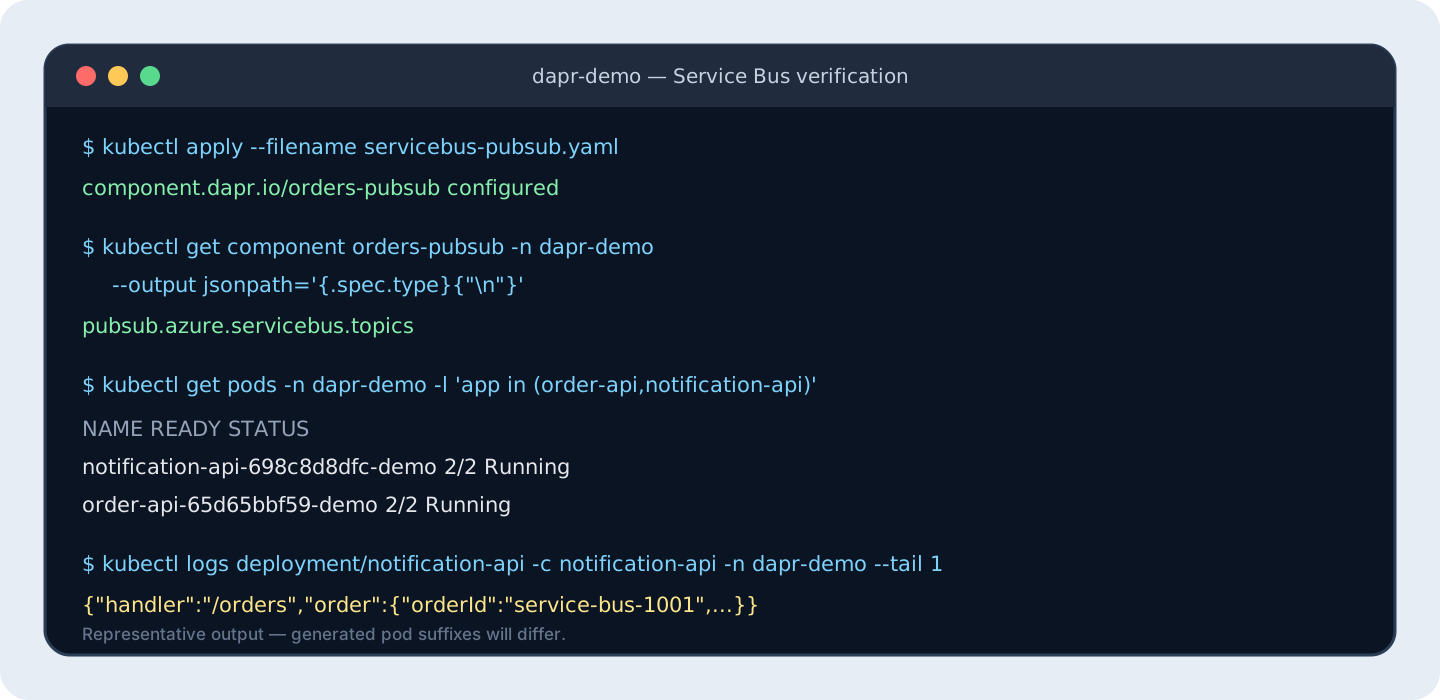
The output must show the Service Bus component type, your real namespace hostname, and the managed-identity client ID:
pubsub.azure.servicebus.topics
my-service-bus.servicebus.windows.net
11111111-2222-3333-4444-555555555555
Restart both Deployments so this walkthrough does not depend on component hot-reload behavior:
kubectl rollout restart \
  deployment/order-api \
  deployment/notification-api \
  --namespace dapr-demo

kubectl rollout status deployment/order-api --namespace dapr-demo
kubectl rollout status deployment/notification-api --namespace dapr-demo
Step 7: Verify Service Bus before removing Redis
First inspect the sidecars for component initialization or authorization errors:
kubectl logs \
  deployment/order-api \
  --container daprd \
  --namespace dapr-demo \
  --since 5m

kubectl logs \
  deployment/notification-api \
  --container daprd \
  --namespace dapr-demo \
  --since 5m
The earlier restart ended the old port-forward session. Start it again:
kubectl port-forward \
  deployment/order-api \
  3500:3500 \
  --namespace dapr-demo
From another terminal, publish a new order:
curl --fail --show-error \
  --request POST \
  --header 'Content-Type: application/json' \
  --data '{"orderId":"service-bus-1001","sku":"coffee-001","quantity":1,"priority":false}' \
  http://localhost:3500/v1.0/invoke/order-api/method/orders

kubectl logs \
  deployment/notification-api \
  --container notification-api \
  --namespace dapr-demo \
  --tail 20
The order should appear in the notification log just as it did with Redis. The application URLs, topic, subscription routes, and payload did not change; only the orders-pubsub component changed.
If authorization fails immediately after role assignment, allow time for Azure RBAC propagation and restart the Deployments again. Also confirm that the federated credential subject, Kubernetes namespace, and service-account name match exactly.
Step 8: Remove the unused Redis workload
Only after a Service Bus event has reached the subscriber, remove the now-unused Redis workload:
kubectl delete deployment redis \
  --namespace dapr-demo

kubectl delete service redis \
  --namespace dapr-demo
Do not delete the orders-pubsub component: it now contains the Service Bus configuration.
Step 9: Prove that messaging still works without Redis
Keep the port-forward from Step 7 running. If it has stopped, start it again in a separate terminal:
kubectl port-forward \
  deployment/order-api \
  3500:3500 \
  --namespace dapr-demo
Publish an order with a unique ID after Redis has been removed:
curl --fail-with-body --show-error \
  --max-time 40 \
  --request POST \
  --header 'Content-Type: application/json' \
  --data '{"orderId":"service-bus-after-redis","sku":"coffee-001","quantity":1,"priority":false}' \
  http://localhost:3500/v1.0/invoke/order-api/method/orders
Give the subscriber a few seconds to process the event, then search the logs from all subscriber replicas:
kubectl logs \
  --selector app=notification-api \
  --container notification-api \
  --namespace dapr-demo \
  --prefix \
  --since 2m \
  | grep service-bus-after-redis
The output should contain service-bus-after-redis. Because the Redis Deployment and Service no longer exist, this final event confirms that publishing and delivery are using Azure Service Bus.
If the event does not appear, inspect both Dapr sidecars before changing anything else:
kubectl logs \
  deployment/order-api \
  --container daprd \
  --namespace dapr-demo \
  --since 5m

kubectl logs \
  --selector app=notification-api \
  --container daprd \
  --namespace dapr-demo \
  --prefix \
  --since 5m
To roll back, reapply the complete Redis manifest and restart the two applications:
kubectl apply --filename pubsub.yaml

kubectl rollout restart \
  deployment/order-api \
  deployment/notification-api \
  --namespace dapr-demo
Service Bus or Event Hubs?
Both have Dapr pub/sub components, but they target different workloads:
| Requirement | Azure Service Bus Topics | Azure Event Hubs |
|---|---|---|
| Primary model | Enterprise messaging and competing consumers | Partitioned event stream and replay |
| Typical data | Orders, payments, workflow events, commands | Telemetry, logs, clickstreams, high-volume events |
| Consumer position | Broker-managed message delivery | Consumer-managed checkpoints per partition |
| Ordering | Sessions and broker semantics | Ordering within a partition |
| Failure operations | Delivery count and broker dead-letter capabilities | Retention, checkpoints, and consumer recovery patterns |
| Dapr setup | Namespace plus topics/subscriptions | Namespace plus event hubs, consumer groups, and checkpoint storage |
For the order-notification example, Service Bus is the clearer default. Event Hubs becomes attractive when the event stream itself is the product: high throughput, partition-aware consumers, retention, and replay. Dapr’s Event Hubs component requires a consumer group for each subscriber app ID and uses Azure Storage for checkpointing. Swapping the component therefore preserves the publish API but changes the operating model substantially.
Production rules for Dapr pub/sub
Before using this pattern for business-critical events:
- Treat at-least-once delivery and duplicate events as normal.
- Version event types and evolve payloads compatibly.
- Store deduplication state durably when side effects are not naturally idempotent.
- Bound retries and add jitter where retry storms are possible.
- Monitor publish failures, delivery latency, retry volume, dead-letter growth, and consumer lag.
- Put alerts and ownership around dead-letter topics.
- Define ordering requirements explicitly; do not assume cluster-wide FIFO behavior.
- Use Workload ID and data-plane RBAC rather than connection strings.
- Scope Dapr components, subscriptions, topics, and identities.
- Load-test sidecars, broker quotas, handler concurrency, and downstream dependencies together.
- Pin container images to reviewed digests in production.
- Use an outbox when state changes and event publication must succeed as one business operation.
Clean up
Stop port forwarding with Ctrl+C, then delete the sample namespace:
kubectl delete namespace dapr-demo
That command does not remove the Azure resources created in this walkthrough.
If the Service Bus resource group is shared with other workloads, delete only the demo namespace and managed identity:
az servicebus namespace delete \
  --resource-group "$SERVICE_BUS_RESOURCE_GROUP" \
  --name "$SERVICE_BUS_NAMESPACE"

az identity delete \
  --resource-group "$SERVICE_BUS_RESOURCE_GROUP" \
  --name "$IDENTITY_NAME"
Deleting the Service Bus namespace also removes its orders and orders-deadletter topics, their subscriptions, and role assignments scoped to that namespace. Deleting the managed identity removes its federated credential.
If you created a dedicated resource group for this walkthrough and it contains nothing you want to keep, you can delete the entire group instead of running the two commands above:
az group delete \
  --name "$SERVICE_BUS_RESOURCE_GROUP"
Azure CLI asks for confirmation before deleting the resource group. Do not use this option when the group contains shared resources.
The pub/sub pattern
Dapr removes broker client code from the publisher and subscriber, but asynchronous design still belongs to the application team. The durable contract is the event: what happened, which version describes it, how duplicates are recognized, and what a consumer may safely do more than once.
The practical rules are:
- Publish facts through the local sidecar rather than embedding a broker SDK in every service.
- Use versioned CloudEvent types as explicit contracts.
- Keep routing declarative when it is operational configuration rather than business logic.
- Design every consumer for duplicate delivery.
- Retry transient failures within a bounded budget, then dead-letter with ownership.
- Select Service Bus or Event Hubs from the delivery model, not from the similarity of their Azure names.
Next in the series, we will combine Dapr bindings, Azure Key Vault-backed secrets, and virtual actors, and explain when each building block is useful—and when it is unnecessary.
Return to the Dapr on Kubernetes and AKS series index.
Sources
- Dapr Docs — Publish and subscribe overview
- Dapr Docs — Pub/sub API reference
- Dapr Docs — Subscription specification
- Dapr Docs — Route messages to event handlers
- Dapr Docs — CloudEvents with pub/sub
- Dapr Docs — Dead-letter topics
- Dapr Docs — Azure Service Bus Topics component
- Dapr Docs — Azure Event Hubs component
- Microsoft Learn — Authenticate an application to access Azure Service Bus entities