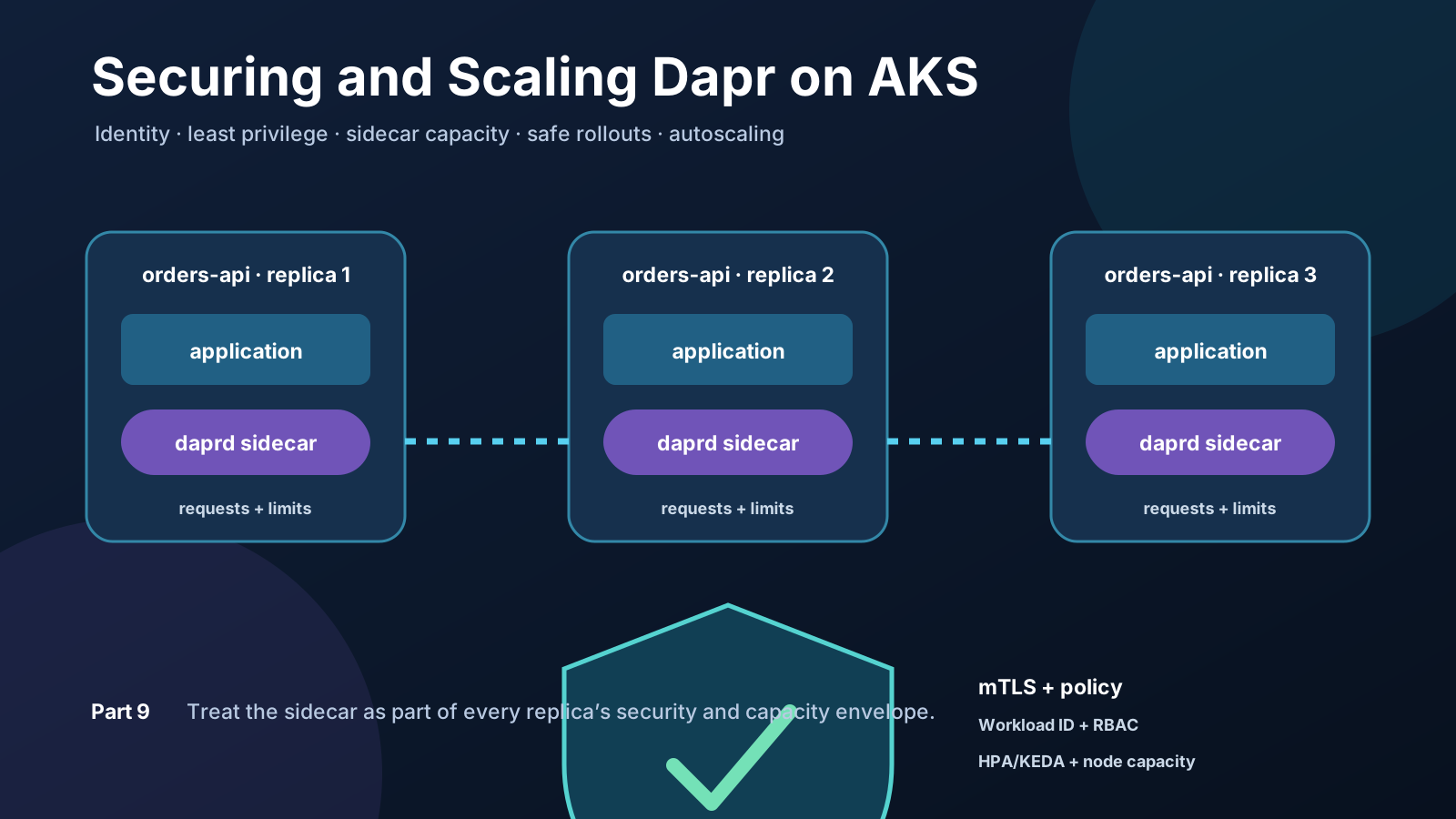
A Dapr-enabled application can work perfectly with one replica and still be unprepared for production. The sidecar may have no resource requests, every application may be able to load every component, a rollout may require capacity the cluster does not have, or an autoscaler may react to application CPU while ignoring a throttled daprd container.
Production readiness is therefore not one switch. It is a chain of explicit decisions about identity, authorization, isolation, capacity, rollout behaviour, scaling signals, and control-plane availability.
Outcome: Apply a secure Dapr application baseline, verify mTLS and least-privilege invocation, calculate sidecar overhead, tune a safe rolling update, scale on application CPU or Azure Service Bus backlog, and understand which protections belong to Dapr, Kubernetes, and AKS.
This is Part 9 of the Dapr on Kubernetes and AKS series. It builds on the telemetry from Part 8: Observability for Dapr on AKS, because resource limits and scaling policies should be based on measurements rather than copied defaults.
Four security boundaries, not one
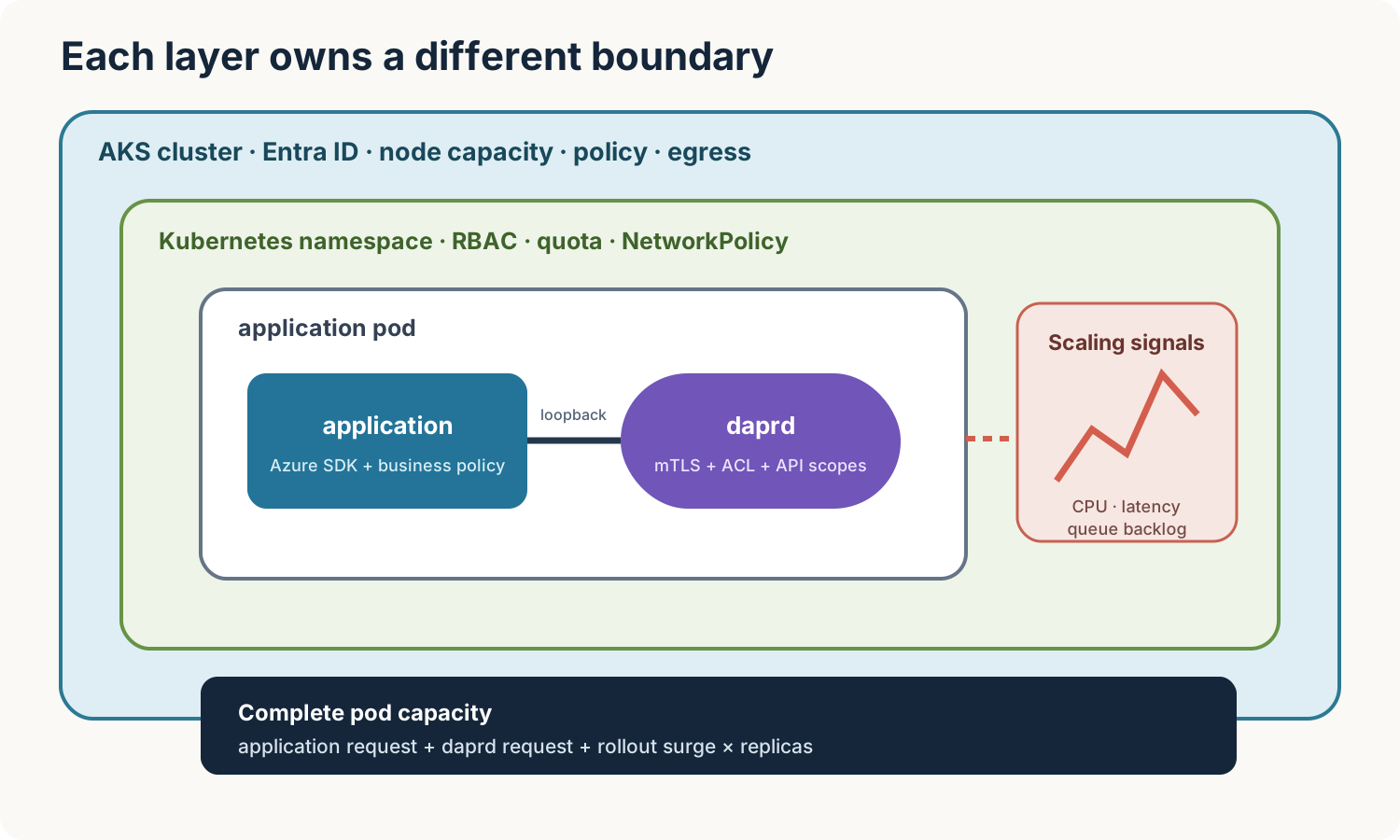
Different controls protect different boundaries:
| Boundary | Primary controls |
|---|---|
| Sidecar to sidecar | Dapr mTLS identity and service-invocation access policies |
| Application to its local sidecar | Loopback binding, Dapr API allowlist, optional API token |
| Application to Azure services | Microsoft Entra Workload ID and Azure RBAC |
| Pod to pod or external endpoint | Kubernetes NetworkPolicy, private networking, egress controls |
These controls complement rather than replace one another. Dapr mTLS authenticates Dapr workloads; it does not decide whether a compromised pod may connect directly to an unrelated database. NetworkPolicy restricts network paths; it cannot distinguish the application container from daprd inside the same pod because they share one network namespace.
Step 1: Check the platform baseline
Start with the installed versions and control-plane health:
kubectl version
dapr version
dapr status --kubernetes

kubectl get nodes \
  --label-columns topology.kubernetes.io/zone
Dapr follows the Kubernetes version-skew policy, so confirm that the installed Dapr release supports the Kubernetes version used by AKS. For a production AKS cluster, also confirm that node pools, zones, network policy, workload identity, monitoring, upgrade channels, and maintenance windows match the platform design. These cluster-level decisions cannot be repaired solely in an application manifest.
Check that mTLS is enabled and inspect certificate expiry:
dapr mtls --kubernetes
dapr mtls expiry
The top-level dapr mtls command needs --kubernetes (or -k) to select the cluster. The expiry subcommand is Kubernetes-specific and does not accept that flag.
On Kubernetes, Dapr enables mTLS by default. Sentry issues short-lived workload certificates whose SPIFFE identity contains the trust domain, namespace, and app ID. Do not disable mTLS merely because traffic remains inside the cluster.
Treat root and issuer certificate rotation as an operated procedure. Test it in a non-production cluster, monitor certificate expiry, preserve the private root key when your rotation design requires trust continuity, and follow the procedure for the installation method you use. An AKS extension-managed control plane should be managed through its supported extension lifecycle rather than modified as though it were a Helm installation.
Step 2: Apply the application baseline
Download the complete production baseline manifest, save it as production-baseline.yaml, and apply it:
kubectl apply \
  --filename production-baseline.yaml

kubectl rollout status \
  deployment/orders-api \
  --namespace dapr-production

kubectl rollout status \
  deployment/frontend-api \
  --namespace dapr-production
The sample creates three orders-api replicas and one frontend-api caller. It deliberately combines several controls that are often left until later:
- a dedicated namespace and service accounts;
- disabled automatic service-account token mounting;
- a Dapr access policy with a deny-by-default rule;
- an API allowlist on the protected sidecar;
- explicit application and
daprdresource requests and limits; - a
PodDisruptionBudgetand topology spreading; - a rollout strategy that keeps all existing replicas available; and
- an HPA that measures only the application container’s CPU.
Verify injection and resources:
kubectl get pods \
  --namespace dapr-production \
  --output custom-columns='POD:.metadata.name,CONTAINERS:.spec.containers[*].name'

kubectl get deployment orders-api \
  --namespace dapr-production \
  --output jsonpath='{range .spec.template.spec.containers[*]}{.name}{" request="}{.resources.requests}{" limit="}{.resources.limits}{"\n"}{end}'
The second command shows both the application resources written in the manifest and the injected sidecar resources created from annotations.
Step 3: Make authorization explicit
The protected sidecar loads this Dapr Configuration:
apiVersion: dapr.io/v1alpha1
kind: Configuration
metadata:
  name: orders-security
  namespace: dapr-production
spec:
  accessControl:
    defaultAction: deny
    trustDomain: public
    policies:
      - appId: frontend-api
        namespace: dapr-production
        trustDomain: public
        defaultAction: deny
        operations:
          - name: /orders
            httpVerb: [POST]
            action: allow
  api:
    allowed:
      - name: invoke
        version: v1.0
        protocol: http
      - name: metadata
        version: v1.0
        protocol: http
The access policy is evaluated by the called application’s sidecar. Only frontend-api in the expected namespace and trust domain may invoke POST /orders. Dapr derives the caller identity from its mTLS certificate; trusting a user-supplied app ID header would not provide the same boundary.
The API allowlist solves a different problem. It limits which Dapr building-block APIs the orders application can call on its own sidecar. Without an allowlist, all Dapr APIs are enabled. Add only the APIs the workload needs.
Test the permitted path by forwarding the caller’s Dapr port:
kubectl port-forward \
  deployment/frontend-api \
  3500:3500 \
  --namespace dapr-production
In another terminal:
curl --fail-with-body --show-error \
  --request POST \
  --header 'Content-Type: application/json' \
  --data '{"orderId":"prod-1001","sku":"coffee-001","quantity":1}' \
  http://localhost:3500/v1.0/invoke/orders-api/method/orders
Expected response:
{"accepted": true, "servedBy": "orders-api-..."}
An ACL is only one layer. Apply component scopes so a state store, pub/sub broker, binding, or secret store is loaded only by approved app IDs:
metadata:
  name: orders-pubsub
  namespace: dapr-production
spec:
  type: pubsub.azure.servicebus.topics
  version: v1
  metadata:
    # Component-specific metadata belongs here.
scopes:
  - orders-api
For pub/sub, also protect sensitive topics with protectedTopics, publishingScopes, and subscriptionScopes. Namespace isolation alone does not express which app may publish which business event.
Step 4: Use namespaces as tenancy boundaries
Dapr applications load components from their Kubernetes namespace. This makes namespaces useful for separating environments or teams, but a namespace is not a complete tenant boundary by itself.
A production namespace should normally have:
- Kubernetes RBAC limiting who may change Deployments, Dapr
Component,Configuration,Resiliency, andSubscriptionresources; - ResourceQuota and LimitRange policies;
- default-deny NetworkPolicy with explicitly tested ingress and egress paths;
- admission policies for images, security context, resources, and approved registries; and
- separate workload identities and Azure role assignments.
Avoid sharing one broadly authorized component across unrelated teams simply because Dapr makes the component easy to reference. If two namespaces use the same Azure Service Bus namespace or database, deploy a component resource into each Kubernetes namespace and give each workload identity only the permissions it requires.
Example: create a bounded team namespace
This example uses the Azure Service Bus Topics component, so you need a Service Bus namespace before completing the component YAML. You can reuse an existing namespace or create a dedicated one. The namespace name must be globally unique, and it must use the Standard or Premium tier because the Basic tier does not support topics.
To find an existing Service Bus namespace in the active subscription:
az servicebus namespace list \
  --query '[].{Name:name,ResourceGroup:resourceGroup,Location:location,Sku:sku.name}' \
  --output table
If you want to create the resources for this walkthrough, set the values first. Choose your own globally unique namespace name:
AZURE_LOCATION="westeurope"
SERVICE_BUS_RESOURCE_GROUP="rg-dapr-production"
SERVICE_BUS_NAMESPACE="<globally-unique-service-bus-name>"
SERVICE_BUS_TOPIC="orders"
SERVICE_BUS_SUBSCRIPTION="order-worker"
Create the resource group, Standard Service Bus namespace, topic, and subscription:
az group create \
  --name "$SERVICE_BUS_RESOURCE_GROUP" \
  --location "$AZURE_LOCATION" \
  --output none

az servicebus namespace create \
  --resource-group "$SERVICE_BUS_RESOURCE_GROUP" \
  --name "$SERVICE_BUS_NAMESPACE" \
  --location "$AZURE_LOCATION" \
  --sku Standard \
  --output none

az servicebus topic create \
  --resource-group "$SERVICE_BUS_RESOURCE_GROUP" \
  --namespace-name "$SERVICE_BUS_NAMESPACE" \
  --name "$SERVICE_BUS_TOPIC" \
  --output none

az servicebus topic subscription create \
  --resource-group "$SERVICE_BUS_RESOURCE_GROUP" \
  --namespace-name "$SERVICE_BUS_NAMESPACE" \
  --topic-name "$SERVICE_BUS_TOPIC" \
  --name "$SERVICE_BUS_SUBSCRIPTION" \
  --output none
Verify the result and print the hostname required by Dapr:
az servicebus namespace show \
  --resource-group "$SERVICE_BUS_RESOURCE_GROUP" \
  --name "$SERVICE_BUS_NAMESPACE" \
  --query '{name:name,status:status,sku:sku.name}' \
  --output table

SERVICE_BUS_FQDN="${SERVICE_BUS_NAMESPACE}.servicebus.windows.net"
printf '%s\n' "$SERVICE_BUS_FQDN"
Creating these Azure resources does not authorize the Dapr application. Step 5 creates the managed identity, federated credential, and Azure role assignments.
Save the following as team-orders-namespace.yaml:
apiVersion: v1
kind: Namespace
metadata:
  name: team-orders
  labels:
    owner: team-orders
    environment: production
---
apiVersion: v1
kind: ResourceQuota
metadata:
  name: team-orders
  namespace: team-orders
spec:
  hard:
    requests.cpu: "8"
    requests.memory: 16Gi
    limits.cpu: "16"
    limits.memory: 32Gi
    pods: "50"
---
apiVersion: v1
kind: LimitRange
metadata:
  name: container-defaults
  namespace: team-orders
spec:
  limits:
    - type: Container
      defaultRequest:
        cpu: 50m
        memory: 64Mi
      default:
        cpu: 500m
        memory: 512Mi
---
apiVersion: dapr.io/v1alpha1
kind: Component
metadata:
  name: orders-pubsub
  namespace: team-orders
spec:
  type: pubsub.azure.servicebus.topics
  version: v1
  metadata:
    - name: namespaceName
      value: <service-bus-namespace>.servicebus.windows.net
    - name: azureAuthMethods
      value: workloadidentity
scopes:
  - orders-api
Apply and inspect it:
kubectl apply \
  --filename team-orders-namespace.yaml

kubectl get resourcequota,limitrange,components.dapr.io \
  --namespace team-orders
Replace <service-bus-namespace> with the short namespace name. For example, if SERVICE_BUS_NAMESPACE is wolkwacht-messaging, the YAML value is wolkwacht-messaging.servicebus.windows.net. A normal YAML file does not expand ${SERVICE_BUS_NAMESPACE} automatically.
The namespace limits total consumption. The LimitRange supplies safety defaults, but explicit application and sidecar requests are still preferable. The component exists only in team-orders, and scopes prevents other app IDs in that namespace from loading it.
At this point there is no Workload Identity yet. That is harmless if no Dapr-enabled orders-api pod is running in team-orders: the component is stored but no sidecar loads it. If such a pod already exists, omit the Component document for now and apply it after completing Step 5; otherwise its initialization will fail until identity and RBAC propagation finish.
Namespace creation alone does not grant a team access. Bind an Entra-backed Kubernetes group to a namespace Role containing only the resources that team may operate. Keep changes to Dapr security Configuration, admission policy, quota, and production identities under platform-owner control when those resources form a security boundary.
Step 5: Replace credentials with AKS Workload ID
AKS Workload ID lets a Kubernetes service account exchange its projected token for a Microsoft Entra token. A Dapr Azure component can then authenticate without a connection string stored in YAML or a Kubernetes Secret.
The complete chain is:
- AKS has the OIDC issuer and workload identity enabled.
- A user-assigned managed identity receives a narrow Azure RBAC role on the target resource.
- A federated credential binds that identity to one Kubernetes service-account subject.
- The service account has the identity client ID annotation.
- The pod template carries
azure.workload.identity/use: "true"and uses that service account. - The Dapr component selects Microsoft Entra authentication using the metadata supported by that component.
Do not assume that configuring the identity on the application container automatically configures every component or KEDA scaler. Verify the authentication contract in the exact Dapr component and KEDA scaler version you deploy. The Dapr sidecar and application share the pod, but Azure authorization still depends on the identity and role assignments used by the SDK or component.
Where neither the application nor sidecar needs Kubernetes API credentials, keep:
spec:
  automountServiceAccountToken: false
The sample also sets dapr.io/disable-builtin-k8s-secret-store: "true". Remove that annotation and restore an appropriately scoped token only when the workload actually uses Dapr’s Kubernetes secret-store API. Component secretKeyRef values can be resolved by the Dapr operator during injection without giving every workload a broadly readable service-account token.
Example: give orders-api access to Service Bus
This example continues with the Service Bus namespace selected or created in Step 4. Start by setting the remaining non-secret values. Use the resource group that contains the managed identity; the Service Bus namespace may be in the same or a different resource group.
AKS_RESOURCE_GROUP="<aks-resource-group>"
AKS_CLUSTER_NAME="<aks-cluster-name>"
IDENTITY_RESOURCE_GROUP="<identity-resource-group>"
IDENTITY_NAME="dapr-orders-api"
SERVICE_BUS_RESOURCE_GROUP="<service-bus-resource-group>"
SERVICE_BUS_NAMESPACE="<service-bus-namespace>"
SERVICE_ACCOUNT_NAMESPACE="team-orders"
SERVICE_ACCOUNT_NAME="orders-api"
Confirm Workload ID and obtain the OIDC issuer:
az aks show \
  --resource-group "$AKS_RESOURCE_GROUP" \
  --name "$AKS_CLUSTER_NAME" \
  --query '{workloadIdentity:securityProfile.workloadIdentity.enabled,oidc:oidcIssuerProfile}' \
  --output yaml

AKS_OIDC_ISSUER="$(
  az aks show \
    --resource-group "$AKS_RESOURCE_GROUP" \
    --name "$AKS_CLUSTER_NAME" \
    --query oidcIssuerProfile.issuerUrl \
    --output tsv
)"

if [[ -z "$AKS_OIDC_ISSUER" ]]; then
  echo 'AKS OIDC issuer is empty; enable OIDC and Workload ID first.' >&2
  exit 1
fi
For AKS Standard, enable missing features with az aks update --enable-oidc-issuer --enable-workload-identity during an approved change window. AKS Automatic normally configures them by default. Verify current platform requirements before changing an existing cluster.
Create the user-assigned managed identity and capture both IDs:
az identity create \
  --resource-group "$IDENTITY_RESOURCE_GROUP" \
  --name "$IDENTITY_NAME" \
  --output none

IDENTITY_CLIENT_ID="$(
  az identity show \
    --resource-group "$IDENTITY_RESOURCE_GROUP" \
    --name "$IDENTITY_NAME" \
    --query clientId \
    --output tsv
)"

IDENTITY_PRINCIPAL_ID="$(
  az identity show \
    --resource-group "$IDENTITY_RESOURCE_GROUP" \
    --name "$IDENTITY_NAME" \
    --query principalId \
    --output tsv
)"
Create the trust relationship. The subject must exactly match the namespace and service-account name used by the pod:
az identity federated-credential create \
  --resource-group "$IDENTITY_RESOURCE_GROUP" \
  --identity-name "$IDENTITY_NAME" \
  --name orders-api \
  --issuer "$AKS_OIDC_ISSUER" \
  --subject "system:serviceaccount:${SERVICE_ACCOUNT_NAMESPACE}:${SERVICE_ACCOUNT_NAME}" \
  --audience api://AzureADTokenExchange \
  --output none
Grant only the required Service Bus data-plane role. This example gives the component both publish and receive permissions because the application does both; use only one role when the workload only sends or only receives.
SERVICE_BUS_RESOURCE_ID="$(
  az servicebus namespace show \
    --resource-group "$SERVICE_BUS_RESOURCE_GROUP" \
    --name "$SERVICE_BUS_NAMESPACE" \
    --query id \
    --output tsv
)"

az role assignment create \
  --assignee-object-id "$IDENTITY_PRINCIPAL_ID" \
  --assignee-principal-type ServicePrincipal \
  --role "Azure Service Bus Data Sender" \
  --scope "$SERVICE_BUS_RESOURCE_ID" \
  --output none

az role assignment create \
  --assignee-object-id "$IDENTITY_PRINCIPAL_ID" \
  --assignee-principal-type ServicePrincipal \
  --role "Azure Service Bus Data Receiver" \
  --scope "$SERVICE_BUS_RESOURCE_ID" \
  --output none
Create the service account and component in team-orders. Save this as orders-workload-identity.yaml, replace both placeholders, and apply it:
apiVersion: v1
kind: ServiceAccount
metadata:
  name: orders-api
  namespace: team-orders
  annotations:
    azure.workload.identity/client-id: <managed-identity-client-id>
---
apiVersion: dapr.io/v1alpha1
kind: Component
metadata:
  name: orders-pubsub
  namespace: team-orders
spec:
  type: pubsub.azure.servicebus.topics
  version: v1
  metadata:
    - name: namespaceName
      value: <service-bus-namespace>.servicebus.windows.net
    - name: azureAuthMethods
      value: workloadidentity
scopes:
  - orders-api
The Deployment must select the service account and carry the mandatory pod label:
spec:
  template:
    metadata:
      labels:
        app: orders-api
        azure.workload.identity/use: "true"
      annotations:
        dapr.io/enabled: "true"
        dapr.io/app-id: orders-api
        dapr.io/app-port: "8080"
    spec:
      serviceAccountName: orders-api
Restart the Deployment after changing the service account, pod label, or component authentication, and wait for Entra role assignments and the federated credential to propagate:
kubectl rollout restart deployment/orders-api \
  --namespace team-orders

kubectl rollout status deployment/orders-api \
  --namespace team-orders

kubectl logs deployment/orders-api \
  --container daprd \
  --namespace team-orders \
  --since 10m
Look for successful initialization of orders-pubsub. An authentication failure usually means one of five values does not line up: OIDC issuer, federated subject, service-account annotation, pod label, or Azure role assignment.
Step 6: Understand what NetworkPolicy can protect
NetworkPolicy applies to a pod, not an individual container. The application and its sidecar share the same IP address and communicate over loopback, so a policy cannot allow app → daprd while denying another container in that same pod.
NetworkPolicy can still:
- allow sidecar-to-sidecar traffic only from selected namespaces or pods;
- restrict direct traffic to the application pod;
- permit DNS and required Dapr control-plane endpoints;
- allow only approved Azure private endpoints or egress gateways; and
- deny unexpected lateral movement.
Start with an observed traffic map from Part 8, then introduce policies in audit or a test namespace. Dapr features use several paths: service invocation, Sentry, Operator, Placement for actors, Scheduler for workflows/jobs/reminders, name resolution, metrics, and external components. A copied policy that allows only port 3500 will break the runtime because 3500 is normally the local HTTP API, not the complete inter-pod/control-plane path.
On AKS, prefer Azure CNI powered by Cilium for a new production design unless another supported data plane is required. Use private endpoints and controlled egress for Azure dependencies. NetworkPolicy is not an egress firewall by itself; combine it with the AKS network architecture and, where required, Azure Firewall or another approved egress control.
Example: default deny, then open deliberate paths
Apply policies in stages and keep a second terminal ready for diagnostics. The following baseline assumes pods carry app labels and Dapr is installed in dapr-system.
First deny ingress and egress for all pods in team-orders:
apiVersion: networking.k8s.io/v1
kind: NetworkPolicy
metadata:
  name: default-deny
  namespace: team-orders
spec:
  podSelector: {}
  policyTypes:
    - Ingress
    - Egress
Allow DNS and outbound HTTPS. Port 443 permits token exchange and Azure public/private endpoints, but it is still broad; production egress should be constrained with private endpoints, an egress gateway, Azure Firewall, or another control capable of enforcing the required destinations.
apiVersion: networking.k8s.io/v1
kind: NetworkPolicy
metadata:
  name: allow-dns-and-https
  namespace: team-orders
spec:
  podSelector: {}
  policyTypes: [Egress]
  egress:
    - to:
        - namespaceSelector:
            matchLabels:
              kubernetes.io/metadata.name: kube-system
      ports:
        - protocol: UDP
          port: 53
        - protocol: TCP
          port: 53
    - ports:
        - protocol: TCP
          port: 443
Allow only frontend-api to reach the orders Dapr sidecar’s internal gRPC port. The application itself remains reachable from its own sidecar over loopback without a NetworkPolicy rule.
apiVersion: networking.k8s.io/v1
kind: NetworkPolicy
metadata:
  name: orders-dapr-invocation
  namespace: team-orders
spec:
  podSelector:
    matchLabels:
      app: orders-api
  policyTypes: [Ingress]
  ingress:
    - from:
        - podSelector:
            matchLabels:
              app: frontend-api
      ports:
        - protocol: TCP
          port: 50001
Allow Dapr-enabled pods to reach the Dapr control-plane namespace. This deliberately allows all ports to selected control-plane pods because the exact services required depend on whether the workload uses actors, workflows, jobs, reminders, or other runtime features. Narrow it only after observing the installed version and enabled features.
apiVersion: networking.k8s.io/v1
kind: NetworkPolicy
metadata:
  name: allow-dapr-control-plane
  namespace: team-orders
spec:
  podSelector:
    matchExpressions:
      - key: dapr.io/enabled
        operator: In
        values: ["true"]
  policyTypes: [Egress]
  egress:
    - to:
        - namespaceSelector:
            matchLabels:
              kubernetes.io/metadata.name: dapr-system
The injector annotation is not automatically copied into pod labels, so ensure the pod template also includes the label dapr.io/enabled: "true" if you use that selector. Alternatively, select the workload’s stable app.kubernetes.io/part-of label.
After applying each policy, verify Dapr component initialization and invocation before continuing:
kubectl get pods \
  --namespace team-orders

kubectl logs deployment/orders-api \
  --container daprd \
  --namespace team-orders \
  --since 5m

kubectl get networkpolicy \
  --namespace team-orders
If Service Bus uses a private endpoint, confirm DNS resolves the namespace to the intended private IP from the pod and that the egress design permits that subnet. Standard Kubernetes NetworkPolicy selects IPs and pods, not DNS names.
Step 7: Budget for the complete pod
The Kubernetes scheduler places a pod based on the resource requests of all its containers. For a Dapr-enabled replica:
pod request = application request + daprd request + any other sidecars/init overhead
In the sample, each orders replica requests:
CPU:    150m application + 100m daprd = 250m
Memory: 128Mi application + 250Mi daprd = 378Mi
Three steady-state replicas therefore request at least 750m CPU and 1134Mi memory before other pod overhead. A rollout with maxSurge: 1 temporarily needs one additional complete pod: another 250m CPU and 378Mi memory.
The sidecar annotations are:
dapr.io/sidecar-cpu-request: "100m"
dapr.io/sidecar-cpu-limit: "300m"
dapr.io/sidecar-memory-request: "250Mi"
dapr.io/sidecar-memory-limit: "1Gi"
dapr.io/env: "GOMEMLIMIT=900MiB"
These are starting values from current Dapr production guidance, not universal answers. Baseline daprd CPU, working-set memory, request rate, component activity, payload sizes, actors, retries, and trace sampling under realistic load. Then tune each workload class.
CPU limits can cause throttling during bursts even while node CPU appears available. A memory limit that is too low causes OOMKilled; no request at all lets the scheduler overpack the node. GOMEMLIMIT gives the Go runtime a soft memory target below the Kubernetes hard limit, leaving headroom for non-heap memory.
Inspect the actual results:
kubectl top pods \
  --containers \
  --namespace dapr-production

kubectl get pods \
  --namespace dapr-production \
  --output custom-columns='POD:.metadata.name,DAPRD_RESTARTS:.status.containerStatuses[?(@.name=="daprd")].restartCount,DAPRD_REASON:.status.containerStatuses[?(@.name=="daprd")].lastState.terminated.reason'
For CPU throttling, use the container CPU throttling metrics from your Prometheus backend. For memory, compare working set and RSS with the request, hard limit, restarts, and OOMKilled events. Averages hide short saturation periods; examine percentiles and rollout windows.
Step 8: Make rollouts fit the cluster
The sample uses:
strategy:
  type: RollingUpdate
  rollingUpdate:
    maxSurge: 1
    maxUnavailable: 0
This protects availability but requires capacity for a fourth app-plus-sidecar pod. If the fourth pod cannot be scheduled, the rollout waits. That may be safer than taking a replica down, but it is not progress.
Before a production rollout, calculate:
surge request = maxSurge pods × complete pod requests
Then verify node allocatable capacity, namespace quota, topology constraints, and cluster-autoscaler maximums. The cluster autoscaler reacts to unschedulable pods; it does not create capacity instantaneously. Leave headroom or pre-scale when startup latency matters.
The PodDisruptionBudget protects against voluntary disruptions such as node drain, not node failure. With three replicas and minAvailable: 2, one healthy replica may be voluntarily evicted. Avoid a budget that blocks every eviction unless you also accept that node maintenance can stall.
Topology spread distributes replicas across hosts and, when the AKS node pool spans zones, across zones. A three-replica Deployment cannot provide zone resilience if the node pool exists in only one zone.
Native sidecars are lifecycle semantics, not free capacity
Dapr can inject daprd as a Kubernetes native sidecar on supported Kubernetes versions:
dapr.io/enable-native-sidecar: "true"
Native sidecars improve startup and shutdown ordering and are particularly helpful for Jobs. They do not remove the sidecar’s CPU or memory overhead. Validate support in the installed Dapr version and AKS Kubernetes version, then test probes, termination, Jobs, admission policies, monitoring, and rollout behaviour before enabling the mode broadly.
Step 9: Choose one pod-scaling owner
HPA for synchronous services
The baseline uses an autoscaling/v2 HPA with a ContainerResource metric:
metrics:
  - type: ContainerResource
    containerResource:
      name: cpu
      container: orders-api
      target:
        type: Utilization
        averageUtilization: 65
This targets the application container instead of averaging application and sidecar CPU together. That is useful when application CPU is the saturation signal. It can be the wrong choice when the sidecar or downstream dependency is the bottleneck. Consider request rate, latency, queue depth, concurrency, and dependency quotas as alternative or additional signals.
Check the HPA after generating traffic:
kubectl get hpa \
  --namespace dapr-production

kubectl describe hpa orders-api \
  --namespace dapr-production
KEDA for asynchronous work
For an Azure Service Bus consumer, queue or subscription backlog is usually more meaningful than CPU. Download the KEDA Service Bus template. It uses a TriggerAuthentication with Azure Workload ID and a ScaledObject that scales an order-worker Deployment.
The template is intentionally not included in production-baseline.yaml: it requires KEDA, an existing worker Deployment, a Service Bus entity, a federated identity, and Azure RBAC. Replace its placeholders and validate them before applying it.
KEDA does not create the queue, topic, or subscription. The scaler identity must be able to read runtime properties, while the worker identity needs only the data-plane operations required to consume messages. Those can be separate identities.
Do not attach an independently managed HPA and a KEDA ScaledObject to the same Deployment. A ScaledObject creates and manages an HPA; competing controllers produce unstable desired replica counts.
Step 10: Coordinate pod and node scaling
Pod autoscaling and node autoscaling solve different problems:
- HPA or KEDA increases the desired pod replicas.
- The scheduler places those complete app-plus-sidecar pods.
- If requests do not fit, pods remain
Pending. - AKS cluster autoscaler or Node Auto Provisioning adds node capacity.
If sidecar requests are missing, the scheduler underestimates future usage and the node autoscaler receives a misleading signal. If requests are inflated, nodes scale earlier and cost more. Accurate requests are therefore part of autoscaling correctness, not only cost optimization.
Set minReplicas from availability and cold-start requirements. Set maxReplicas from downstream capacity, Service Bus throughput, database limits, subnet IP capacity, and budget—not from optimism. A retry storm multiplied by an aggressive autoscaler can make an incident worse.
Step 11: Make the Dapr control plane highly available
Application replicas do not help when the supporting control plane is under-sized or concentrated on one node. Production Dapr guidance recommends HA mode, which creates three replicas of applicable control-plane services.
For a new CLI-managed installation:
dapr init \
  --kubernetes \
  --enable-ha \
  --wait
For Helm, use the matching HA chart values. For the AKS Dapr extension, configure HA through the supported extension settings for the installed version. Do not run dapr init or Helm on top of an extension-managed installation.
Verify replicas and placement:
kubectl get deployments,statefulsets \
  --namespace dapr-system \
  --output wide

kubectl get pods \
  --namespace dapr-system \
  --output custom-columns='POD:.metadata.name,NODE:.spec.nodeName,READY:.status.containerStatuses[*].ready'
HA replicas still need topology spreading, disruption budgets, sufficient system-node capacity, monitoring, and tested upgrades. If you use actors, give Placement special attention; if you use workflows, jobs, or actor reminders, include Scheduler in the availability review.
Production review checklist
Before approving a Dapr workload for production, verify:
- mTLS is enabled and certificate expiry is monitored;
- invocation ACLs default to deny where the boundary requires it;
- Dapr API, component, topic, and secret access are scoped;
- Azure components use Workload ID and narrow Azure RBAC roles;
- namespaces have Kubernetes RBAC, quotas, admission policy, and tested network policy;
- every application and
daprdcontainer has measured resource requests; - sidecar CPU throttling and
OOMKilledevents are monitored; - rollout surge capacity includes the complete pod;
- probes, disruption budgets, and topology spread match the availability objective;
- one controller owns pod scaling, with bounded minimum and maximum replicas;
- AKS node scaling can satisfy the complete pod request; and
- the Dapr control plane is highly available and distributed across failure domains.
Cleanup
Stop the port-forward with Ctrl+C, then remove the sample:
kubectl delete namespace dapr-production
kubectl delete namespace team-orders
If you created a dedicated Service Bus namespace only for this walkthrough, remove that namespace after confirming the variables still identify the intended resource:
printf 'Delete Service Bus namespace %s from resource group %s\n' \
  "$SERVICE_BUS_NAMESPACE" \
  "$SERVICE_BUS_RESOURCE_GROUP"

az servicebus namespace delete \
  --resource-group "$SERVICE_BUS_RESOURCE_GROUP" \
  --name "$SERVICE_BUS_NAMESPACE"
Deleting the namespace also deletes its topics and subscriptions. This cleanup does not remove KEDA, Dapr, the managed identity, its federated credential, the resource group, or cluster-level monitoring. Delete shared infrastructure only when you have confirmed that no other workload uses it.
Takeaway
The Dapr sidecar is part of every replica’s security and capacity envelope. Protect it with identity and least privilege, measure it as an independent container, and include it in scheduling, rollout, and autoscaling calculations. Production safety comes from composing Dapr policy, Kubernetes controls, and AKS identity and infrastructure—not from expecting one layer to understand all three.
The final post will turn this baseline into an operating model: upgrades, GitOps promotion, disaster recovery, multi-cluster design, cost, and the lessons that matter after deployment day.
Sources and further reading
- Dapr production guidelines for Kubernetes
- Dapr security concepts
- Configure Dapr mTLS certificates
- Dapr service invocation access control
- Scope Dapr components
- Scope pub/sub topic access
- Authenticate Dapr components to Azure
- Dapr Azure Service Bus Topics component
- Dapr native sidecars
- Security concepts for AKS
- Deploy Microsoft Entra Workload ID on AKS
- Use network policies on AKS
- AKS cluster autoscaler
- Kubernetes PodDisruptionBudget
- Kubernetes topology spread constraints
- KEDA Azure Service Bus scaler
- KEDA Azure Workload Identity authentication