
Persisting a shopping cart often involves database-related tasks: choosing a client library, setting up a connection pool, managing credentials, serializing the model, retrying transient failures, and deciding on concurrent update policies. When using a different language or database, much of this integration effort varies.
Dapr state management moves the infrastructure-facing layer behind a local HTTP or gRPC API. The application works with keys, values, ETags, and consistency hints. A Dapr Component tells the sidecar which store to use for those operations, such as Redis, Azure Cosmos DB, PostgreSQL, or another supported store.
That separation is helpful, but it does not guarantee perfect portability. Different stores vary in durability, consistency, transactions, TTL, query support, throughput, latency, and cost. Dapr standardizes the application-facing API; it doesn’t ensure that all databases function exactly the same.
Outcome: deploy a small cart API and Redis to Kubernetes, save and read carts using Dapr, reproduce an ETag conflict, use the bulk API, and understand what changes when the component is replaced with Azure Cosmos DB on AKS.
This is Part 5 of the Dapr on Kubernetes and AKS series. It follows Service Invocation with Dapr on AKS, but the sample can also run independently on any Kubernetes cluster with Dapr installed.
Follow one state operation
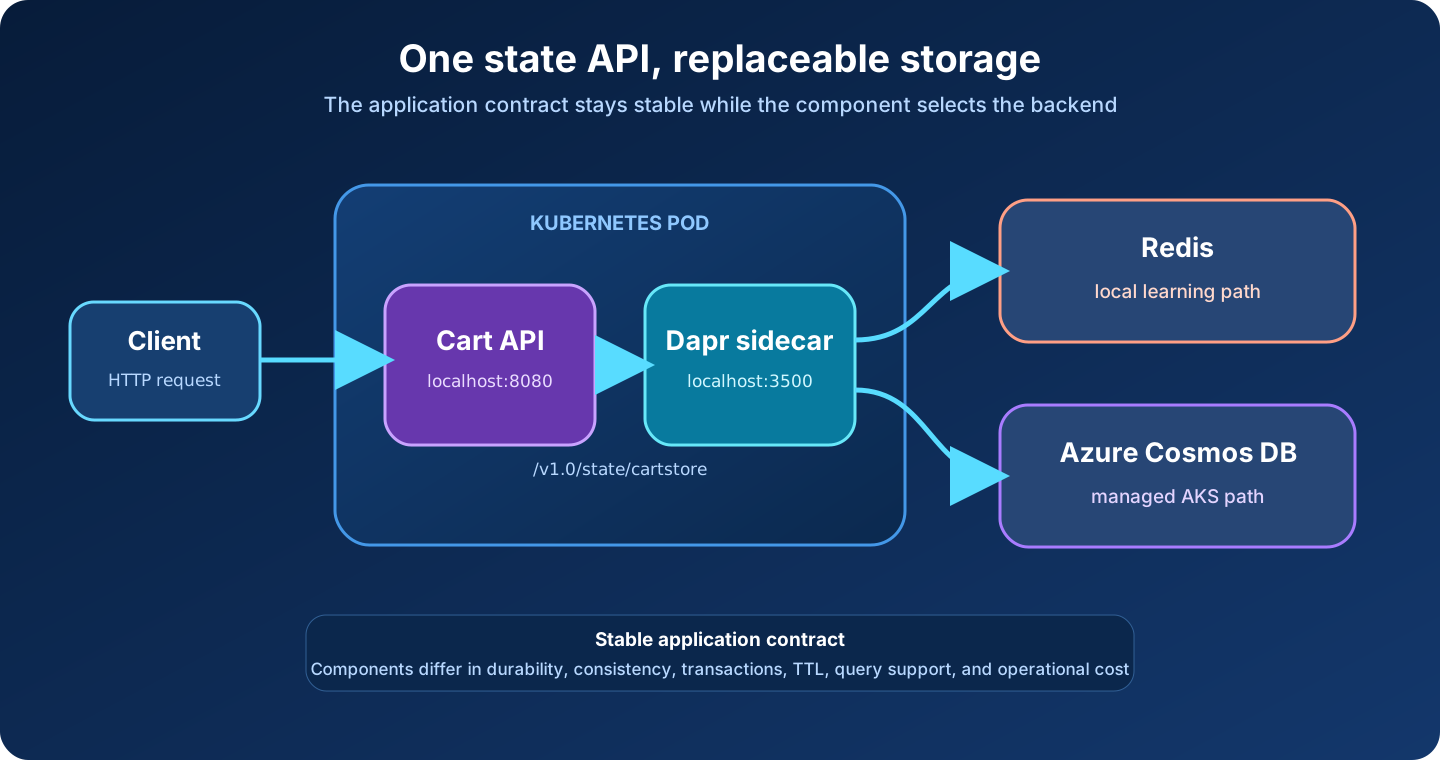
The request path is deliberately short:
- A client invokes the
cart-apiapplication through Dapr. - The application handles the cart operation on port
8080. - It calls
http://127.0.0.1:3500/v1.0/state/cartstore. - The sidecar loads the
cartstorecomponent scoped to this app ID. - The component translates the request for Redis or Azure Cosmos DB.
The application knows the component name cartstore, but it contains no Redis hostname, Cosmos DB endpoint, database SDK, or cloud credential. Reusing the component name lets the infrastructure change without changing the state API calls.
What the state API guarantees and what it does not
Dapr exposes CRUD, bulk, transaction, and optional query operations. The exact capabilities depend on the component. Before treating a feature as portable, check the state-store capability table.
Two defaults deserve particular attention:
- Without an ETag, writes use last-write-wins behavior.
- Without an explicit consistency hint, applications should assume eventual consistency.
This sample requests first-write concurrency and strong consistency. A component can only honor behavior it supports. Application design still needs to account for the selected store and its documented semantics.
Deploy the Redis-backed cart
The learning manifest includes a namespace, a single Redis instance, the cartstore component, and a dependency-free Python cart service. Redis has append-only persistence enabled, but it still runs as a single pod without a persistent volume or authentication. That is suitable for the exercise, not for production.
Download the complete state-management manifest, then apply it:
kubectl apply \
  --filename state-management.yaml

kubectl rollout status \
  deployment/redis \
  --namespace dapr-demo

kubectl rollout status \
  deployment/cart-api \
  --namespace dapr-demo
Confirm that the component is present and the cart pod contains both the application and daprd:
kubectl get components.dapr.io \
  --namespace dapr-demo

kubectl get pods \
  --namespace dapr-demo \
  --selector app=cart-api \
  --output jsonpath='{range .items[*]}{.metadata.name}{"  "}{.spec.containers[*].name}{"\n"}{end}'
The component is intentionally scoped:
apiVersion: dapr.io/v1alpha1
kind: Component
metadata:
  name: cartstore
  namespace: dapr-demo
spec:
  type: state.redis
  version: v1
  metadata:
    - name: redisHost
      value: redis.dapr-demo.svc.cluster.local:6379
    - name: redisPassword
      value: ""
    - name: enableTLS
      value: "false"
scopes:
  - cart-api
scopes prevents unrelated Dapr applications in the namespace from loading this component. It is useful containment, but it is not a replacement for database authorization, network policy, or separate identities.
Check component initialization before debugging the application:
kubectl logs \
  deployment/cart-api \
  --container daprd \
  --namespace dapr-demo \
  --tail 100
Look for a successful cartstore component initialization. A wrong host, unavailable Redis pod, or malformed component appears in the sidecar log rather than the application log.
Save and retrieve a cart
Forward local port 3500 to the cart sidecar:
kubectl port-forward \
  deployment/cart-api \
  3500:3500 \
  --namespace dapr-demo
Keep that terminal open. From a second terminal, add an item by invoking the application through Dapr:
curl --fail --show-error \
  --request POST \
  --header 'Content-Type: application/json' \
  --data '{"sku":"coffee-001","quantity":2}' \
  http://localhost:3500/v1.0/invoke/cart-api/method/carts/alice/items
The response contains the cart returned by the application:
{"cartId": "alice", "items": [{"sku": "coffee-001", "quantity": 2}]}
Read it through the application:
curl --fail --show-error \
  http://localhost:3500/v1.0/invoke/cart-api/method/carts/alice
The application persists the document by posting this shape to its local sidecar:
[
  {
    "key": "cart:alice",
    "value": {
      "cartId": "alice",
      "items": [
        {"sku": "coffee-001", "quantity": 2}
      ]
    },
    "etag": "<etag-from-the-read>",
    "options": {
      "concurrency": "first-write",
      "consistency": "strong"
    }
  }
]
The application uses the raw HTTP API, so no Dapr SDK or database SDK is required. A Dapr SDK can reduce boilerplate in a real service, but it uses the same state contract.
Protect updates with ETags
Two cart replicas can read the same value, make different changes, and write at nearly the same time. With last-write-wins, the later write silently replaces the earlier one. Optimistic concurrency control makes the conflict visible.
Read the state directly through the sidecar and capture its ETag:
ETAG="$(
  curl --silent \
    --dump-header - \
    --output /dev/null \
    'http://localhost:3500/v1.0/state/cartstore/cart:alice?consistency=strong' \
  | awk 'tolower($1) == "etag:" {gsub("\\r", "", $2); print $2}'
)"

printf 'Current ETag: %s\n' "$ETAG"
Use the ETag for an update:
curl --include \
  --request POST \
  --header 'Content-Type: application/json' \
  --data "[{
    \"key\": \"cart:alice\",
    \"value\": {
      \"cartId\": \"alice\",
      \"items\": [{\"sku\": \"tea-002\", \"quantity\": 1}]
    },
    \"etag\": \"$ETAG\",
    \"options\": {
      \"concurrency\": \"first-write\",
      \"consistency\": \"strong\"
    }
  }]" \
  http://localhost:3500/v1.0/state/cartstore
The write succeeds and produces a new version. Run the same command again without refreshing ETAG; the stale version is rejected. That rejection is the protection. The application should re-read, decide whether the changes can be merged, and retry with a bounded policy. Blindly replaying the same update can turn conflict detection back into accidental last-write behavior.
ETags protect one key. They do not turn an arbitrary read-modify-write workflow across several services into a distributed transaction.
Read several carts with the bulk API
Create a second cart:
curl --fail --show-error \
  --request POST \
  --header 'Content-Type: application/json' \
  --data '{"sku":"mug-003","quantity":1}' \
  http://localhost:3500/v1.0/invoke/cart-api/method/carts/bob/items
Fetch both keys in one request to the local sidecar:
curl --fail --show-error \
  --request POST \
  --header 'Content-Type: application/json' \
  --data '{"keys":["cart:alice","cart:bob"],"parallelism":2}' \
  http://localhost:3500/v1.0/state/cartstore/bulk
A bulk endpoint reduces application-to-sidecar round trips. It does not necessarily mean the backend performs one atomic operation. Dapr also has a transaction endpoint for components that advertise transactional support; transaction scope and isolation remain store-specific.
Treat the Query API as an optional capability
Dapr’s state Query API can filter, sort, and page over JSON values, but the API is currently alpha and is not implemented by every state store. It is useful when the query shape is modest and portability matters more than a backend’s native query language.
The endpoint makes its maturity visible:
POST /v1.0-alpha1/state/<store-name>/query
Do not make the sample’s Redis-to-Cosmos DB swap depend on a query until both component versions have been verified against the exact filter and index design. For rich analytics, joins, or backend-specific performance tuning, use the database’s native API behind a repository or dedicated query service. The Dapr Query API documentation should be the compatibility check, not an assumption based on another component.
Replace Redis with Azure Cosmos DB on AKS
The application contract stays cartstore; only the component changes. A minimal Cosmos DB component looks like this:
apiVersion: dapr.io/v1alpha1
kind: Component
metadata:
  name: cartstore
  namespace: dapr-demo
spec:
  type: state.azure.cosmosdb
  version: v1
  metadata:
    - name: url
      value: https://<cosmos-account>.documents.azure.com:443/
    - name: database
      value: carts
    - name: collection
      value: state
    - name: azureClientId
      value: <managed-identity-client-id>
scopes:
  - cart-api
Download the Cosmos DB component template. Replace the placeholders before applying it.
For AKS, prefer Microsoft Entra Workload ID over a Cosmos DB account key. The important operational steps are:
- Enable OIDC issuer and Workload ID on the AKS cluster.
- Create a user-assigned managed identity and federated credential for a Kubernetes service account.
- Grant the identity an appropriate Cosmos DB data-plane role at the narrowest practical scope.
- Add
azure.workload.identity/use: "true"to the cart pod template and set itsserviceAccountName. - Add
dapr.io/sentry-request-jwt-audiences: "api://AzureADTokenExchange"when required by the Dapr Workload ID configuration you operate. - Remove the Redis component before applying another
cartstoredefinition.
The component deliberately contains no masterKey. Dapr’s current Azure authentication guidance recommends Workload ID on AKS, and the Cosmos DB component reference documents the data-store fields.
Reusing an application service account for every component gives that pod the union of all permissions. Prefer workload identities aligned with application and data boundaries, and keep the component scoped to the app IDs that actually need it.
Portability has a boundary
Switching the component is easy YAML. Proving the new backend is suitable is the real migration. Compare at least:
| Concern | Redis learning deployment | Azure Cosmos DB production candidate |
|---|---|---|
| Durability | One ephemeral pod in this sample | Managed, replicated service with configurable policies |
| Authentication | None in this sample | Microsoft Entra Workload ID and data-plane RBAC |
| Concurrency | ETags supported | ETags supported |
| Transactions | Supported with Redis-specific constraints | Supported within documented Cosmos DB boundaries |
| Consistency | Requested through Dapr; backend semantics still matter | Select and validate an account consistency model |
| Query | Optional capability; verify component support | Optional Dapr API plus native Cosmos DB queries |
| Cost model | Pod resources and operations | Provisioned/serverless throughput, storage, and regions |
Test failure behavior too. A component can preserve API syntax while changing latency, throttling signals, retry requirements, maximum item size, and transaction boundaries. Portability is strongest for simple key-value access and weakest where the application relies on a backend-specific capability.
Production rules for stateful Dapr applications
Before moving this pattern beyond a tutorial:
- Pin application and dependency images to reviewed digests.
- Use a managed, highly available store rather than the sample Redis pod.
- Scope components and identities to explicit app IDs.
- Keep credentials out of component YAML; use Workload ID where supported.
- Use ETags for read-modify-write flows and handle conflicts deliberately.
- Choose consistency from a business invariant, not from a generic preference.
- Confirm transactions, TTL, query, item-size, and encryption requirements against the selected component.
- Monitor sidecar errors, backend latency, throttling, conflicts, and retry volume.
- Back up and restore the data store using its native controls; Dapr is not a backup system.
- Load-test the application, sidecar, and backend together.
Clean up
Stop port forwarding with Ctrl+C, then remove the learning environment:
kubectl delete namespace dapr-demo
If you created Cosmos DB resources, identities, or role assignments, remove them separately when they are no longer needed. Deleting the Kubernetes namespace does not delete external Azure resources.
The state-management pattern
The valuable boundary is not “any database can replace any other database.” It is narrower and more useful: the application uses a consistent local API for common state operations, while the platform owns component configuration, connectivity, identity, and store selection.
The practical rules are:
- Keep the component name stable and the backend configuration outside application code.
- Check the capability matrix before relying on transactions, TTL, queries, actors, or workflows.
- Use ETags when concurrent updates must not be silently overwritten.
- Treat consistency as an explicit application requirement.
- Use bulk operations to reduce calls, not as an assumption of atomicity.
- Validate operational semantics whenever the state store changes.
Next in the series, we will publish an order event through Dapr pub/sub and consume it with a notification service backed by Azure Service Bus.
Return to the Dapr on Kubernetes and AKS series index.
Sources
- Dapr Docs — State management overview
- Dapr Docs — State management API reference
- Dapr Docs — Supported state stores and capabilities
- Dapr Docs — Redis state store component
- Dapr Docs — Azure Cosmos DB state store component
- Dapr Docs — Authenticate Azure components
- Dapr Docs — Use Workload Identity federation